Server Version#: 1.21.1.3876
Player Version#: 5.6.1
I have been linking my Samsung TV to my Plex via my desktop PC over a WiFi connection for years, and in the last week the TV has not been able to connect. I get the error message on the TV app “This server is offline or unreachable”.
This all happened after I updated my Plex server to 1.21.1.3876
Some more info:
-Under Authorized Devices, my TV is listed as SamsungTV 2018, 5.6.1, 18_KANTM2_UHD
-On my TV, the Plex App itself is listed as version 5.1.0 (last updated on 8/12/20)
Things I’ve already tried:
-All the steps lined out in this thread. https://forums.plex.tv/t/issues-with-samsung-tv-plex-apps-please-help/643484
-Sign in/out of Plex app on TV
-Sign in/out of Plex server
-Reboot modem/router
-Reboot TV
-Manually input the exact same IP from the Plex Server setting Remote Access on my TV - When I now check server status from the TV app, it shows my server’s name and the manual IP as two separate connections. Both get the same "“This server is offline or unreachable” error
I’m at a loss of what to try next. It was working a week ago before the last server update. I can still access the server via my Roku streaming stick on another TV.
Any help is much appreciated.
Solution
I found the fix for this issue in the link provided
I did most of what’s in that thread already. When I do this "Open Plex Settings > Authorised Devices and click on All and select Server. Remove everything except for the most recent entry, then restart the server. "
I only have one option there and it’s my own server, so I’m sure what it means to “remove everything except for the most recent entry”. It’s my only entry.
I see your response in that thread:
Apart from entering EG: 192.168.1.0/255.255.255.0
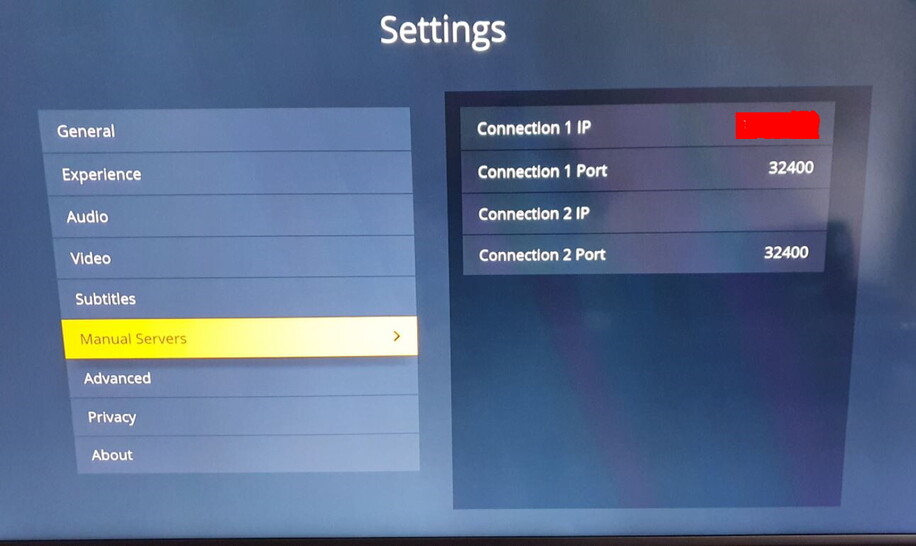
I also added my server IP into the Samsung TV App Settings under Manual Servers.
And Presto…It Worked!
Questions:
- Did you put the letters EG: into your Settings-Network? Or just the numbers?
- What exactly did you put in the Plex app on your TV? Was it 192.168.1.0? Did you change the port?
- Add your LAN IP Address to the:
List of IP addresses and networks that are allowed without auth in Plex Settings > Server > Network > Show Advanced.
Your IP Address should include the netmask and look something like this:
EG: 192.168.1.0/255.255.255.0 or you can use the shorthand version:
EG: 192.168.1.0/24
The last octet of the IP address = 0
Meaning that your LAN IP for example is 192.168.1.1, then make sure you put 192,168.1.0/255.255.255.0 in this setting in your plex server settings as stated above.
Then add your server IP (your IP of the pc you are running your server on) under manual servers option in the Samsung plex app.
Don’t type EG, that just stands for example.
in command prompt on pc, type ipconfig
This is only an example , you may have a subnet of 10.0.0.0 or something completely different.
Copy that. So when you put 192.168.1.0, in that other thread someone insisted that the IP must end in 0. However, my LAN IP ends is 192.168.1.64… would i put the .64 in the Plex settings and Samsung app settings?
For what it’s worth, I’ve tried putting 192.168.1.0 in both the server and app settings, as well as 192.168.1.64 in both and neither of those methods work. Still get that the server is unreachable.
OK in the plex settings put 192.168.1.0/255.255.255.0
Then in the Samsung app put 192.168.1.64
Tried that as well. After a full restart of the server PC, TV and router/modem, still isn’t working. Hmmm…
Ok, so your PC IP Address that is running server is 192.168.1.64 Right?
If that is your IP, then your Subnet Mask would be 192.168.1.1, so in the
List of IP addresses and networks that are allowed without auth in Plex Settings > Server > Network > Show Advanced. you must put 192.168.1.0/255.255.255.0
Then in the Samsung TV App, go to settings and under manual servers put in 192.168.1.64, then make sure that the port number just below is entered the same as the port number that’s listed in the plex server settings under remote access.
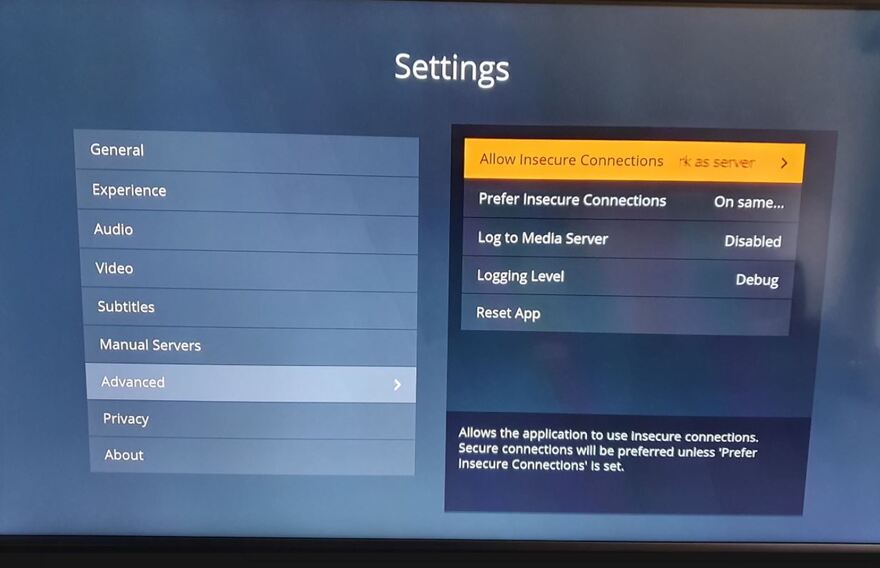
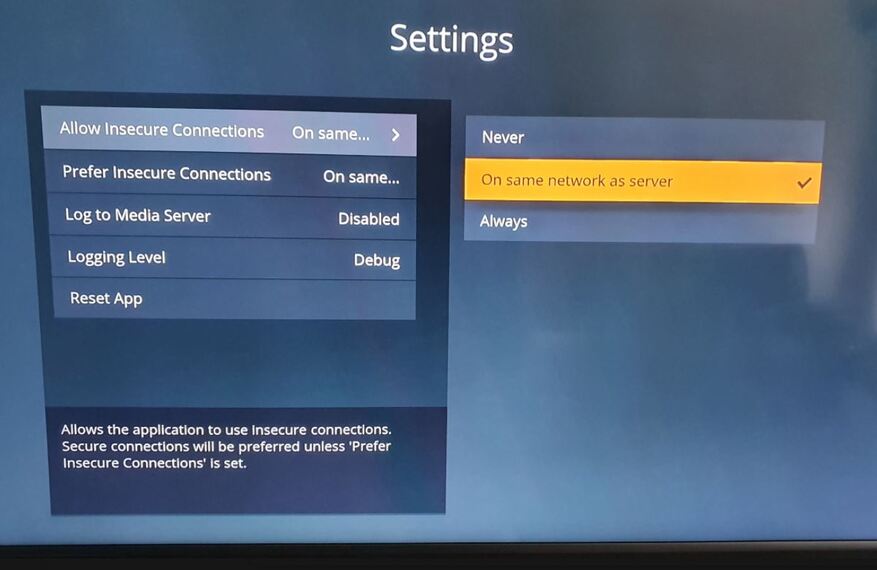
Then Go to Advanced Settings an make sure to set Allow Insecure Connections to: On Same Network as server.
I hope this helps.
Thanks for sticking this out with me and the pics to follow. Bad news is I’m doing all that already.
My subnet mask is 255.255.255.0 according to my ipconfig. Not sure I’m following how you’re getting 192.168.1.1
I’m wondering if something broke in this recent update that is causing this.
So is your IP address to PC 192.168.1.64 and subnet mask 255.255.255.0 ???
also what IP address do you use to access your Modem/router admin settings.???
Server IP: 192.168.1.64
Subnet Mask: 255.255.255.0
IP to access Router: 192.168.1.254
Ok, disregard the IP 192.168.1.1 yours is 192.168.1.254, so your settings should be
List of IP addresses and networks that are allowed without auth in Plex Settings > 192.168.1.0/255.255.255.0
Which you have done right?
So then, if you have entered 192.168.1.64 in the TV app settings as well as the same port number in Plex server settings and then allow insecure connections as server you should be good to go, so my next question is, what version of plex are you running on your Samsung TV, as I am using the early access version, see pic below
If you are not using the early access version, try doing that to see if that makes a deference.
Also, what model Samsung TV are you using?
My TV is this one.
The tv app has all the settings you do. Early Access, correct port and IP (192.168.1.64).
You keep posting the portion below, which I’ve tried, but I’ve also tried every possible ending to the IP (0, 64, 1, 254) and still getting the same issue.
I may try uninstalling the app on the tv and reinstalling at this point.
In your About settings on the tv app, what do you have? Mine is:
Client Version 5.6.1
Platform Version 4
Yer, I’m sorry it isn’t working for you. I’m out of options.