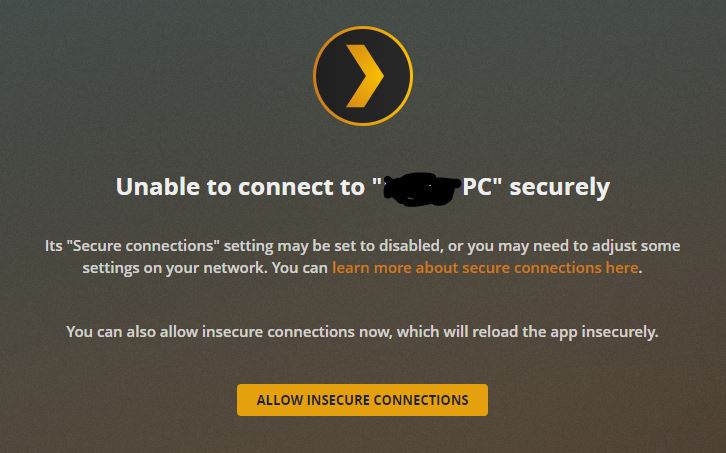
I removed a few select devices on plex.tv, but not all. Just was trying anything and saw someone suggest it in another thread.
But here are the logs you requested.
I removed a few select devices on plex.tv, but not all. Just was trying anything and saw someone suggest it in another thread.
But here are the logs you requested.
You do not have a certificate problem.
It appears, when you changed your password, you didn’t check the box to sign out all devices, By not doing so, your credentials are all out of sync.
The end result is you locked yourself out of your own server.
Sign out of Plex/web and back in with new password. See if that corrects your browser.
If not, then your server and Plex.tv are out of sync and require manual intervention
The procedure to re-establish sync between server and Plex.tv is here.
Hi @ChuckPa, yes, I did select “Sign out all devices” when I changed the password. I figured that’d be the safest from a security standpoint. Perhaps not?
Getting logs together now.
@ChuckPa one thing to note: when I log into the web UI via localhost:32400/web, the server is marked secure. But when trying from a laptop on the same subnet via the Plex web app, it shows insecure.
I have also tried logging into the Plex web app (not the localhost UI) from the server itself, and it shows insecure.
localhost (loopback) adapter is different. You’re within the confines of the machine (trusted). A device on the same subnet is not guaranteed to be trusted.
You have the logs?
PS: Checking the box is the best practice. I’m trying to convince engineering to make it the default behavior for security and ease of administration sakes.
Sorry for the delay, had to restart it and capture the latest start.
pms.zip (15.7 KB)
Thank you for that. You do indeed have the “404”
Oct 07, 2020 16:52:20.323 [0x7f04660cb700] ERROR - CERT: Could not fetch certificate from the cloud: 404
Oct 07, 2020 16:52:20.324 [0x7f046714e700] DEBUG - [CERT] MyPlex: Last published value didn't change, we're done.
I’ve reset the certificate,
You can restart it.
Groovy, thanks a bunch!!! It’s working great now. Greatly appreciated on the wicked-fast turnaround time.
@ChuckPa Thanks for the info, makes sense but just tried the method provided and same thing going on. Signed in with the local web app and claimed the server, all looks fine but once I go to plex.tv get the insecure connection stuff. Got the green lock, but webpage says ‘not secure’ and can’t connect without allowing insecure connections. Not sure.
Sike no green lock, seems to only be the case on the primary pc with the server.
would you please restart it. open the web browser, then connect the logs?
I would like to see what’s happening.
Also: Do you have your own certificate involved?
Show me what you see please (small focused) region screenshot ?
@ChuckPa Yes no problem, thanks for the help.
And no I don’t believe I have my own cert.
So here are some screens:

Starting from here all my libraries are inaccessible as you can see here:

Clicking one of the libraries yields this window:
Allowing insecure loads all my libraries like it used to but now the webpage URL states it’s not secure:


Reloading securely takes the process right back to the beginning.
And on the primary PC I get the green lock next to my server name even though the webpage still says not secure and plex let me still try to ‘reload securely’ from the same pc. But on any other pc even on the same network the lock is not there.
Hope that gives a full overview, let me know if you’d like to see any other specifics.
Also here are the logs:
Plex Media Server Logs_2020-10-07_21-38-13.zip (1.1 MB)
I found that part. It isn’t authenticating you as the owner.
You’re a guest and apparently don’t have permission to open those shares.
Oct 07, 2020 21:37:37.784 [3324] DEBUG - HTTP requesting GET https://plex.tv/media/providers?X-Plex-Token=xxxxxxxxxxxxxxxxxxxx
Oct 07, 2020 21:37:38.265 [3324] DEBUG - HTTP 200 response from GET https://plex.tv/media/providers?X-Plex-Token=xxxxxxxxxxxxxxxxxxxx
Oct 07, 2020 21:37:38.354 [8336] DEBUG - HTTP 200 response from GET https://plex.tv/api/v2/server/users?auth_token=xxxxxxxxxxxxxxxxxxxx
Oct 07, 2020 21:37:38.356 [8336] DEBUG - Auth: authenticating user as guest
Oct 07, 2020 21:37:38.356 [2520] DEBUG - Auth: authenticating user as guest
Oct 07, 2020 21:37:38.356 [2520] DEBUG - Request: [71.121.200.8:55784 (WAN)] GET /:/websockets/notifications (9 live) GZIP Signed-in Token ()
Oct 07, 2020 21:37:38.356 [8336] DEBUG - Request: [71.121.200.8:55783 (WAN)] GET /:/websockets/notifications (9 live) GZIP Signed-in Token ()
Oct 07, 2020 21:37:38.357 [2520] DEBUG - Completed: [71.121.200.8:55783] 401 GET /:/websockets/notifications (9 live) GZIP 0ms 357 bytes
Oct 07, 2020 21:37:38.357 [2520] DEBUG - Completed: [71.121.200.8:55784] 401 GET /:/websockets/notifications (9 live) GZIP 0ms 357 bytes
@ChuckPa Hmmm that’s super strange, it’s my only account and my server on the same computer it always has been. The only thing I’ve changed in upwards of a year is my password recently (when this started happening) and uploading media.
So what does that even mean? Checking the users still has me as admin and no guest (never even knew that was a feature)


Any way to change that? Sorry everything you said makes this more confusing and worrying.
There is something going on with PlexHome (which involves the cert and SSL) but that is a level of understanding far beyond me.
I’ve asked Engineering (the big guy)
What I can tell you is , I was told the team is sitting down and figuring this whole thing out because it’s not right.
I see plex.tv blaming PMS and PMS blaming plex.tv (in the logs)
Something isn’t truthful there.
Trick for them to identify is the “What”.
All I can suggest to you at this point is to clear out the ownership of your machine and fully ‘reclaim it’.
If windows follows Linux:
does this make sense? If not , I can ask one of the Windows guys to jump in.
Ok well thank you for you’re time and effort.
If I’m understanding correctly this problem is possibly bigger than me and my account. If that is the case I will stay tuned.
But I am still worried about this and if there is a chance another team member is more qualified to assist I will gladly take it. Because I honestly don’t know a lot about this stuff and for the suggestion, I don’t want to get ahead of myself and cause any more issues til it’s recommended.
Thanks for the help @ChuckPa, more assistance would be appreciated.
@ChuckPa Actually ended up trying this anyway, seemed very similar to the other method posted besides step 4. Same results, everything exactly the same as before.
To update here:
The issue is bigger than any single user.
Engineering and operations have been working on it.
As of this morning, the problem is well defined and they’re looking at a permanent & persistent solution which will prevent this from happening again (it’s a really strange condition that occurred)
Just to clarify; I am having the same issue with Plex Web accessing my 2019 NVIDIA Shield PMS securely from a PC on the same LAN. Temporarily allowing insecure connections fixes it and all my phone and TV apps are streaming fine. The difference is I have not changed my password like many on here have reported. Nothing has changed at all unless the Shield has updated the app in the last week or so or some PLEX cloud issue is present. Do I wait for your investigations or is my issue possibly unrelated?