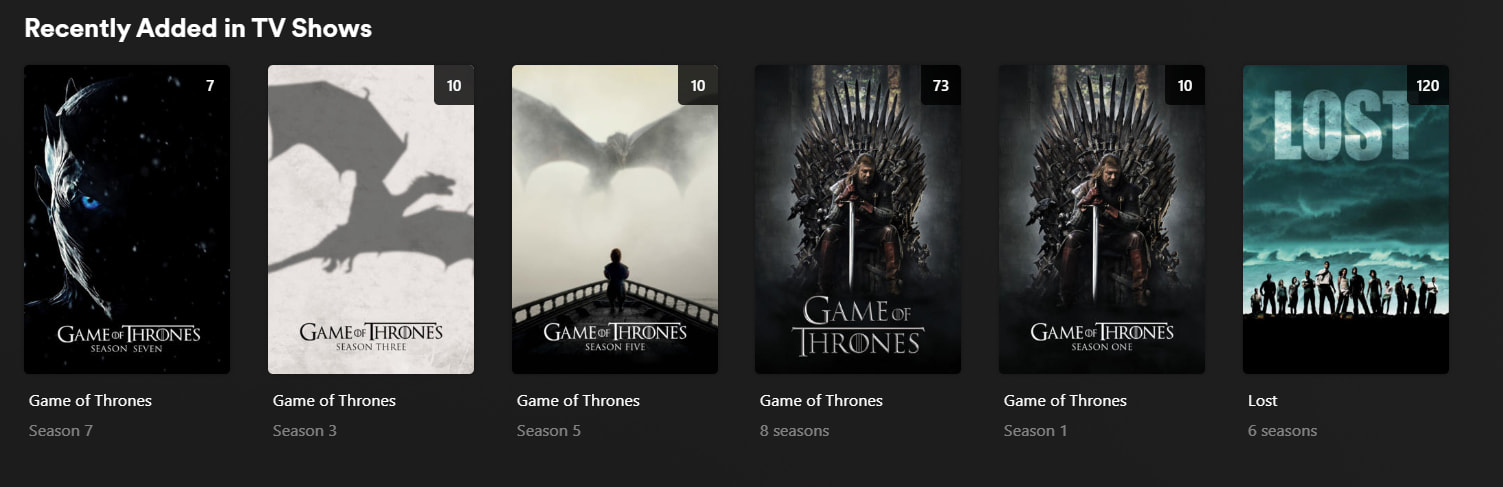
I am making this forum post because I am having a problems with a TV Show I have installed. Their seasons aren’t combined/aren’t under on title, it displays multiple seasons in a separate category/title/entry (not all, but some), and then one main TV Show/Series title/entry showing all 8 seasons, which shows all seasons anyway if you click on it. I just want it to be under one main category/title/entry showing 8 seasons like in the screenshot, not all these separate ones like “Season 5”.
I have checked the Plex forum’s for similar issues, and I have read the official naming scheme article provided by Plex, but it did not solve my problem. I am confident my naming scheme is not the problem, as it seems to be accurate and properly named. I can send screenshots of it here, but it is a TV Show so there will be a lot of screenshots, and I don’t want to make this post too long. Let me know if you require it, and I will send it in my next response.
I would really appreciate some help with my problem.
Thanks.
Server Version#: 1.43.0.10492
Player Version#: 4.156.0
<If providing server logs please do NOT turn on verbose logging, only debug logging should be enabled>
Just some wild guesses…
If you refer to plex grouping/splitting items in its „Recently Added“ hub: that’s intentional. Plex will only merge items added in a certain period (iirc 20 hours). If you add multiple episodes each day, Plex will display the season, if you add multiple episodes across multiple seasons, Plex will list the show…
If Plex is splitting seasons of the same show in the regular library view… let’s check if the single seasons are possibly just collections. If your files are in mp4/m4v/mov format and contain an embedded „album“ metadata tag, Plex will automatically add those items to a collection.
Firstly, I would like to apologise for responding very late, I have been busy these past 10 days. Secondly, I apologise for not including more details, the reason I didn’t was because I was a bit skeptical of posting these screenshots.
I have attached many screenshots showing all of the naming scheme of all the seasons/episodes in the TV Show Series I have on my Plex Media Server.
I am not sure of what else to provide, as this problem is not displayed on the Docker Logs. Please let me know if you need anything else.
I added it all at once. It’s been like this since I added it, over a month ago.
I don’t think they are collections. I didn’t put it into a collection manually, and they all use the mkv video format. I have checked if Plex has automatically put them in a collection like you suggested, and it’s not.
I apologise if I have misunderstood your response with your suggestions/tips with possible reasons for my problem. Let me know if I have done anything wrong or misunderstood.
You can check my most recent response showing all the screenshots of the naming scheme for the TV Show I have.
Ignore the “Recently Added” stuff that you are showing. What do you actually see in your library? I have the same show in my library and it matches fine. Do you see one show with 8 seasons? Are they showing up as separate shows?
I assume this is what you mean by Library, hopefully I’m not wrong. I have posted the screenshots below:
I also forgot to mention one important thing, on the Home page, I did not include the other TV Show I have on my Plex Media Server within the screenshots I have previously posted. The “Lost” TV Show is normally displayed on my Homepage, but Game Of Thrones isn’t. That’s the weird thing. Why?
Ok, you got what I meant. The shows look fine in the library, they aren’t showing up as separate as separated there. I think the behavior of “Recently Added” is just coming across as confusing to you. As far as I can tell, you are all good.
Display the results as shows (the default order is descending (newest to oldest));
Ordered by the date the shows were added;
Only display those shows which have had episodes added in the last 12 months;
Limit the output to 10 total shows.
After saving this as a smart collection, that collection can be published to your home screen, thus creating your own “Recently Added Whatever” hub (and you can disable Plex’s native “Recently Added” hub(s).
This has some limitations which may or may not be important for your use case (not being able to combine multiple libraries into one hub being the primary).