Server Version#:1.16.5
Player Version#:
Syno :ds3615xs
Hi all.
I had a working server on my nas, but i had to change raid version, so removed everything from it,
moved back to the new one, reinstalled the plex server. but after it when i open plex from nas (nasip:32400, or plex.tv ) no server found.
i removed the package, removed the whole plex folder, logged out from web apps, and restarted the nas server. reinstalled again, logged in again, but still the same issue. server not found.
i tried to install it from plex download page the latest : 1.18, and from package center on syno 1.16. still the same result.
I have no other idea, what can i do.
Could you please help?
Regards
I have encountered the same problem, and I have done the same general operation as you. In fact, I have not found the correct way to solve this problem. And hope to get a useful answer. Thank you.
Then we are have to wait i guess  i checking the logs currently,
but didn’t find any problem, that i can identify as related to this issue.
I noticed that many users have problems similar to you and me, but in their topics I have not found a way to help restore the link with PMS.And I think this is a technical problem with PLEX.
As is wrote i tried the last version of Plex, and an other also. I’ll go through the Q16 as you suggested.
Thank you. I’ll be back with the results.
I tried it according to the method described in Q16, but I still can’t link to PMS, the following is a screenshot.

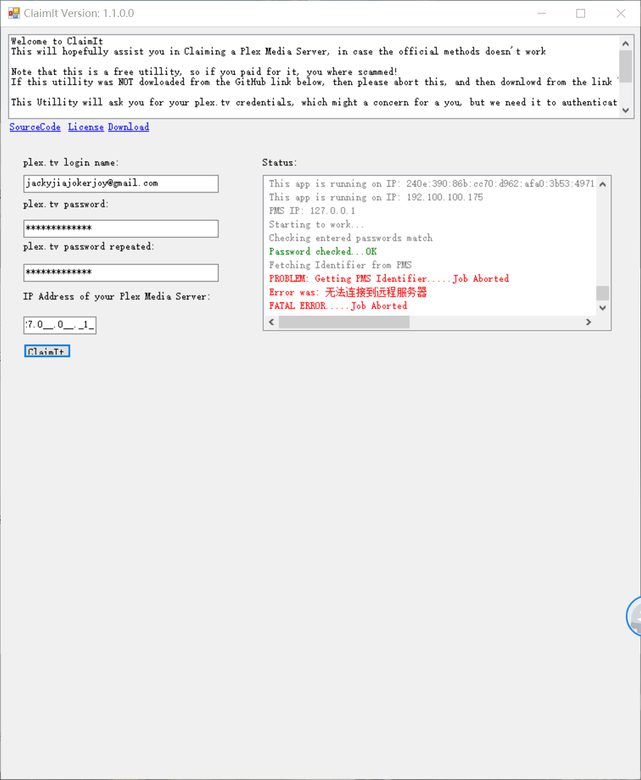
maybe try only the name at username not email address… just a guess.
To me, it’s full success on Q16. mostly. i ran the script, tried to open the suggested link :127.0.0.1:32400/web etc, but it doesn’t work.
BUT i tried to run plex server on nas, and it’s working now.
Thank you very much the help.
@jacky i think you should try it also. The guess with username is stupid, forget it
but the problem is the authentication by the log. Try again, be sure the password is correct.
Good luck!!
I found the solution in Q3, it is the problem of the LAN IP address I set. Now I can find the PMS, but the new problem has appeared. I can’t access the PMS remotely. I am looking for a solution. Thank you. I will continue.
I am trying now, thank you for your reply.
This topic was automatically closed 90 days after the last reply. New replies are no longer allowed.
