Server Version#:1.40.4.8679
Player Version#::1.98.2.208
I try to find solution for this problem, looking in the help files. Most settings seem to be OK. But also many things that are shown in the help files are not present/visible in my Plex installation, so I cannot use them.
For example: on this page “https://support.plex.tv/articles/200289506-remote-access/” I see this: You can enable remote acces under Settings > Server > Remote Access in Plex Web App.
But I do not see anywhere the “Settings > Server > Remote Access” button.
This is only one example of what is different in my Plex installation and what is shown in the help files.
How comes?
But more important question is of course 'what can be the reason that my server is unavailable? Server and web application are on the same windows 10 computer, and this computer has perfect access to internet via wifi. All other applications are running perfectly.
If you don’t see the „Server“ section in the settings, that means you’re not connected to the server or signed in as a different user.
Do you experience the same if you’re accessing the server using its local IP from within the same network, e.g. http://127.0.0.1:32400/ web if you’re on the same machine, http://[PMS IP address]:32400/web otherwise?
Thanks a lot for helping me!
I am definitely logged in on both as same user. There is only one user.
And I tried to connect to the local web app, not the hosted.
So with my wifi IP in the http://etc…
It could not connect to the local web app. Do not understand why…
another thing that happened: everything was working properly after fresh reinstall of plex server and plex web app. But a while later I switched off and on again the computer, then the connection was lost. And impossible for me to find out why…
What I really do not understand is the combination of the following:
- plex server is installed on my pc
- this pc has full connectivity to wifi and internet…
- within the plex server I can watch Live TV, so it is connected to internet (via home wifi)
- my own media files (music library) are on the D drive of this computer
- this drive is shared
- and still, the plex server cannot see the library
-BUT: everything (plex server, music librabry are on the same pc!)
Also this is what happens when I want to grant library access: to someone else: I get this message: You don’t have any connected servers.
Are you testing this from the same machine or within the same subnet?
If you open the same address with /identity instead of /web, you should see an unformatted XML message… does it show an attribute claimed with the value 1 or 0?
- yes same machine, I have only one computer at use for this.
- same subnet? subnet mask is 255.255.255.0
- I type this: http://192.168.0.138:32400/identity
answer is the same as before: This site is not accessible
As you’re on the same machine… do you get the same results with http://127.0.0.1:32400/web or http://localhost:32400/web (those should both be interchangeable)?
Do you have an active VPN or security tools installed that could interfere with even local connections?
- same results with localhost: this site is not accessible
- no VPN; and firewall is disabled; I have AVG basic installed
I disabled AVG. Still the same… no connection
Before digging deeper in what might be blocking those connections…
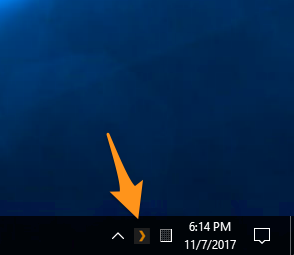
This is silly… can you confirm the server is actually running? → PMS icon showing in the system tray
Do you experience the same using a different browser, possibly using a private / incognito window?
thanks for so many help! but I have to stop now, it is late here…  And I will be absent until friday evening. I’m afraid I will have to come back with this problem then
