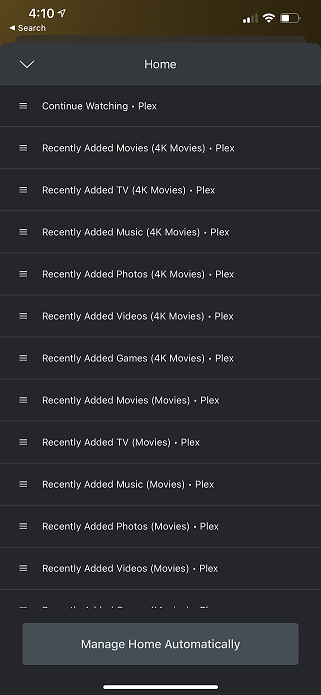
Since I’ve gone back and forth with versions, going all the way to the latest beta, then back to 4163… I’m starting to see strange things occur. The screenshot below… is happening to ALL devices. It’s showing countless libraries when I only have one for 4K movies, one for regular movies, and one for tv shows. I think me going back and forth has really hosed up and confused my database. This only shows 12 or so, but there’s at least 30-40 if I keep scrolling. It’s like my Plex server is very confused. I think going to the new hubs, then going back, it didn’t remove everything that the hubs added originally in the database. I get the “new” look and feel when I go to settings > libraries, but only shows the “edit library” link, and not the “manage recommendations” (I think that’s what it was called) link.
No, I’ve even tried on my Apple TV 4K, as well as my iPhone app. I uninstalled, and re-installed the iPhone app just to ensure there was no strange caching going on.
Ive checked my server logs for whatever the server was doing when it crashes and it always seems to be doing something different. I’m at a loss at this point
I am running PMS v. 1.22.2.4264 and Windows 10 version 20H2. Dual Intel Xeon E5-2690 v3, 128 GB DDR 4 Registered ECC.
Crashing is still happening on 1.22.2.4264.
My server has been crashing for the last week or two seemingly at random. The application does not close but it becomes unresponsive and essentially crashes. If I quit the server app, and try to start the server again, I will usually have to open up Task Manager to end the process tree because it doesn’t seem to actually open up. Only then am I able to get the server running again until it crashes again. Sometimes only an hour later or sometimes a bit longer.
I am seeing the SSDP/XML error that I have seen posted here, slow queries, many other similarities between individuals posting in the forums. EDIT: also was seeing sqlite3 failed memory resize errors.
I have also been having this issue after the last few updates. It seems that sometimes the process doesn’t crash, but the PMS console is unresponsive and everything shows offline. Ending the process for PMS and restarting seems to fix the issue for a bit.
Was crashed again this morning, here are today’s logs: FYI behavior is that the server shows as unavailable. I have to go to the server, kill all processes and restart plex. Every 8-12 hours depending on usage.
Another pesky Windows security update recently released causing havoc in the community with third party software!!
Try removing KB5000842 and see if that helps or KB5000802
Latest update (public) has officially crashed again. I don’t understand why after 4+ versions including beta, this is still not resolved. I am going back to 4163 and not moving. This is ridiculous.
I believe the reason why we aren’t getting “crash logs” is because Plex isn’t actually crashing. The icon still appears in the systray and it’s still running in task manager… so technically, it never “crashes”… but it does become unresponsive, and inaccessible. In order to get Plex responsive again, we have to not only close out the systray icon, but we have to shut down the task manually in task manager. That’s probably why it’s so difficult to track down the issue. Apparently the logs don’t show much information in regard to how often, or why it becomes inaccessible. For me, it typically happens every 4-6 hours, but it’s hard to tell because I’m not using it 24/7. I do have users complain, and that’s when I try to gauge the time period.