Server Version#:1.18.3.2156-349e9837e
Player Version#: 4.12.3
I all the sudden got this error today before it was working properly
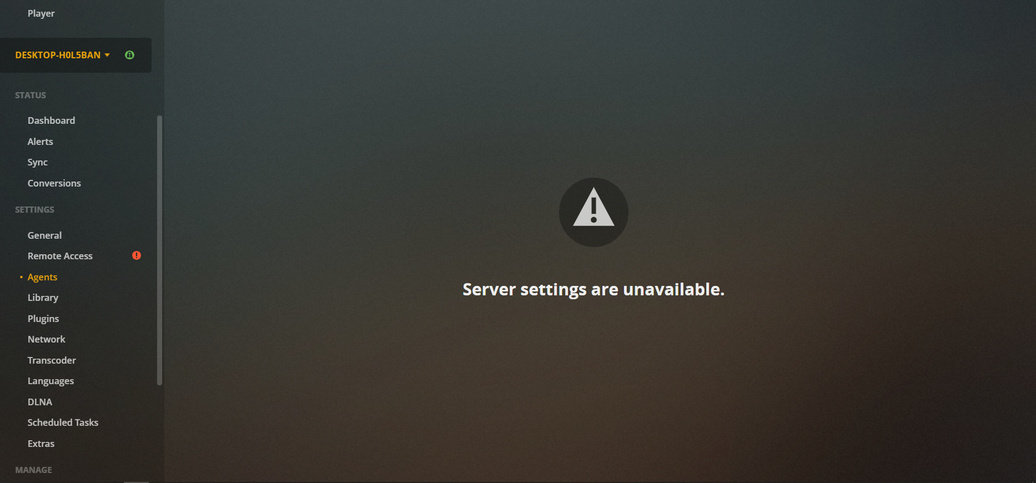
would need server logs with debug logging and plex web log with verbose logging
So first click on web settings and select show advanced and then debug in left side bar and select verbose logging and save.
Then attempt to connect to server and load server settings
when you get the error - get the screenshot - not cropped so url and time of day can be seen and then get the web log immediately - settings / web / show advanced / debug / view log / select all / copy to text file
Then get server logs - copy out logs directory and zip the copy
See this article for location of server logs
Upload server logs zip, web log text file and screenshot
Verbrose log - error plex.txt (164.9 KB)
Plex media server log - Plex Media Server.log (685.8 KB)
Will have a look but normally need all the agent logs as well - The zip I was after is a zip of the logs directory not zip of one log file
Looks like a bad install / or bad download
Files are missing from the installed set
Dec 21, 2019 20:00:31.432 [4520] DEBUG - Plugin::createProcess: Creating plugin process: "C:\Program Files (x86)\Plex\Plex Media Server\PlexScriptHost.exe" "C:\Program Files (x86)\Plex\Plex Media Server\Resources\Plug-ins-349e9837e\Framework.bundle\Contents\Resources\Versions\2\Python\bootstrap.py" "C:\Program Files (x86)\Plex\Plex Media Server\Resources\Plug-ins-349e9837e\HTbackdrops.bundle"

Dec 21, 2019 20:00:31.432 [4520] ERROR - Plugin::createProcess: Couldn't create plugin process: 2
Error 2 is defined on windows as
2 (0x2): ERROR_FILE_NOT_FOUND - The system cannot find the file specified.
Can you check the download file that you used for the install
Right click on file PlexMediaServer-1.18.3.2156-349e9837e-x86.exe
Select Properties
Check file size
Check if there is a “Digital Signatures” tab and if it has a certificate listed
Is this a fresh install ? If not, is it possible that you did the install whilst Plex processes were active? That could result in a bad install
Another possibility is some security / firewall software quarantined this exe
C:\Program Files (x86)\Plex\Plex Media Server\PlexScriptHost.exe
I reinstalled it after I noticed the error in agent thinking it may solve it . So i reinstalled again this time closing plex just to be sure it installed still getting the error. No file in antivirus
Fresh logs please and see if that error is in the new log and if it see if the files exist - the ones in the preceding line - the createprocess line
I installed Linux mint removed my windows now it working again .
A drastic action to fix a firewall / install issue on windows !
Thanks for the feedback
This topic was automatically closed 90 days after the last reply. New replies are no longer allowed.
