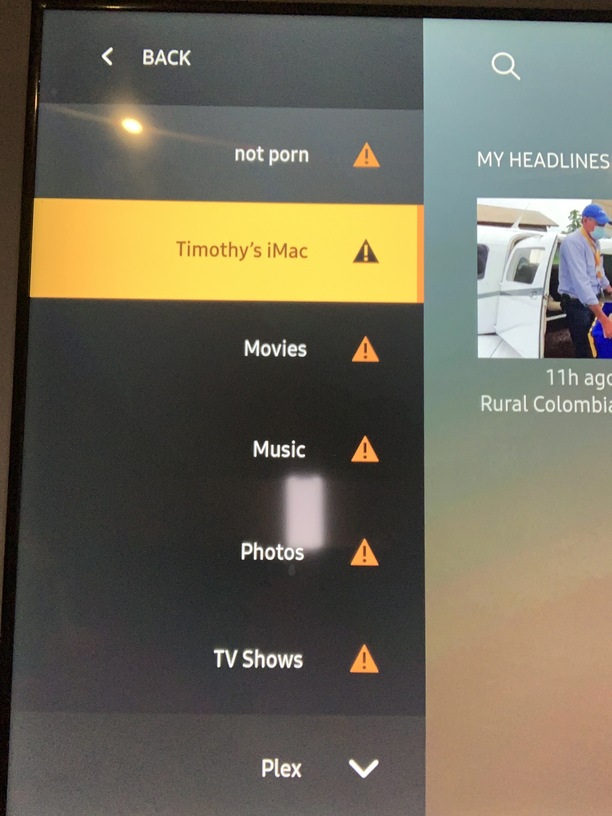
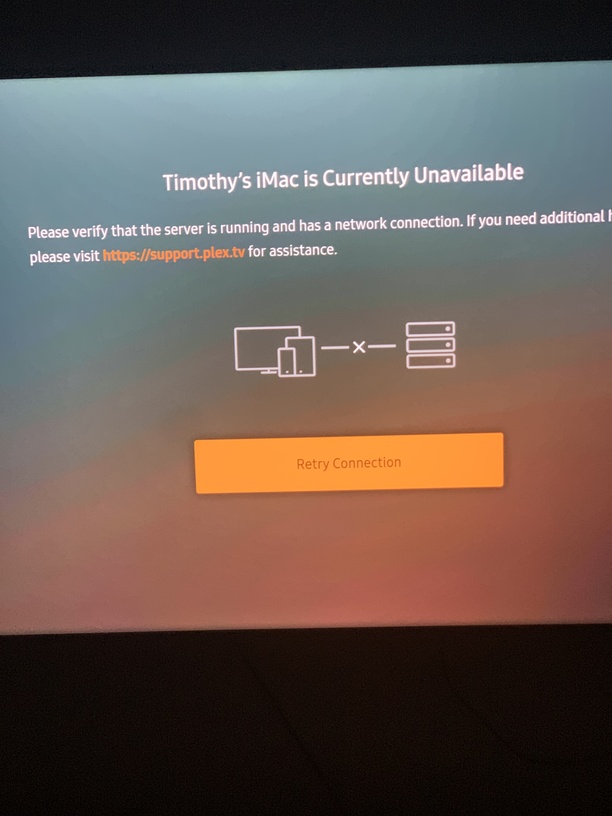
here’s both compressed, so maybe it was a size thing, haha
Also ive just setup my MacBook with a new internal hd, so just freshly installed plex and the same thing, it hasn’t worked once, i haven’t even glanced at the settings on the plex client on the MacBook, but literally every time i launch plex, under the MacBook, i get the dreaded orange !.
I wonder if its got to do with my old library from my MacBook, i looked at the plex app on my iPhone and it was still displaying content from my now erased and removed, old MacBook internal hd, even though ive removed it from the main plex server- i dunno if that helps at all?
Thanks for the logs - I have looked at the logs and it does not look the same issue as what you had with the smart tv app. It is possible the Smart TV issue was to do with secure connections - Smart TVs often have issues with secure connections.
With regards to latest diagnostics, it looks like there was a possible hang and delays in processing requests as a scanner process was started for a TV Library (TV Shows)
I notice some errors to do with access to some library paths and may be the disk setup or system had some issues. I see it is a pooled drive - at least the name suggests it is and I wonder if this was a factor
Jun 06, 2020 18:28:53.427 [0x11b463dc0] DEBUG -   * Marking media not available in /Volumes/POOLED HD/plex/tv /Band of Brothers and The Pacific 10bit hevc-d3g (rbrboxset)
Jun 06, 2020 18:28:53.427 [0x11b463dc0] DEBUG -   * Taking 7 items out of the map (which has 399 items) for being unavailable.
Jun 06, 2020 18:28:53.427 [0x11b463dc0] DEBUG -   * Taking 3 directories out of the map (which has 103 dirs) for being unavailable.
and is that really a space character at the end of the directory name “tv” ?
The transcoder job was started at 18:28:23.999 and Process ID logged at 18:28:24.170
Jun 06, 2020 18:28:23.999 [0x700002cb7000] DEBUG - Job running: EAE_ROOT='/var/folders/qc/v2kjl635207d73gjmjrgy0yw0000gn/T/pms-cf0ca1e5-172f-4f80-91f1-4b4b8ea2b1b3/EasyAudioEncoder' FFMPEG_EXTERNAL_LIBS='/Users/timothylee/Library/Application\ Support/Plex\ Media\ Server/Codecs/99c90e0-3095-darwin-x86_64/' X_PLEX_TOKEN='xxxxxxxxxxxxxxxxxxxx' '/Applications/Plex Media Server.app/Contents/MacOS/Plex Media Scanner' '--scan' '--refresh' '--section' '1' '--activity' '2dd509c4-fb32-4643-b358-0d3892c02386'

Jun 06, 2020 18:28:24.170 [0x700002cb7000] DEBUG - Jobs: Starting child process with pid 15404
But … the logs for the scanner job started seconds later - so I wonder if there is a system issue / or filesystem / disk issues here
Is this a pooled drive ? Not sure what system logs exist on the Mac to see if there were system / disk issues at the time.
Are you referring to Plex Media Player ? Plex for Mac app ? or Plex Web ?
Whilst troubleshooting Plex Media Server possible issues best to stick to the Plex Web app - so browser with http://127.0.0.1:32400/web and see if you have issues with access
If Plex Web app works fine - then we can switch to application specific diagnostics and also get logs from the apps as well as the server
You do have two servers that have been authenticating with plex.tv.
One on IP address 192.168.0.8 running Mac OS 10.15.4
and the other on IP Address 192.168.0.9 running Mac OS 10.13.6
Have you copied any Plex Media Server application data from one to the other ?
Have you copied any Plex Media Server application data from one to the other
no
Is this a pooled drive ? Not sure what system logs exist on the Mac to see if there were system / disk issues at the time
no, I do have an external hd that was probably plugged in at the Time, but really thats just an old label, it is not really pooled anymore, I did create a plex Media file on there to see if I could store excess media there, but it didn’t work and in future I won’t be using it at all I don’t think.
and is that really a space character at the end of the directory name “tv
"
I see, your looking at the har drive pool, thats the file path that was added when I clicked, but I’m removing the 'pooled hd" because I don’t use it and its just adding confusion, makes me wonder if the plex server was having trouble locating the external hd, because it didn’t have a wifi connection, I just thought id see if I’d be able to store excess files on that hard drive if I had it plugged into the iMac, it didn’t work and I hadn’t gotten around to removing it yet, but now I have, I wonder if that would resolve the issue.
Are you referring to Plex Media Player ? Plex for Mac app ? or Plex Web ?
sorry, I’m saying it comes up with the same error as the iMac, when I try to access the media on the Samsung smart tv, I get the same orange !, not ? a ! that says plex cannot locate the server.
I only ever use plex on my Samsung tv, thats all I use it for, to stream the media from computers and laptop to my tv. thats it. so if I’m refferring to a problem, its always when trying to access the media files when I turn my tv on. Maybe I should of been more specific, sorry.
Just plugged in unintentionally ? It is actually the other way round. The Plex Media Server library “TV Shows” has paths defined to that drive and the path was not available.
What does that mean ? You get errors on both the iMac and on the Samsung TV ?
Is the iMac the server we are talking about or the computer?
What Plex application are you using on the iMac that gives an orange error ?
Need to establish if the issue is only on the Samsung app or also in Plex Web on the Mac when trying to access the server. And is the issue all the time - or it is ok and then fails ?
The last set of logs you gave me which were collected at 18:28 and 18:32 on the 6th June had no evidence of any Samsung TV plex app connection attempt at that time. The only access was from Plex Web on the computer itself through Safari
If this is the only use of Plex then lets concentrate on this.
Your original screenshot showed the error to be “No Content Available for This Library” - is it still the same error text? The server has 4 libraries but your other server has 1 library only. Could you delete your old Plex Media Server - go to settings in Plex Web and select devices and then find the old entry and remove it.
After doing that - go to the samsung app and sign out and sign in again to the same account the server is owned by. And on the Plex for Samsung app - could you see if enabling logging does actually get logs to the server ok
and then get me screenshots (photo) and please the time the error arose - and will see if the logs have any info.
It would be interesting to establish if disabling secure connections helps the connectivity of the Samsung app. In the last set of logs there was no evidence of any attempts for the Samsung tv app to connect to the server
If making changes to secure connections setting, it is safer to restart the server and sign out / sign in the plex for Samsung app after making a change to the setting
I understand that the Plex for Samsung user menu has a Media Server Status option - please check this to see what is showing for the server
I am told by the Plex for Samsung app team that whilst secure connections are supported, the Tizen TV prefers insecure connections for the local network. So not sure why you want to run with “Secure Connections = Required” on the server
I haven’t had time just yet to do any of the other suggestions.
But I setup up plex, running the app from my iMac into my tlc tv in the other family room and it worked flawlessly, so I think you’re right, i think it’s the Samsung plex app that might be the issue.
I changed the setting back to “preferred” to see if that helps.
Also whenever I get the orange !, the status of the server is always “server unavailable”, this is what I’ve been referring to throughout.
Also I’ve never used plex on my iMac to watch movies, but whenever ive loaded it up to update firmware, it’s always worked, it’s never displayed the orange ! As well m the photos above. Ive always just opened the app on the iMac and streamed to my tv via the app on the tv, I’ve never used it any other way, so everything I’ve said, previously and from now on, will be pertaining to that setup, with the only sleight variation being that I watched on my older TLC tv last night, which again worked perfectly, not 1 issue.
I think my laptop (MacBook - “not porn”) hasn’t been setup properly, so ignore that sever and let’s just focus on the Samsung tv.
So focusing on the Plex for Samsung app and the the Plex Media Server on “Timothy’s iMac” - running the server with “preferred” as opposed to “required” secure settings initially and then trying after that with secure connections disabled on the server
When you have time, i would like to see if enabling logging in the Plex for Samsung app gets any logs into the server and also would like to see a packet capture (you would need to send this zipped to me privately)
so please download wireshark for Mac from here
enable logging to PMS in the plex for samsung app settings
Server secure settings set to preferred (as you have it now)
launch wireshark on the iMac and capture all packets through the network interface. Start capture
on the Plex for Samsung app now - see status of the server and where it says unavailable - click on retry connection.
If still the same, note down the time, take a photo and stop the wireshark capture and save to pcap file and download the server logs zip and also zip / compress the pcap and send to me
Then would like to try with secure connections disabled
so server settings / network / disable secure connections
save changes
restart the server
close the plex for samsung app and relaunch it
see app settings and again select send logs to PMS
Also see if there is an option to fallback to insecure connections. select it if there is
Start wireshark capture again on the imac
try to connect to the server from the samsung app
see if it is any better now
stop the wireshark capture and save as pcap
if there is still a problem, zip the pcap and download server logs and note down time when the error arose and send me compressed pcap and logs
(when changing secure connections settings / it is always best to restart the server and app after the change)