Any new for this issue?
Any change in the last updates? Is this problem fixed?
Anyone tested 1.19? Going to build a new server so will be giving it a try in a day or 2…
So lve had 1.19 running for a few days and no issues so far, looks like they have fixed it or a windows update did…
I’ve had this issue on and off for the last 12 months. Usually closing my tv down and logging in again fixed it, but recently I e had to quit the the sever on my iMac too. Now nothing is working, usually I’m prompted for the “ allow fallback to insecure connections” message, which never works at all.
Now I can’t get in at all.
This would not work anyway when you the server setting for secure connections set to “Required” as opposed to “Preferred”
See Server Settings / Network.
To investigate any issues with the server being unavailable would need to have server logs and may also need plex client app logs as well and an indication as to what time the server was not available and on what device / IP address.
It would be best to limit the testing to get the diagnostics for this arising within the local network.
For logging see
https://support.plex.tv/articles/201643703-reporting-issues-with-plex-media-server/
https://support.plex.tv/articles/200250417-plex-media-server-log-files/
and for the various Plex client apps, see
https://support.plex.tv/articles/201869908-log-files/
Uploading: Plex Media Scanner.5.log… Plex Media Scanner.log (10.4 KB) Uploading: Plex Media Scanner.4.log… com.plexapp.agents.imdb.log (16.0 KB) Uploading: Plex Media Server.log… Uploading: Plex Media Scanner.1.log… Uploading: Plex Media Scanner.3.log… Uploading: Plex Media Scanner.2.log… Plex Media Scanner Chapter Thumbnails.3.log (30.5 KB) Plex Media Scanner Deep Analysis.1.log (519 Bytes) com.plexapp.agents.lastfm.log (7.7 KB) Plex Media Scanner Chapter Thumbnails.2.log (30.5 KB) Plex Media Scanner Deep Analysis.log (2.5 KB) Plex Media Scanner Deep Analysis.2.log (2.5 KB) Uploading: Plex Media Server.5.log… Uploading: Plex Media Server.4.log… Uploading: Plex Media Scanner Chapter Thumbnails.1.log… Plex Media Scanner Deep Analysis.3.log (519 Bytes) Plex Media Scanner Chapter Thumbnails.5.log (30.5 KB) Uploading: Plex Transcoder Statistics.log… Plex Media Scanner Chapter Thumbnails.4.log (30.5 KB) Uploading: Plex Media Server.1.log… Uploading: com.plexapp.system.log… Uploading: Plex Media Server.3.log… Plex Media Scanner Deep Analysis.4.log (2.5 KB) Uploading: com.plexapp.agents.plexthememusic.log… Plex Media Scanner Deep Analysis.5.log (2.7 KB) Uploading: Plex Media Server.2.log… Uploading: com.plexapp.agents.thetvdb.log… com.plexapp.agents.fanarttv.log (12.3 KB) com.plexapp.agents.themoviedb.log (10.0 KB) Plex Media Scanner Chapter Thumbnails.log (44.3 KB) com.plexapp.agents.none.log (14.9 KB) Plex Tuner Service.4.log (2.6 KB) com.plexapp.agents.opensubtitles.log (6.9 KB) Plex Tuner Service.5.log (2.6 KB) Plex Tuner Service.1.log (1.2 KB) Plex Media Scanner Analysis.log (43.5 KB) Plex Tuner Service.2.log (2.0 KB) com.plexapp.agents.localmedia.log (15.6 KB) org.musicbrainz.agents.music.log (7.3 KB) Plex Tuner Service.3.log (2.6 KB) Plex Transcoder Statistics.2.log (33.1 KB) Plex Transcoder Statistics.3.log (23.0 KB) Uploading: Plex Media Scanner Analysis.1.log… Plex Media Scanner Analysis.3.log (12.4 KB) Plex Crash Uploader.4.log (195 Bytes) Uploading: Plex Transcoder Statistics.1.log… com.plexapp.agents.movieposterdb.log (5.0 KB) Uploading: Plex Media Scanner Analysis.2.log… Plex Crash Uploader.1.log (195 Bytes) Plex Transcoder Statistics.4.log (6.5 KB) com.plexapp.agents.lyricfind.log (5.1 KB) com.plexapp.agents.htbackdrops.log (7.4 KB) Plex Transcoder Statistics.5.log (23.0 KB) Plex Tuner Service.log (1.9 KB) Uploading: Plex Media Scanner Analysis.5.log… Plex Crash Uploader.2.log (195 Bytes) Plex Crash Uploader.3.log (195 Bytes) Uploading: Plex Media Scanner Analysis.4.log…
databaseBackup.log (4.2 MB)
Ok so this is new.
I had to rest my Samsung tv and delink my account.
Before this I thought the issue was fixed.
Time was 9:33 am
I’ll have to add the logs later.

databaseBackup.log (4.2 MB)
Plex Media Scanner.5.log (115.9 KB) Plex Media Scanner.log (610.6 KB) Plex Media Scanner.4.log (115.9 KB) com.plexapp.agents.imdb.log (16.0 KB) Plex Media Server.log (8.7 MB) Plex Media Scanner.1.log (18.0 KB) Plex Media Scanner.log (10.4 KB) Plex Media Scanner.2.log (444.0 KB) Plex Media Scanner Chapter Thumbnails.3.log (30.5 KB) Plex Media Scanner Deep Analysis.1.log (519 Bytes) com.plexapp.agents.lastfm.log (7.7 KB) Plex Media Scanner Chapter Thumbnails.2.log (30.5 KB) Plex Media Scanner Deep Analysis.log (2.5 KB) Plex Media Scanner Deep Analysis.2.log (2.5 KB) Plex Media Server.5.log (10.0 MB) Plex Media Server.4.log (10.0 MB) Plex Media Scanner Chapter Thumbnails.1.log (75.8 KB) Plex Media Scanner Deep Analysis.3.log (519 Bytes) Plex Media Scanner Chapter Thumbnails.5.log (30.5 KB) Plex Transcoder Statistics.log (816.4 KB) Plex Media Scanner Chapter Thumbnails.4.log (30.5 KB) Plex Media Server.1.log (10.0 MB) com.plexapp.system.log (916.6 KB) Plex Media Server.3.log (10.0 MB) Plex Media Scanner Deep Analysis.4.log (2.5 KB) com.plexapp.agents.plexthememusic.log (179.2 KB) Plex Media Scanner Deep Analysis.5.log (2.7 KB) Plex Media Server.2.log (10.0 MB) com.plexapp.agents.thetvdb.log (522.6 KB) com.plexapp.agents.fanarttv.log (12.3 KB) com.plexapp.agents.themoviedb.log (10.0 KB) Plex Media Scanner Chapter Thumbnails.log (44.3 KB) com.plexapp.agents.none.log (14.9 KB) Plex Tuner Service.4.log (2.6 KB) com.plexapp.agents.opensubtitles.log (6.9 KB) Plex Tuner Service.5.log (2.6 KB) Plex Tuner Service.1.log (1.2 KB) Plex Media Scanner Analysis.log (43.5 KB) Plex Tuner Service.2.log (2.0 KB) com.plexapp.agents.localmedia.log (15.6 KB) org.musicbrainz.agents.music.log (7.3 KB) Plex Tuner Service.3.log (2.6 KB) Plex Transcoder Statistics.2.log (33.1 KB) Plex Transcoder Statistics.3.log (23.0 KB) Plex Media Scanner Analysis.1.log (58.3 KB) Plex Media Scanner Analysis.3.log (12.4 KB) Plex Crash Uploader.4.log (195 Bytes) Plex Transcoder Statistics.1.log (431.1 KB) com.plexapp.agents.movieposterdb.log (5.0 KB) Plex Media Scanner Analysis.2.log (100.3 KB) Plex Crash Uploader.1.log (195 Bytes) Plex Transcoder Statistics.4.log (6.5 KB) com.plexapp.agents.lyricfind.log (5.1 KB) com.plexapp.agents.htbackdrops.log (7.4 KB) Plex Transcoder Statistics.5.log (23.0 KB) Plex Tuner Service.log (1.9 KB) Plex Media Scanner Analysis.5.log (358.4 KB) Plex Crash Uploader.2.log (195 Bytes) Plex Crash Uploader.3.log (195 Bytes) Plex Media Scanner Analysis.4.log (374.1 KB)
I will have a look but it would have been easier to either copy all the log files out into another directory and then zip the copies and attach the one zip file or if the server is still accessible through http://127.0.0.1:32400/web directly, to use the Troubleshooting link and download the logs through the web interface
I can see a Samsung TV on IP address 192.168.0.4 - Device Name: TV UA65NU7100
Is this the Samsung TV you are referring to?
I do see some errors
Jun 01, 2020 08:34:52.525 [0x7000012a1000] DEBUG - Request: [192.168.0.4:33603] rejected because secure connections are required
Jun 01, 2020 09:57:53.719 [0x7000012a1000] DEBUG - Request: [192.168.0.4:37178] rejected because secure connections are required
Jun 01, 2020 10:35:09.221 [0x7000012a1000] DEBUG - Request: [192.168.0.4:37843] rejected because secure connections are required
Jun 01, 2020 10:40:36.492 [0x70000121e000] DEBUG - Request: [192.168.0.4:55639] rejected because secure connections are required
Jun 01, 2020 10:40:46.899 [0x70000121e000] DEBUG - Request: [192.168.0.4:55663] rejected because secure connections are required
Could you go to server settings in Plex Web and select Network, and then change secure connections from “Required” to “Preferred” and then save the changes and restart the server and the Plex client apps and see if it makes it better
If there are still issues after making this change, please get me new logs but please attach the zip of the logs and not individual files and let me know the name of the device and its IP Address
Thanks
Hi,
I had the setting on “ preferred” before and that’s when I had all these issues, I feel like it’s much better atm, like 98% of the time it’s working atm and if it isn’t, it’s resolving quite quickly. Much better than before.
But yes that is the tv I’m having issues with.
The server is on the MacBook.
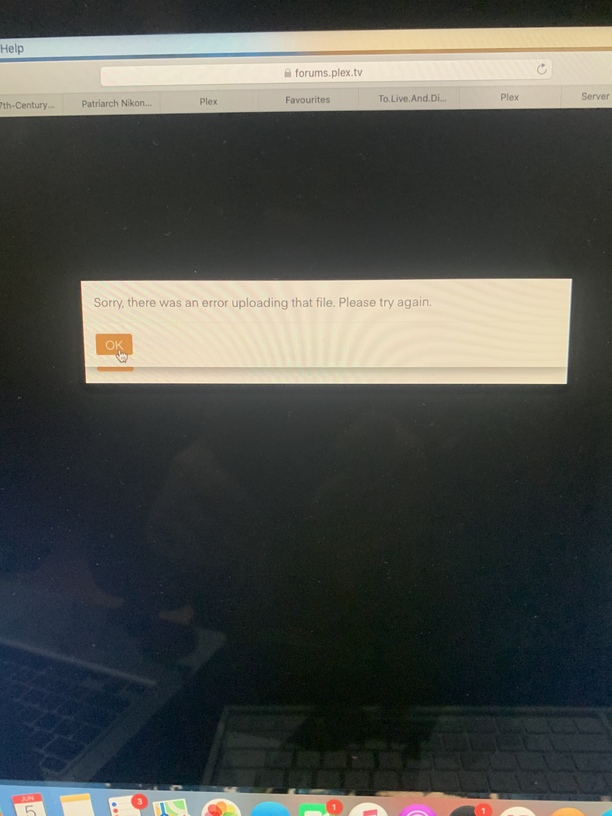
Also sorry for the file being delivered like that, but this is just the way the Mac is delivering them, it won’t actually accept the format that the Mac provides and I’m not really sure how to change it to another format so it stops delivering them individually.  Sorry
Sorry 
When you select Download Logs on this screen - you will get one zip file

So just attach the one zip file in the forum post
Not sure if you saw, but I tried to explain already, the format that the Mac puts it in, plex won’t accept, it accepted one of the downloaded files, either the data or the logs, it was the one that delivered them
All separate, that’s just what it does when I transfer the downloaded file to the plex, response box.
The other one I had to change to a “ log” file.
Also I just realised I wrote “MacBook” instead of iMac, I know it won’t make too much difference, but for future clarity sakes.
Oh and I changed the setting to “ preferred”
All that does is give me the option of “ allow when on the same network” on my Samsung tv when plex says my library is “ unavailable”
My IP address for the iMac is, 121.223.xxx.xxx
Plex Media Scanner.5.log (18.2 KB) Plex Media Scanner.log (18.2 KB) Uploading: Plex Media Scanner.4.log… com.plexapp.agents.imdb.log (6.1 KB) Plex Media Server.log (4.8 MB) Plex Media Scanner.1.log (18.2 KB) Plex Media Scanner.3.log (18.2 KB) Plex Media Scanner.2.log (18.2 KB) Plex Media Scanner Chapter Thumbnails.3.log (57.5 KB) Plex Media Scanner Deep Analysis.1.log (4.4 KB) com.plexapp.agents.lastfm.log (7.7 KB) Plex Media Scanner Chapter Thumbnails.2.log (8.9 KB) Plex Media Scanner Deep Analysis.log (4.5 KB) Plex Media Scanner Deep Analysis.2.log (4.5 KB) Uploading: Plex Media Server.5.log… Uploading: Plex Media Server.4.log… Plex Media Scanner Chapter Thumbnails.1.log (6.3 KB) Plex Media Scanner Deep Analysis.3.log (4.5 KB) Plex Media Scanner Chapter Thumbnails.log (44.3 KB) Plex Transcoder Statistics.log (5.3 KB) Plex Media Scanner Chapter Thumbnails.4.log (137.1 KB) Uploading: Plex Media Server.1.log… Uploading: Plex Media Server.3.log… Plex Media Scanner Deep Analysis.4.log (4.5 KB) com.plexapp.agents.plexthememusic.log (5.1 KB) Plex Media Scanner Deep Analysis.5.log (4.7 KB) Uploading: Plex Media Server.2.log… com.plexapp.agents.thetvdb.log (15.3 KB) com.plexapp.agents.fanarttv.log (12.3 KB) com.plexapp.agents.themoviedb.log (8.1 KB) Plex Media Scanner Chapter Thumbnails.log (10.9 KB) com.plexapp.agents.none.log (14.9 KB) Plex Tuner Service.2.log (2.0 KB) com.plexapp.agents.opensubtitles.log (6.9 KB) Plex Tuner Service.3.log (2.6 KB) Uploading: Plex Tuner Service.1.log… Plex Media Scanner Analysis.log (43.5 KB) Plex Tuner Service.2.log (2.6 KB) com.plexapp.agents.localmedia.log (28.4 KB) org.musicbrainz.agents.music.log (7.3 KB) Plex Tuner Service.1.log (1.2 KB) Plex Transcoder Statistics.2.log (2.1 KB) Plex Transcoder Statistics.3.log (24.1 KB) Plex Media Scanner Analysis.1.log (58.3 KB) Plex Media Scanner Analysis.3.log (12.4 KB) Uploading: Plex Transcoder Statistics.1.log… com.plexapp.agents.movieposterdb.log (5.0 KB) Plex Crash Uploader.4.log (195 Bytes) Plex Media Scanner Analysis.2.log (100.3 KB) Plex Crash Uploader.1.log (195 Bytes) Plex Transcoder Statistics.4.log (4.4 KB) com.plexapp.agents.lyricfind.log (5.1 KB) com.plexapp.agents.htbackdrops.log (7.4 KB) Plex Tuner Service.log (1.2 KB) Plex Media Scanner Analysis.5.log (358.4 KB) Plex Crash Uploader.2.log (195 Bytes) Plex Crash Uploader.3.log (195 Bytes)
This is what it loads after I remove these screens
What is the filename and filename extension that gets created ?
And what is the file size?
May be it is over the maximum size for the forum uploads.
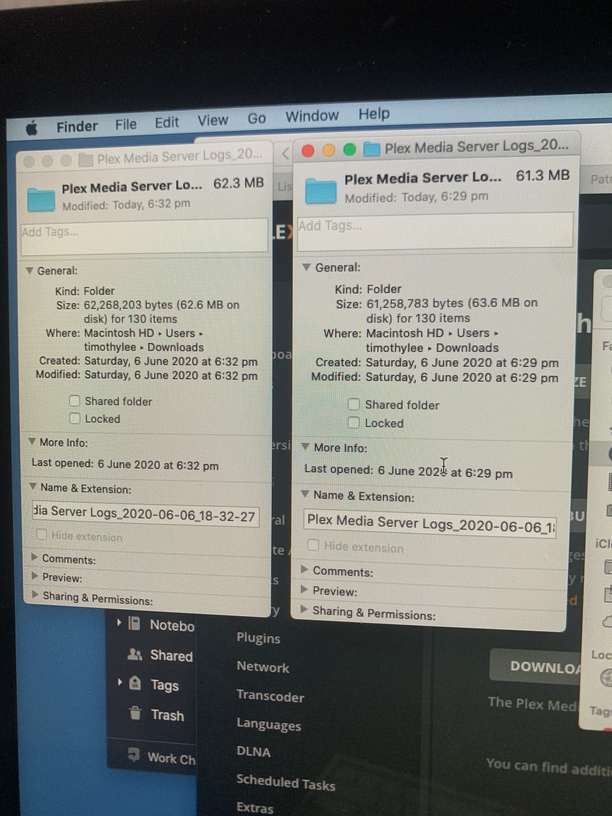
you can also see the timestamp here cuz it was actually happening whilst I got these logs. Also I’m going to change it back to “required”, cuz when I had it on that it seemed to always work, but now that I changed it back to "preferred’ its happening literally every time again.
