Could you please explain how to downgrade PM’s to 1.24…o link to a guide. I’ve googled with no luck.
Those butler tasks weren’t meant to be run individually so it would take work to allow that functionality. To be clear, it’s not that I don’t know which task is causing it, it’s that I see PMs stop responding while performing different tasks so it’s not as simple as run this task and see if it breaks. If it was like that, running all the tasks would reproduce the problem.
OK - was a thought. And if you need anyone to test anything out then I’ll be happy to as currently have to restart Shield every morning so anything to try to get to the bottom of it.
I set them to both the same… it took down my PMS, just rebooted.
Hmm. That’s not expected. I just tried the same and my server is still fine. 
Just set the scheduled tasks to run at 10pm as it’s just gone 10pm. The tasks seems to have finished, but every 30 seconds or so the Dashboard notification keeps showing that it’s scanning the libraries. It lasts about a second before going from the dashboard notification, and then about 30 seconds or so it comes back again. Is this potentially something that’s causing it to then keep scanning and running out or memory? It hasn’t kicked PMS offline, but maybe that takes a while after constant scans all night? Logs attached.
@anon18523487 Is there any way to disable all scheduled tasks? I saw you mentioned above that it seems to be something running overnight that’s causing issues and I currently have my server working again, but hoping to avoid it going down overnight. I tried setting the ‘time to start’ and ‘time to stop’ the same time (2:00), but after clicking save and going back into setting it bumps the stop time back to 3:00.
My current setup: 2019 Shield Pro with USB hard drive (removable storage, NTFS) storing media and library files. I installed the Android update a few days ago, along with the Hotfix #2 (including PMS 1.25.3.5410). Initially Plex worked as usual, but once I tried add a few movies and scan library, the Shield slowly started grinding to a halt, couldn’t even bring up Settings menu to reboot and had to unplug.
After installing PMS 1.25.3.5448, I got the message to grant access, and after granting access, neither ‘Continue’ or ‘Cancel’ did anything. I hit the back button on the remote to go back to the message about granting access and clicked Open App from there, and now I’ve been able to scan library and refresh metadata without issues. Neither Plex/PMS have battery optimization enabled (the didn’t by default), and the screen saver is set to not turn on for two hours (max).
I’ve got the same symptoms as most here, with the latest hotfix and second-latest PMS (the latest wouldn’t let me install, just a loop of "you need to ok permissions, do you want to ok permissions? you need to ok permissions, do you want to ok permissions? over and over), external 8TB in exFAT.
…only when PMS crashes for me, rebooting doesn’t bring it back. It requires reinstalling PMS.
Downgrading the Shield Pro software seems like it’s more of a PITA than I care for and I don’t know if I have a keyboard that would work.
I’m not really asking for help, just chiming in with a similar but slightly different experience (as reboots don’t help and I couldn’t get through the install of the latest PMS - “Continue” was the only button that allowed out of that screen, referring to a suggestion to cancel upstream somewhere).
I’m just going to run Kodi / VLC / whatever to play my files in the meantime. Hope you guys sort it out soon but I don’t have the time / energy to devote to all the administration and troubleshooting of Plex right now. Reminds me of when it was new - only I don’t have that time, these days.
Update @anon18523487
Shield up for 2 days now.
Yes the drive is always seen by Shield.
No the drive is not used as device storage, it is dedicated to Plex only and is classified as “removable storage”.
Sleep is when you press the red button on the remote and projector and av receiver turn off via CEC. Same button is pressed and it all turns on again. Green light on the shield turns off but the shield is running in the background and is LAN accessible and you can see USB drive activity.
In my opinion this bug is also causing the external storage not seen by the PMS “modify storage location” wizard.
I was in the same boat as @Rocky-J but trying the same process a few times made it work but its a hit and miss and not a solution.
From memory the wizard actually displayed a message “failed to move data” but trying again kicked it over and then it worked as it should. If I restarted or not between that I don’t recall I’m leaning towards no.
My external drive has always been formatted NTFS and solid for over a year. After several factory resets (due to music metadata filling up the 1TB) I never had any issues with the drive.
For those complaining about transcoding not working, I am seeing this in the console.
I am running the latest .5448 apk from this thread.
If a dev wants more logs let me know how and where to supply them.
This is my trying to transcode videos that have image based subtitles.
I will say that transcoding is much improved in this release, in previous release .5410, videos would just stop and have horendous quality. So good job to the team for improving transcoding from the last release. Right now quality isnt too bad but I get error and hickups in playback. Shield i ethernet connected to router and streaming wirelessly to my android phone in this example.
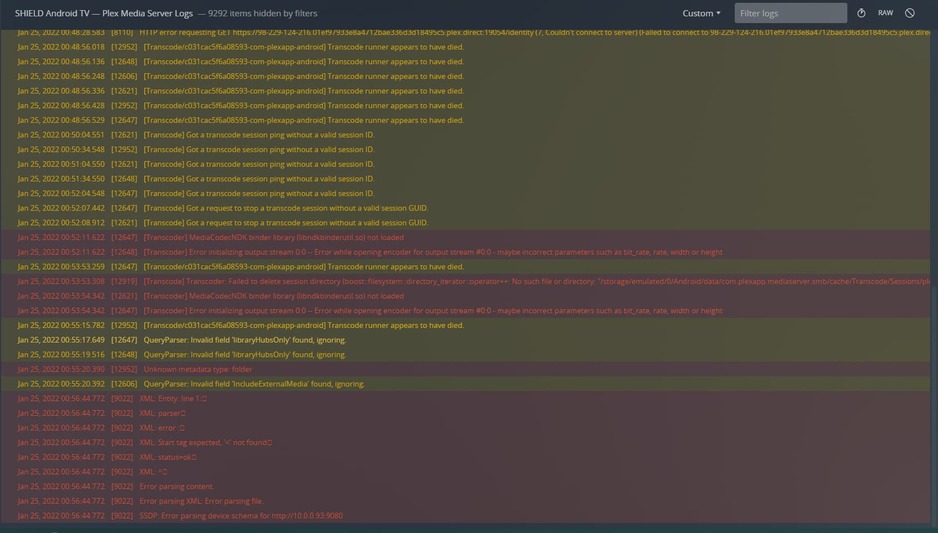
Shield/PMS not only freezing during scheduled tasks. Also when you’re manually trying to update the library it freezes.
I’m a bit done with ‘can’t reproduce the problem’. We’re more than 2 weeks further… and we are all still bearing with the same problems.
We - forum users - or ‘advanced users’. Thousands of people at home have no idea why the’re stuck with a product that suddenly doesn’t work anymore.
Plex crashed for me tonight too. I’ll try to grab the logs and update this message.
edit: logs added
Plex Media Server.log (132.8 KB)
Same as @FMisplon reported, added a folder for scan and PMS slowly crashed. Initially the server was still showing as online but going to Console or Libraries just gave a blank screen.
Turned ON (out of sleep) the Shield, went into Plex which looked fine but even Live TV & DVR showed “An error occurred”.
Now the app can not find the server.
Can not access STORAGE in settings - doesn’t want to go into it at all.
I suggest if you want to replicate this, factory reset, add an external drive and format it as “removable storage” and connect to Synology NAS or similar SMB device.
Then move Plex data onto it.
Then add a few different libraries.
In this case it was scanning home videos about 859 of them.
Can’t restart the Shield at all, even though Shield is responsive it opens apps but the app doesn’t load, also the Settings menu doesn’t want to appear anymore.
Only thing that works is Google Assistant so it must have internet connection but the “restart” command doesn’t do anything.
Also seeing that at times Shield connects via SMB with signing enabled sometimes not.

Plex Media Server Logs_2022-01-25_21-08-18.zip (4.7 MB)
same issue again while playing back show - just stopped responding storage again not accessible. Will have to pull the plug.
So even after a few restarts PMS won’t start this time, not really surprised its happened to others too.
Is there a fix for Plex Media Server not starting/showing up in Plex settings?
I’m running v1.25.3.5410 and overnight the PMS died again. I had set the start and end time of the tasks to 2am for both, it did not prevent PMS from stopping at some point.
Im on 1.25.3.5448, its just a matter of time before it won’t start at all - even after a restart. Just have to find an alternative till this gets fixed, Im thinking Kodi or Emby.
Get it working, then the shield goes to sleep and stuffs everything up.
When I woke the shield, I could not even open the settings menu. Had to pull the power cable.
Probably going to look at downgrading the shield to the previous stable release.
Same as @triks_melb, @FMisplon and many others.
I installed the PMS hotfix from this thread and received the 2 hotfix from Nvidia on my Shield.
I rebuilt my PMS from scratch 3 times and everytime when the server is scanning the same large library the Shield completly freeze and the only option is to unplug and replug to restart the Shiled.
After a week of reboot I finally finished to scan my library but I tried once to click on Optimize Database and once again the Shiled froze.
But since I’m not able to start PMS at all.
I tried to restore a backup of my database but nothing worked. My PMS seems to be Just dead.
Impossible to see PMS status and Storage Location in Plex App.
For information, my PMS is stored on a USB key and datas are on a NAS.
Well I’ve had enough how can something that worked so  well become an utter mess spent to much time trying fixes only to have the same outcome at the minute the Nvidia shield pro and Plex just don’t work together for personal media libraries
I see that contrary to what is said here, many of us have this problem.
