Maybe someone can help – the plex server after the 9 experience upgrade and official patch seem to work when the server is on, but if I turn Shield off (in rest mode , say overnight) my server seems to crash unless I keep Shield powered on and not in rest mode. Any idea how to fix this? I’m presuming (and this may be wrong) that it’s taking my external hard drive plugged into the shield and sleeping it, causing my server to not run if the Shield isn’t out of rest mode, but that’s just a guess. On the old shield experience this was never a problem.
If you have it on and you’re not experiencing issues, it might mean that, due to the HW transcoding issues in 1.25, hardware transcoding is not kicking in when it should and it using the software based transcoding.
I am not sure how it manifests itself since I am still on PMS 1.23…
Also keep in mind that depending on your Plex clients (playback devices) and specific media clips being played, you might not need HW transcoding that much anyway.
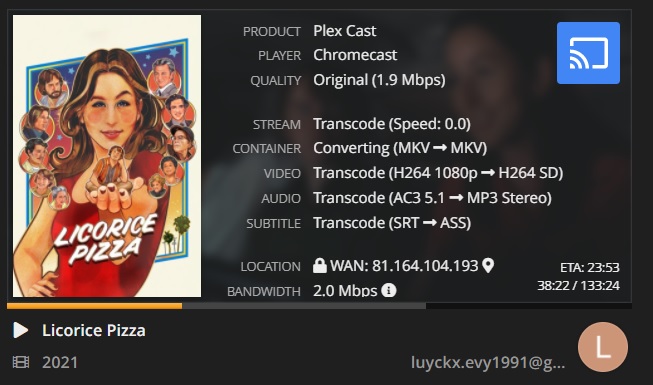
Can you tell me what’s going on here?
She’s a remote user using chromecast, settings: maximum quality
Why all that transcoding? And why quality lower? Does this has anything to do with the hardware transcoding?
Last week, I chose to:
-
Switch from ‘Internal Storage (System)’ to ‘Internal Storage (User accessible location)’ so I could back up my PMS data without needing to put it on my external drive. Keep in mind, depending on the size of your data, this might not be work since the 2019 Shield TV Pro has only 16GB of internal storage.
-
I then simply added the mapping in Windows to that folder (using the IP address and authentication details provided by the Shield).
-
Use the ‘copy and paste’ approach to back up the PMS data easily from the Shield to my primary external drive (which also houses my Plex media).
I also copied the PMS data to a 2nd external hard drive which also contains a backup of all my media (in case on HDD dies).
That should work also but only if you have small databases.
In my case I have around 7GB of data for my PMS databases and it doesn’t fit onto my internal shield pro 2019 storage of 16GB anymore so I need to use external storage for my PMS databases.
And that is now an issue because I cannot access the PMS databases anymore on my external usb SSD through the network or even directly on the Shield with X-Plore or anything like that
subtitles can cause the video to transcode depending on the settings.
Yes, found this out the hard way. I think one or several of the hot fixes still allowed it for some reason, but the current one does not.
I shut down the server, backed it up via usb, and removed PMS 5577 and installed 5448. Restored the server files. I’m still getting choppy playback and buffering for some reason (HEVC direct play and bitstream passthrough).
Something is causing the server to have hitchy playback, whereas before it was fine.
To be sure, I tired playing the UHD’s through Kodi from the adopted storage and they play fine. This is beyond frustrating at this point.
I’m moving PMS Data to one of the large external drives that also holds media. Will see how it works out…. Before doing a PMS start-over from scratch.
Are .bif thumbnails preserved with the backup/restore method above? Rebuilding the library is nothing compared to rebuilding thumbnail indices.
Almost 2 hours of a spinning wheel. Eek.
I just noticed I can access Shield’s Plex Data files on iOS FE File Explorer app. Just copied the “Preference.XML” file to a pc over local network.
Hello again, just wanted to provide an update and give my thanks to the Plex team.
After signing up for and installing the “NVIDIA SHIELD TV Software Upgrade 9.0.1+ HotFix” my Plex server is running and working successfully for the first time.
I bought the Nvidia Shield Pro in January for use as a Plex server and hadn’t been able to get it to work with my external hard drive (5TB exFAT) despite numerous factory resets, installations, etc. It would crash gathering metadata and then the server would completely disappear.
However, since the latest hotfix it seems to be working. Hopefully, the other users in this thread are likewise having better experiences with the latest hotfix.
Thank you again to the Plex team, I’m sure this headache cause your development team no end of frustration. As a new user to Plex really enjoying it now that its working - very nifty features and I’m liking all the little touches I notice.
I think I’m having a similar problem to this. Seems to be better since 9.0.2 but has still happened at least once since then. On one of the previous hotfix builds the server had been completely crashing and would need a restart to come back to life, but it seems just waking it up now fixes the issue. I’ll keep an eye on how often it happens now with the latest hotfix.
I have exactly the same issue, file transfer speed has more than halved.
Also it causes Plex to buffer if I’m watching content on our TV (LG app) at the same time as transferring content from my laptop to the Shield over the network, it never used to do this. I could have 2 or 3 people using Plex and still be able to copy over files without buffering previously.
Yeah that is a long process which could take a lot of time depending on the size of your data.
If you can copy the Preferences.xml you should probably also be able to make a complete backup
Not sure what you mean by the .bif files but coping the whole “Plex Media Server” folder in /Android/data/com.plexapp.mediaserver.smb location should contain everything including thumbnails, posters and everything.
That’s why my complete backup is around 7GB
March and nothing works
.bif are the files generated that display images as you scrub through a movie or show. Without those files, there is no visual indication of where in the video you are. These are extremely time consuming to generate as every movie has to be analyzed and images compiled. It takes 4 days to complete that process with my collection, whereas creating the libraries and cover art only takes a couple of hours. Detecting intros is the next biggest time consumer, but I greatly appreciate the ability to skip intros.
Update also on my side, after performing a factory reset and rebuilding my library over 2 days. Edit: I’m on the latest version + hotfix.
The server is not crashing overnight, nor I am getting messages of corruption in the database, but every client I try to use, iOS one, the one on the smart tv or even the Shield one, some files (not all) are stuck with the loading circle after clicking on it, and even if I ignore it and click play I receive a message of “unexpected problem occurred”.
On the web interface everything (actors, reviews, extra dat) is pulled instantly.
What could be the cause @anon18523487 ?
Edit: when I start the plex app on the shield I also get sent back to the Home Screen without anything happening. Sometimes I have to click 2-3 times before it’s opened.
Don’t know. I’m not seeing this on my end. Reproduce and grab the Logs please.
Logs attached
