All settings in
Settings - Server - Agents are inconsequential for the new agents.
The new agents have all their settings on the “Advanced” tab in the properties of each library.
(Which means you can have differing agent settings in each library.)
If you want to use local “sidecar” posters with the new agents, you need to enable “Use local assets” on the “Advanced” tab of the library properties.
Seems like the old agent extensibility was completely dropped in these new agents - unable to add additional agents to provide metadata info from other agents in a prioritized fashion. Am I missing something here? It is the “Plex way or the highway?”
Also, maybe I am reading too much into this, but it feels like this is one step closer to shutting down 3rd party agents, etc. Will there be any framework for 3rd party agent development going forward?
What to do for shows with no entries on TVDB/IMDB, etc…?
Example would be the Superfan Episodes of The Office. I want these separated out from the main TV show and I was able to do so via the old agent preferences, using the XBMCNFOImporter Agent tool (https://github.com/gboudreau/XBMCnfoTVImporter.bundle.) I was able to “Match” the show using this agent after the initial library scan, the agent would read my NFO files (present in media directory, named appropriately, etc.), and my TV show would be populated with all metadata from my NFO file.
With the new agent, even with Local Media Assets enabled, Plex does not read my NFO file information into the TV show. Why in the HELL the NFO file isn’t used to populate the TV show by default with Plex logic and why I needed a 3rd party agent to do it, I will never know.
Regardless of that fact, I have no way to match this show now. At all.
And 3rd party agents are still left in the dark.
Superfan Example (current library, old agent setup)
All show information populated - including my note at the end of the summary that I included in my NFO files - “Peacock exclusive ‘Superfan’ extended cuts.”
All episode information is also populated:
Superfan Example (test library, new agent setup)
No info, no cast, no rating, incorrect name, etc., etc.
Lol have you ever tried to deal with them over there/add/modify anything? They run that place like 1930’s Germany.
Not to mention that “The Office Superfan Episodes” is already an alias of “The Office (US)” on the TVDB, hence why it matches to that “version” of The Office. But that leads to duplicate entries/joined series in Plex, which is exactly what I DON’T want and what I was able to avoid when using the old agents.
It’s tough to tell what the consensus is.
If I have multiple large libraries (Films, TV series, Music films and webcasts, Movie shorts (Stooges, Pixar shorts, Looney Tunes) and many of my films are arranged in collections, I should not upgrade? Or should I just not refresh metadata on entire libraries?
From what I gather, best to not upgrade entire libraries. I don’t have time to rematch all of the Looney Tunes shorts…
If that is the case, can anyone post a detailed set of instructions with screenshots to not lose your existing library metadata but to do the upgrade for all subsequent additions?
So much time and energy has been taken by me and others to get their libraries to where they want it…
Upgrade, if your media are “match-able” against Plex’s metadata sources
(movies: IMDb and TheMovieDB,
tv shows: TheTVDB and TheMovieDB)
But do it “manually”, do not use the popup.
Refer to the articles linked below.
After the conversion, but before performing the metadata refresh,
adjust the agent preferences (on the “Advanced” tab in the library properties) and disable automatic collections.
Sucks you cannot force TVDB matching without getting the upgrade notification!
Under Match/Search Options when you are manually doing a match, why not have the option to use the TVDB? This new forced Agent, is not picking up a show on TVDB. Changing the setting to TVDB finds the show but then you get the stupid notification to “upgrade”.
Don’t select a different agent.
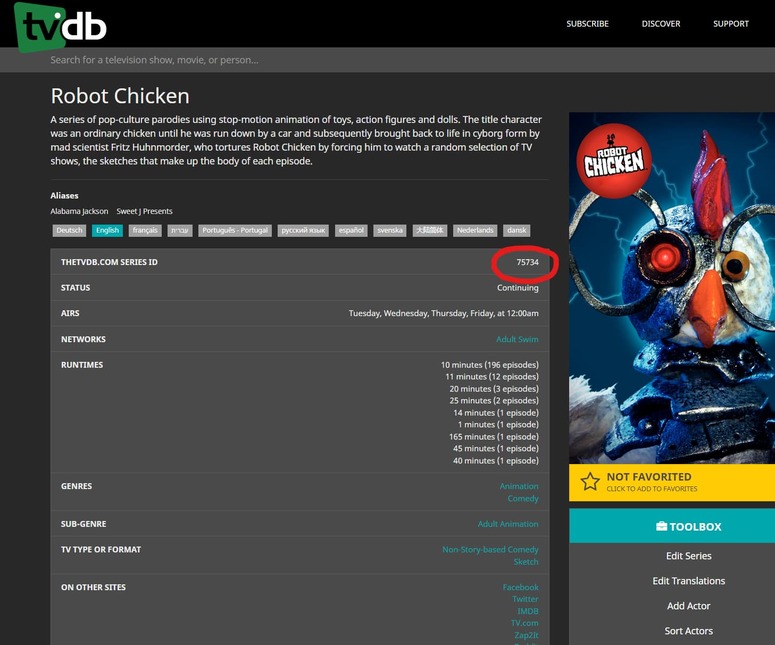
When going to "Fix Match "use tvdb-xxxxxx instead of the show’s title in the “title” input field.
Where xxxxxx is the ID number of the show on TheTVDB.
This doesn’t work. tvdb-408219. tvdb-408217 also doesn’t work. Both work fine when I change Agent to TVDB but then I get the dreaded “upgrade” library notification.
Hmmm… It seems I have to eat my earlier words/ grips about this new agent. It got most of the shows/animes on there and those that are not found by the agent are often misplaced and should be moved to movie folders. I know it sounds painful and tbh it was painful however if you get something like filebot… it took me 3 weeks 1-2 hours a day to clean up everything but once it’s all renamed it is SO MUCH faster, more posters, and there are some things that thetvdb can’t match when not in english that tmdb can and it gives you both options. That said there are some obscure shows that it can’t find. but it is often just one or 2 episodes.
All in all the guy that made the absolute scanner said it best if it is worth keeping it is worth renaming. however unless you got a lot of time to spend it might be better to just keep your libraries as is for now and see if a better solution comes. Even if a better solution comes though i don’t regret the work I put into it though.
@evanars1 for those i think it is better to just isolate the shows in a new library or you can attempt to go maintain the entries on thetvdb. that is really not a plex issue its more of it thetvdb issue.