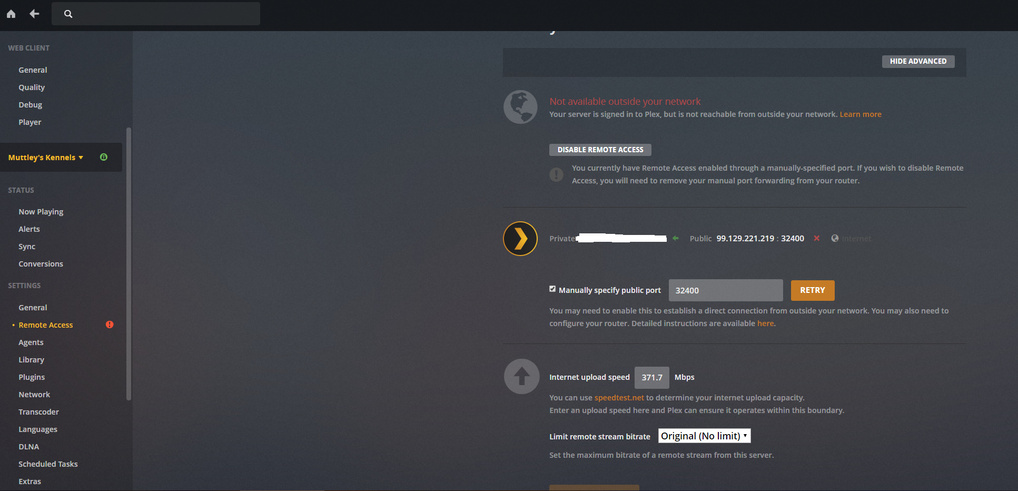
I’ve been a Plex Pass member for a few years now. I’ve NEVER had “remote access enabled” yet somehow, it still works. Except for when it doesn’t. I’ve jumped through all of the hoops mentioned here to no avail. Sometimes remote will work, sometimes it won’t.
Now, however, I’m even having issues within my home on my roommate’s Fire TV stick. We either have no access (no direct connection) and have to restart Fire TV and/or Plex server a few times or we’ll eventually get “relay connection successful”.
Why isn’t there 'phone/chat tech support for paying customers?
And I cannot get it to work at all if I activate my VPN.
Remote access is free, Plex Pass does not effect it. If the app has your IP cached it does not need to be enabled because it already knows where server is. What a green check mark means is that plex.tv which acts as a DynamicDNS has your IP address and when it pings it reaches your server. so when you are remote the player asks plex.tv what IP to use and it tells the player then the player connects to the server directly. If there is something causing an issue with connection like DNSrebinding in router as one example then it may go red and/or the player trys an indirect connection.
I see you have a port manually specified. so you have port forwarding set up manually in router?
a good thing to do is to go to canyouseeme.org and enter the port number and see if it shows as open. if it is closed then need to fix port forwarding.
i’m fed up to the point where I cancelled my subscription. i’m even willing to pay someone to either remote in to my computer or help me set it up properly again.
Your post made me realise that I did just change to the Google WiFi mesh system last week and hadn’t yet opened the port in the Google WiFi app (although this problem precedes the switch to Google). So, I tried without a port forward in the Plex app and I got the green check mark for about five minutes! Fully accessible outside the network. As I was contacting a friend to have them check I had to go to the sharing tab to remind them which email had been used. When I went back to remote access it was red again.
I spoke with Google support (very helpful and professional, BTW, I was impressed) and they eventually looped in AT&T as they determined we needed to put my AT&T fibre optic modem into bridge mode. AT&T was unable to do this so I’m currently waiting on a different modem to be delivered. At that point, we’ll put it into bridge mode and Google is confident we’ll be able to solve the remote issue.
I’ll let you know.
And sorry to hear that, JCO23, I hope you get yours sorted.
AT&T had to send me a new modem (to replace the recent new one) as Google determined it needed to be in bridge mode and AT&T were unable to do it with the one I had. I also replaced all of my other routers with switches instead of relying on getting them all into bridge mode.
So, my Google router is now my first firewall and the AT&T modem is just a bridge. Simply opening the port on the modem didn’t do the trick.
It is quite probable that this was the issue before I switched to AT&T fibre and then Google WiFi. The modem I had from Spectrum probably needed to be in bridge mode too. I’m not sure.