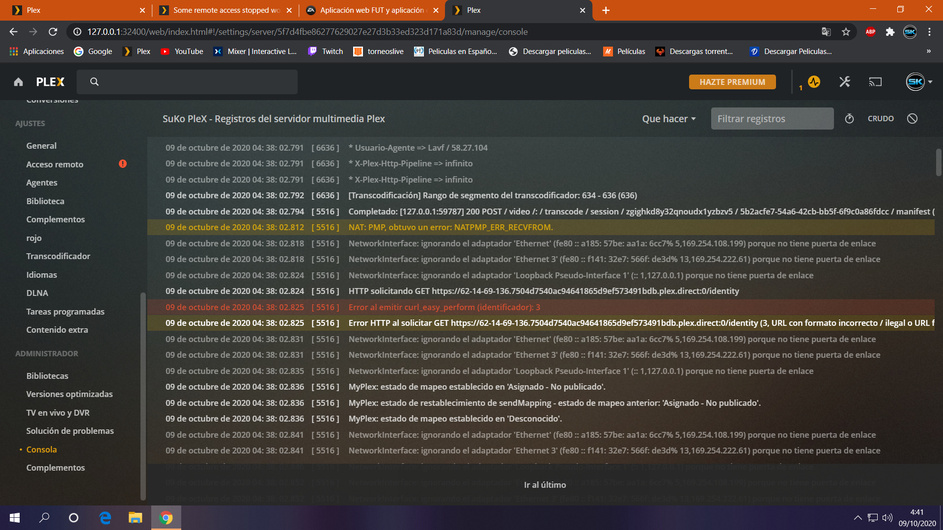
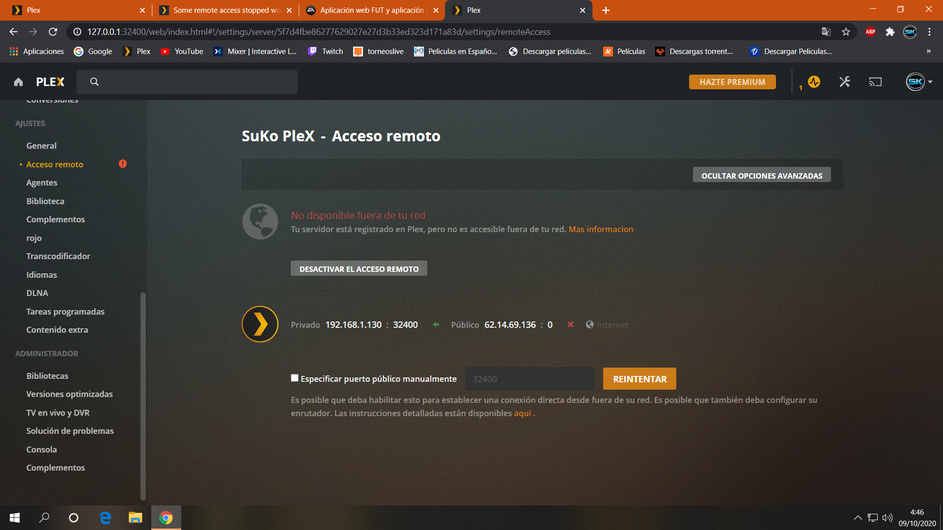
Looks like I scored the same issue. Can I get a certificate reset please?
(Also, if I just generate my own validly signed ssl cert and upload it, would that fix this issue?)
Thanks
Oct 07, 2020 17:43:44.541 [0x7f47cd18d700] ERROR - OCSP: Our certificate (SN: 0637DE027330580024D973F903FE6BDF) has been revoked. Revocation reason: '(UNKNOWN)'. Not refreshing OSCP.
Oct 07, 2020 17:43:44.541 [0x7f47cd18d700] INFO - OSCP: fetching new certificate to replace revoked one.
Oct 07, 2020 17:43:44.541 [0x7f47cd18d700] DEBUG - CERT: Forcing refresh.
Oct 07, 2020 17:43:44.541 [0x7f47cd18d700] DEBUG - HTTP requesting POST https://plex.tv/devices/71487f95f7f22b89ac2c0c6ea96cdeb2073e5cbe/certificate?version=2&X-Plex-Token=xxxxxxxxxxxxxxxxxxxx
Oct 07, 2020 17:43:45.608 [0x7f47cd18d700] DEBUG - HTTP 404 response from POST https://plex.tv/devices/71487f95f7f22b89ac2c0c6ea96cdeb2073e5cbe/certificate?version=2&X-Plex-Token=xxxxxxxxxxxxxxxxxxxx
Sure, if you don’t mind removing the others (There’s probably a way old version of Rendrag Plex, and my old dev instance from when I used to run PRT, and would need to test upgrades before rolling them), that’d be great
Looks like I’m in the same boat. Since this morning, after installing the latest Plex, all external access via the Plex Web URL is no longer working, but access via local/remote IP is working.
So, what steps do you need me to perform?
I stopped the server, and then started it again, waited about two minutes, and then captured my logs. Here they are:
Sorry to drag into this subject, but I’m wanting to move from Windows to Ubuntu. Is there some way that I can ‘retire’ my old server name, before standing up the new one, or how is that handled? Basically, I don’t want to cause the same issue when I make the move.
How many of you are Linux command line savvy and have some time?
In particular, we’re hoping for a bit of independent verification of this problem from a different perspective.
The finer grain details.
the 404 unable to obtain certificate error message at startup
/var/lib/plexmediaserver/Library/Application Support/Plex Media Server/Cache/ ca.crt and certificate.crt exist.
any additional errors or complaints from “MYPLEX”
What we’re looking to do is:
Start PMS manually with strace
Capture the TON of output it generates
Stop when the newly opened up Plex Media Server.log outputs the 404 message. (it’s errored again)
Between steps 1->3 above, there is a sequence of messages and replies between PMS and Plex.tv. In those sequences are key points.
Engineering is hoping to capture the whole sequence so they can step through and find the ONE message which didn’t resolve the way it should — which is what strace will tell them.
If there are any volunteers with the time, I’ll help out with the setup so it can be done.
To be candid, we had it on my machine and then I lost it. Now I need wait, probably a LONG time, for it to happen again. We’re hoping someone still has the same condition so we can resolve this here & now.
**Edit - I saw the last update was 10-6 (1.20.2.3402), about when the issue started. Rolled the server back to 8-28 (1.20.1.3252) and remote access is working fine. Something in the latest update breaks remote access for me.
I don’t see the 404 in the server log but I’ve been down since at least yesterday.
I’m port mapped so no router upnp issues. Just can’t stay connected to the server for more than a few seconds. Restarted the server and computer with no change.
Anything else I should check? Plex Media Server Logs_2020-10-08_18-58-23.zip (3.4 MB)