Server Version#:
Player Version#:
after PC restart the option ‘start plex media server at login’ is not working. for plex to work I must start the application manually. Windows 11.
What’s in this registry key: HKEY_CURRENT_USER\Software\Microsoft\Windows\CurrentVersion\Run ?
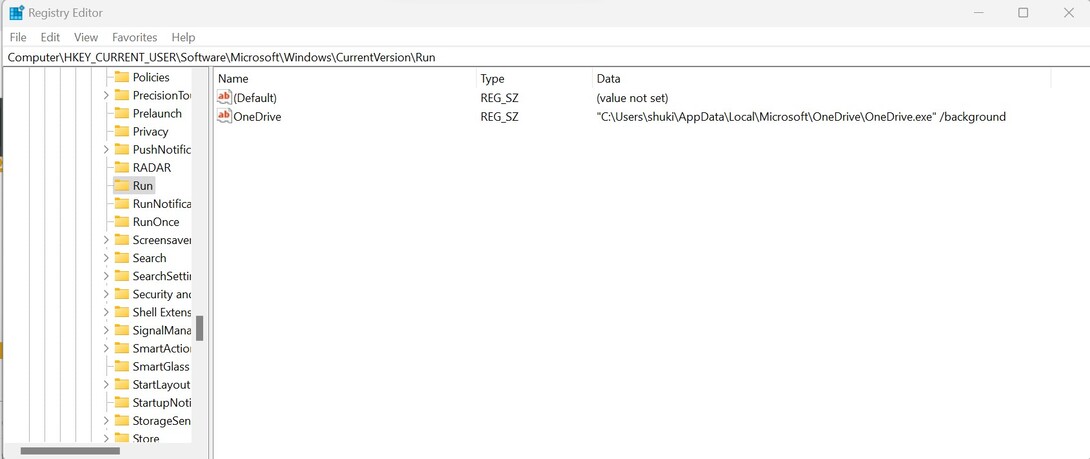
Interesting…
Did you install your server into a non-default drive/directory ?
i don’t know. i followed the instruction without any changes.
Press CTRL+Shift+Esc to open the Windows Task Manager.
Switch to the Autostart tab
is Plex Media Server or PMS listed on there, and is it activated?
the Plex Media Server is NOT listed in the AutoStart on the Windows Task Manager.
What happens if you remove the Auto-run checkmark in the Plex task tray icon context menu and then add it again?

Check in file explore, if the following directory exists: C:\Program Files\Plex\Plex Media Server
i can’t remove the Auto-run checkmark because it’s not checked.
Can you check it?
And then see if PMS now is in the autostart list?
this is exactly the problem. i can’t check it.
What happens if you try?
Is there an error message?
Do you (or have you ever) run Plex server with the “Run as Administrator” option?
(if you haven’t yet, don’t)
nothing happens and no error message.
no. i didn’t.

Have you some 3rd-party anti virus software on there, or did you activate some protection against auto-start software?
Can you add an autorun manually, as explained in here: How to Add Programs to Startup in Windows 11
i’m running windows anti-virus and Malwarebytes. i open the Startup folder. what should i do next?
i mean, what file/shortcut should i add manually?
