I am think of starting over with Plex. All I want to do is look at my NAS-stored photos on my laptop and iPad. It used to work. Then I did not use it for along time and now it no longer works. I have not idea why and I could spend my whole life fumbling around and asking the wrong questions. I add libraries and it tells me it they are empty. I give the Plex user on the NAS all the permission I can. So I am thinking of just deleting all the apps and starting over. Are there any good articles for doing that? It seems it would be much faster than trying to fix it once it won’t work. Any advice that does not involve me spending my life becoming an expert at Plex?
Did you upgrade from DSM 6 → DSM 7 and now Plex on DSM 7 is what’s giving you all the trouble? I suspect you did.
No clue. I have not used Plex in about 6 months
I am running DSM 7.0.1-42218


Please open Package Center.
Look at which version of Plex is installed.
I suspect you have 1.21.0.3744
Yes. 1.21.0-3744
Cool.
Do you still have all your data in the “Plex” share? (Plex/Library/Application Support/Plex Media Server) ?
If you do, we can move it over.
If this is strictly a permissions problem (not seeing the media) the answer is SIMPLE.
Grant permission for System Internal User ‘PlexMediaServer’ instead of “Plex”/
DSM 7 forced the change.
Everything is documented here.
If you still want to wipe it all out, it’s very easy .
I’ll give you the instructions.
Chuck. I appreciate the help. I am guessing that I no longer have that data. The only device on which I see a “Plex” folder is on my NAS and it appears to be empty. The article you attached appears to be quite lengthy. Given my circumstances, and you in a position to direct me to the short version of what I need to do?
OK So I think I need to have a NAS user called plexmediaserver within DSM instead of the user called “Plex” that I currently have. True? If so can I just create one and grant it read/write access? Will that do it?
If you install (upgrade) any version of Plex higher than 1.24.2.4973, it will do all the work for you, without interaction, to bring you the rest of the way up.
From there, adding permissions to your media for PlexMediaServer as needed.
If you want to start completely over.
-
Uninstall + Erase – it will wipe out ALL the server data which is in the 1.21.0.3744 area.
-
PlexMediaServer is the new DSM 7 username. We were forced to change as of DSM 7.
On DSM 7 – NO user ‘Plex’.
Change to System Internal User (that’s a dropdown) and add “PlexMediaServer”

This will bring it all to life so it can see your media.
Chuck. It seems like you think I am really close to getting this fixed without starting all over.
It seems like you think that all I need to do is “… adding permissions to your media for PlexMediaServer as needed.”
How do I do this? I think this is something I do in NAS, but I do not have a user called PlexMediaServer (I do have one called Plex). I do have a shared folder called PlexMediaService, and Plex has read write access

No.
Change “Local users” → “System Internal Users”
PlexMediaServer will appear.
In DSM 7, Plex was forced to comply with the new App framework.
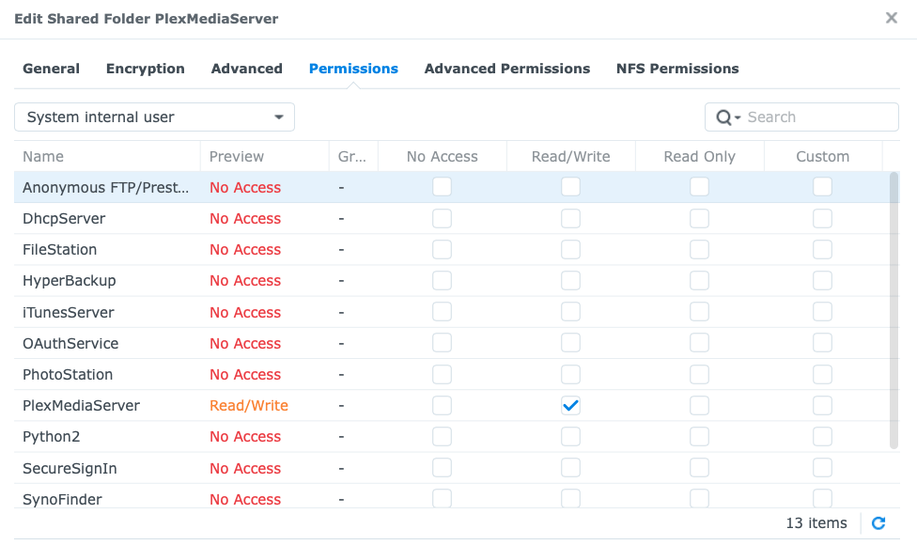
Shared folder PlexMediaServer is for Plex use only. that’s the shared folder which replaces the old “Plex” shared folder.
DSM created the shared folder when it installed the package. We, plex, don’t manage it whatsoever.
I left the “Plex” share for you to keep your media in.
If you put media in the PlexMediaServer shared folder, you’ll guaranteed break it.
DSM 7 is that fragile.
Any chance you can give me more direct instructions on how to fix this?
