Status on the audio source change between tracks issue

Hi, just wanted to ask what’s the status on this issue: Don’t switch audio source between tracks (NOT about gapless playback) - #11 by deactivated

You’ve been able to reproduce this and said that you’ll try to fix it in the Windows app when time permits. That was in May 2021 so I just wanted to ask if there’s any ETA?

Please let me know, it’s such a pain to listen to music through the Windows app because of this and Matt reproduced/confirmed this issue last year.

Please confirm/fix.

Please fix.

@Moussa Please respond.

The way it works now:

<begin_exclusive_session>
- Play track 1
<end_exclusive_session>

<begin_exclusive_session>
- Play track 2
<end_exclusive_session>

The way it should work to avoid cutting off the beginning of each song:

<begin_exclusive_session>
- Play track 1
- Play track 2
<end_exclusive_session>

If not possible, please add an option to add 1 second of silence to the beginning of every audio track to account for the new session initialization.

@VarHyid Could you try adding these options to your mpv.conf to see if they help? You can find documentation on them at mpv.io.

audio-stream-silence=yes
audio-wait-open=1 (adjust value as needed)

Just tried it and unfortunately it didn’t help :frowning:

I tried different numbers, even as extreme as audio-wait-open=10 and it made no difference. Just to clarify, the mpv.conf file I created should only contain this text:

audio-stream-silence=yes
audio-wait-open=1

and nothing else?

If so, any other suggestions? Is there generally a chance that it’s something you guys can address in the app or is it simply not possible or feasible?

BTW, the MPV documentation mentioned that the stream silence option also applies when pausing playback, but that’s actually never been an issue. If I pause, Plex doesn’t kill the exclusive session so as soon as I resume, the stream continues with no interruption, delay or cut-off so it is streaming silence when pausing. Only not in-between tracks.

That looks fine, where are you creating the mpv.conf file? You could also try:

gapless-audio=yes

to see if that has an effect. In regards to the app (as far as my understanding of the situation is) I don’t believe we’re killing the player (and thereby the session) between track changes, so if the audio session is being re-initialized between tracks it’s likely something to do with mpv and the audio device. But I’m looking.

where are you creating the mpv.conf file?

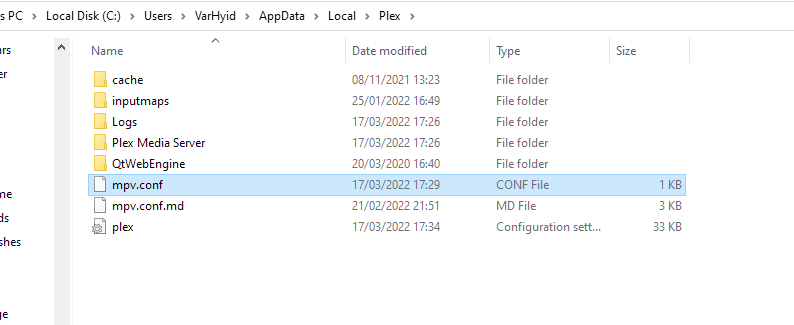
I’ve put it into the C:\Users\VarHyid\AppData\Local\Plex directory. That’s also where the mpv.conf.md file is (with the instructions). I made sure it’s really a .conf file and not .conf.txt.

I also have an old MacBook so I tried to do the same there and put the file into the ~/Library/Application Support/Plex folder. Didn’t work either. I even get the impression the cut off is worse on macOS as on Windows, maybe because the Windows PC also hosts the server and the MacBook is getting the file via network. Anyway, it seems to have no effect on both Windows 10 and macOS.

Can you grab some logs from the app just so we can verify the mpv options are being read and applied?

Sure. Here’s the most recent one, documenting the playback of a few audio tracks:

Plex.1.log (294.0 KB)

I searched for the properties from the config file and it looks like it is aware of them here:

Mar 17, 2022 17:16:47.162 [13876] DEBUG - [MPVEngine/mpv] cplayer: Built with NDEBUG.
Mar 17, 2022 17:16:47.162 [13876] DEBUG - [MPVEngine/mpv] cplayer: Reading config file C:/Users/VarHyid/AppData/Local/Plex/mpv.conf
Mar 17, 2022 17:16:47.162 [13876] DEBUG - [MPVEngine/mpv] cplayer: Applying profile 'default'...
Mar 17, 2022 17:16:47.162 [13876] DEBUG - [MPVEngine/mpv] cplayer: Setting option 'audio-stream-silence' = 'yes' (flags = 4)
Mar 17, 2022 17:16:47.162 [13876] DEBUG - [MPVEngine/mpv] cplayer: Setting option 'audio-wait-open' = '2' (flags = 4)
Mar 17, 2022 17:16:47.162 [2060] DEBUG - [InputManager] Initializing.
Mar 17, 2022 17:16:47.162 [13876] DEBUG - [MPVEngine/mpv] cplayer: Set property: audio-client-name="Plex" -> 1
Mar 17, 2022 17:16:47.162 [13876] DEBUG - [MPVEngine/mpv] cplayer: Set property: demuxer-lavf-probe-info=true -> 1
Mar 17, 2022 17:16:47.162 [13876] DEBUG - [MPVEngine/mpv] cplayer: Set property: demuxer-mkv-probe-start-time=false -> 1
Mar 17, 2022 17:16:47.162 [13876] DEBUG - [MPVEngine/mpv] cplayer: Set property: demuxer-seekable-cache="yes" -> 1
Mar 17, 2022 17:16:47.162 [13876] DEBUG - [MPVEngine/mpv] cplayer: Set property: gpu-hwdec-interop="auto" -> 1

and here, for example:

Mar 17, 2022 17:19:05.040 [13876] ERROR - [MPVEngine/mpv] ao/wasapi: Error initializing device: AUDCLNT_E_BUFFER_SIZE_NOT_ALIGNED (0x88890019)
Mar 17, 2022 17:19:05.040 [13876] WARN - [MPVEngine/mpv] ao/wasapi: This appears to require a weird Windows 7 hack. Retrying.
Mar 17, 2022 17:19:05.040 [13876] DEBUG - [MPVEngine/mpv] ao/wasapi: Device period: 10 ms
Mar 17, 2022 17:19:05.046 [13876] DEBUG - [MPVEngine/mpv] ao/wasapi: Buffer frame count: 448 (10 ms)
Mar 17, 2022 17:19:05.046 [13876] DEBUG - [MPVEngine/mpv] ao/wasapi: IAudioClock::GetFrequency gave a frequency of 44100.
Mar 17, 2022 17:19:05.047 [13876] DEBUG - [MPVEngine/mpv] ao/wasapi: device buffer: 448 samples.
Mar 17, 2022 17:19:05.047 [13876] DEBUG - [MPVEngine/mpv] ao/wasapi: using soft-buffer of 8820 samples.
Mar 17, 2022 17:19:05.047 [13876] WARN - [MPVEngine/mpv] ao/wasapi: The --audio-stream-silence option is set. This will break certain player behavior.
Mar 17, 2022 17:19:05.047 [13876] INFO - [MPVEngine/mpv] cplayer: AO: [wasapi] 44100Hz stereo 2ch s16
Mar 17, 2022 17:19:05.047 [13876] DEBUG - [MPVEngine/mpv] cplayer: AO: Description: Windows WASAPI audio output (event mode)
Mar 17, 2022 17:19:05.047 [2060] INFO - [Web] [Metrics] Updating session last interaction time
Mar 17, 2022 17:19:05.048 [13876] DEBUG - [MPVEngine/mpv] af: [convert] (disabled)
Mar 17, 2022 17:19:05.048 [13876] DEBUG - [MPVEngine/mpv] af: [out] 44100Hz stereo 2ch s16

Here’s also a log from the Mac app (where the same issue occurs), if it helps:
PlexLog(macOS).log (150.0 KB)

Been a while and I’ve been wondering if there’s any news. On my end I’ve been updating the Windows app whenever a new version came out, but this behavior persists.

Any news?

Ping.

Two and a half years later… any news?

Any news?

Nothing still?

3rd anniversary

Can’t wait for the day Plex goes full open source.
