Since the issue with the upgraded CC Audio firmware which caused Plex not to be able to cast was fixed, all is still not well.
Prior to the problem, every file streamed flawlessly, both FLAC & MP3 with never a problem encountered. Since the fix, songs will skip to part way through a track on the change from one track to another. I have cleared the cache on mobile devices and optimised the Plex database but it is still happening. It’s not always on the same tracks so there is nothing wrong with the files. Also, if I cast using a different app, there is is no problem so it’s still a Plex issue by the looks of it.
Is anyone else experiencing this? Interestingly the offending tracks seem to be the batch that I was using when the casting problem first cropped up…
It’s getting rather frustrating now and I’m not really sure what to do about it as the Plex server has been updated a couple of times over the last month too.
Also to add, if the same tracks are played via Plex directly on a device (e.g. a phone or tablet) and not to the CC Audio, there are no issues whatsoever.
And today (30th) it seems that Plex & CC Audio seems to have stopped working completely again, replicating exactly what happened a month ago. Everything plays fine directly to devices and other apps cast with no issue so it’s definitely a Plex/CC problem.
The householders who I promised would have a simple solution to play music are not happy!
Same here. Today both of my CCA stopped working completely with PLEX. The CCA work with other streaming apps, but not PLEX. Can we get this fixed (again)? The symptoms are a bit different now than before. Now it will appear to be connected in the app but will not play music. Either it appears to play music and no audio comes out or it just spins.
I’m noticing this as well. Music casting is borked except for from browser. Note that my unsuccessful casting is coming from IOS devices and the Google Home app reports that the devices are playing from Plex.
Same issue with me - tried lots of variations of reboot, restarts Chromecast factory reset etc.
Only problem is from Plex
Plex seems to start casting - the bar for the album appears at the bottom but no music and then the bar disappears - earlier on I had a variation when the bar flickered but now it just vanishes
Seems to me like another patch is probably needed.
Same here. Restarted lots of stuff, brought the Plex server up to date. Nothing improved. Found this thread. I can cast to Nest home, but not to any of my 7+ CCA devices from the Plex web page or Android app.
Why does this keep happening every few weeks? Unfortunately fully expect another three weeks of no updates from Plex staff or moderators on any of this.
Plex, seriously. This is getting old. At least pretend like you value us as customers.
Does anybody from Plex management look at this? Does anybody who actually works at Plex have any clue how absolutely frustrated and at the end of our rope we are with the lack of a working product or responsive support?
Do something. Anything. There was a time I would preach to everybody how wonderful of a solution Plex was for a home media server but quite honestly now, could not confidently recommend it to anybody, the stability and support just simply aren’t there.
I’m also having this issue.
Can’t case to any CCA devices with Plex.
Other apps (i.e. Jellyfin) work fine.
Server Version # 1.18.1.1973
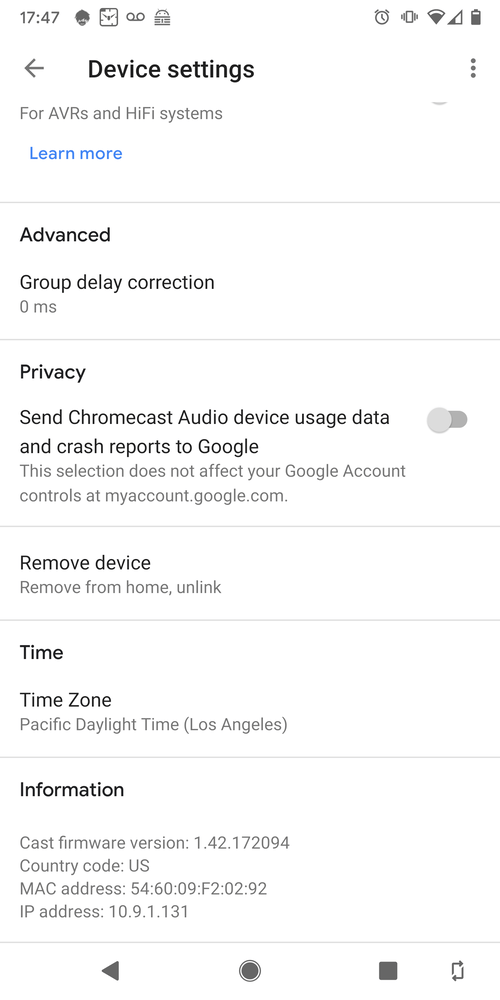
CCA (Google Mini/Nest Firmware Version) # 1.42.171861 Google states that this version is both Preview AND Production firmware, so I assume it has been out for several weeks (first in preview and now moved to production).
Like others, I can now connect to the speakers (as opposed to the quick disconnect we were having with the last CCA issue a couple months ago), but I am unable to play anything…the wheel just spins.
This is true when trying to play from Android apps, or from web client to CCA devices.
Experienced this same issue on CCA without any kind of server update done.
Firmware: 1.42.172094 on CCA
Tried Web/Android Stable/Android Beta. All suffer from the same issue.
Same issue here. Works fine with CC Ultra devices but not CC Audio. App on Android phone acts as though connected, and it looks as if the song is playing (clock and progress bar are running in the App), but no sound. Google Home app acts as though music is playing as well. However, Plex Media Server web interface says “Nothing is currently being played.” Also, when casting to a group of speakers containing both CC Audio and CC Ultra devices, no sound, even on the CC Ultra devices.
Cast firmware version: 1.42.172094
Plex Android App version: 7.23.0
Verified with both:
Plex Media Server version: 1.18.0.1944
Plex Media Server version: 1.18.1.1973
I’m experiencing the same problem when trying to cast to my CCA devices, nothing is playing and the player at the bottom flashes constantly (on Windows 10 PC). Casting works with Spotify but not Plex.
They pushed the update of the casting app which lives on the cloud and gets delivered to our devices when casting is requested. It is neither server nor your app which was broken.