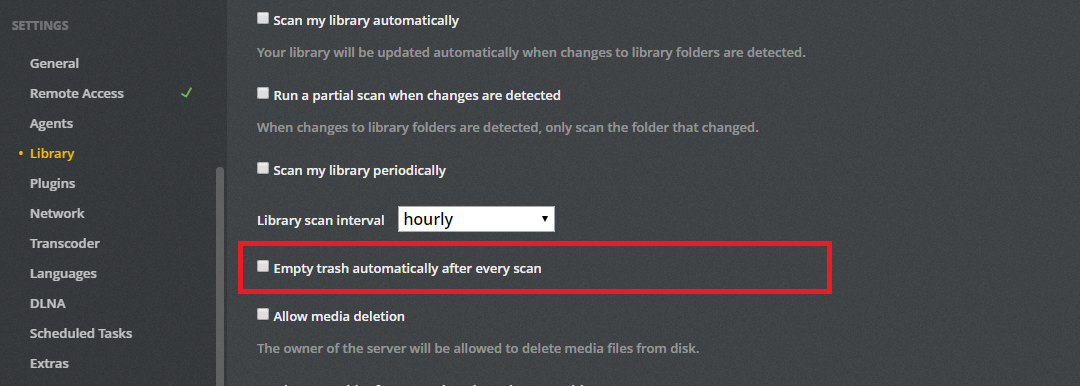
I recently reloaded PLEX after a Windows !0 clean install. Now my library acts differently when any changes are made. Previously, when I deleted a movie, the icon/poster would disappear in the Library where it had been. Now the icon remains after the delete and I have to DELETE it manually. In my TV Library, when have watched the last episode of a particular show, the icon used to disappear. Now It remains without showing any number of unwatched episodes, but it does not go away.
Do I have a setting incorrect, or has PLEX lost this automatic behavior?
I see these actions on my PC (Windows 10) as well as my ROKU TV streaming.
Thanks for your reply, MovieFan. I looked and this option was, in fact, checked. I now have it turned this OFF. Reading some other posts I’m now confused. It sounds as if this should be checked. I should mention that I have moved my entire PLEX folder to a new drive. I am, however, deleting old paths to Libraries as I use them. My main TV Library has been correctly modified but still does not behave as I think it should.
Sorry, I’m not clear about the terminology… the manual delete was of the poster/thumbnail of an episode file or series folder and I used and I did it from the … on the thumbnail drop down menu. I think that says it is being deleted from the file system. I’m not sure what “Plex Web” means.
I used the wrong term again when I used “icon.” I should have said the poster/thumbnail.
In both cases, I am referring to the poster/thumbnail for each of the shows or episodes in my TV library. At any rate, I checked the “empty trash” option in the settings and things seem to be working as they did originally. I’ll continue to watch and cross my fingers!
Ok, then it sounds like things are working as expected. When you delete a file from your drive (using file explorer) PMS needs to be triggered to see that change, with either a manual scan or by having the option enabled to automatically scan for changes. Once a change is identified (a missing file in this case), PMS will mark that item to be deleted and no longer shown. The “empty trash” setting then controls whether these marked items get removed immediately when enabled or wait for the user to manually remove them.