DLNA was already disabled (issue was occuring - so that’s not the cause).
GDM was enabled. Just in case, I turned that off.
I do have a manual Port mapped - but cannot spot the option to disable upnp.
Michael.
DLNA was already disabled (issue was occuring - so that’s not the cause).
GDM was enabled. Just in case, I turned that off.
I do have a manual Port mapped - but cannot spot the option to disable upnp.
Michael.
By manually mapping a port, UPnP gets turned off.
You’re the best you can be for now. Sorry
Ok, thanks. I’ll report back if the latest version still crashes with a log.
Yep. Still crashes. It’s going to be a couple of days to get a log unfortunately though. Will provided it as soon as I can.
@MichaelW - Do you have any updates? I have neither DVR enabled, or UPNP and I’m seeing (recently) PMS using nearly all available memory. QNAP hasn’t shut it down on its own, but it does render PMS unresponsive.
1.16.2 - Still stopping.
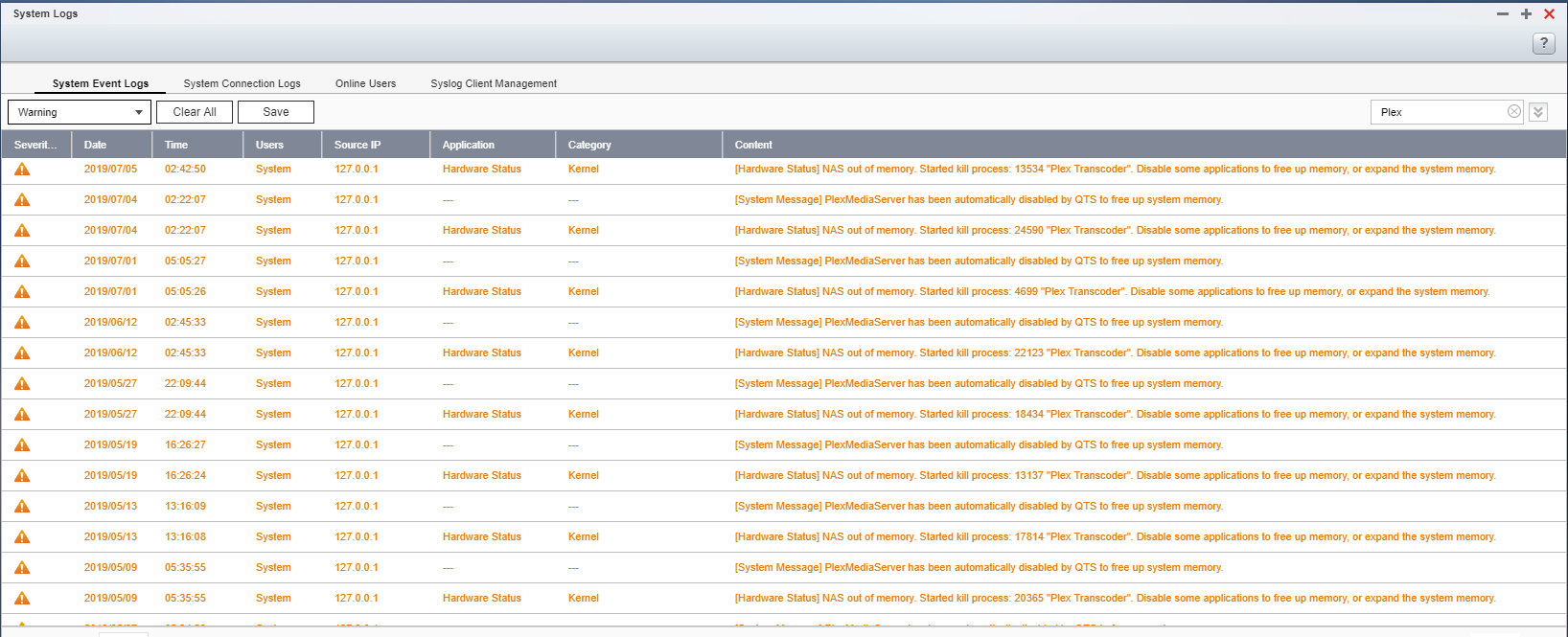
Every morning - it’s not running. The overnight job is starting the transcoder - and it’s the transcoder component that has the memory leak causing this issue.
I’m NOT comfortable posting the full logs. How can we troubleshoot just the transcoder component? Is there any way I can stop the transcoder doing anything outside of transcoding something being watched live?
This seems to occur most often with the nightly background maintenance tasks. I have those starting at 2am - and QNAP stops Plex due to excessive memory usage at 2:50am-ish pretty much every night. It’s ALWAYS the transcoder using the memory. How do I stop the transcoder being used at all on nightly maintenance? I have un-checked “Perform extensive media analysis during maintenance” and there does not appear to be any other nightly task that should cause the transcoder to kick in…
In a downloaded log bundle - the transcoders last logged event was 3 days ago - but the last two nights QNAP killed Plex because the Transcoder was using too much ram. But nothing is logged from the transcoder. So - what gives?
Little progress…
Digging in the log prior to the last crash - it’s generating .bif files - and this is what’s taking all the system RAM and causing the QNAP to kill it to recover resources… Important to know - my QNAP has 8GB of RAM. It runs normally with about 6GB free…
Jul 06, 2019 02:50:48.243 [0x7f65a904c700] DEBUG - Activity: registered new activity 3fb66f72-dee4-4b7b-9f21-758cbac27e86 - Generating video preview thumbnails
Jul 06, 2019 02:50:48.243 [0x7f65a904c700] DEBUG - Job running: EAE_ROOT=’/share/CACHEDEV1_DATA/.qpkg/PlexMediaServer/Library/tmp/pms-118945da-78af-4df5-acef-200e7c9a6319/EasyAudioEncoder’ FFMPEG_EXTERNAL_LIBS=’/share/CACHEDEV1_DATA/.qpkg/PlexMediaServer/Library/Plex\ Media\ Server/Codecs/2144ff1-2376-linux-x86_64/’ X_PLEX_TOKEN=‘xxxxxxxxxxxxxxxxxxxx’ ‘/share/CACHEDEV1_DATA/.qpkg/PlexMediaServer/Plex Transcoder’ ‘-codec:v’ ‘h264’ ‘-i’ ‘/share/CACHEDEV1_DATA/mythtv-videos/TV-Michael/Star Trek The Next Generation (1987)/Season 04/Star Trek The Next Generation (1987) - S04E18 - Identity Crisis.ts’ ‘-threads’ ‘0’ ‘-nostats’ ‘-q’ ‘3’ ‘-loglevel’ ‘quiet’ ‘-filter_complex’ ‘[0:V:0] fps=fps=0.500000:round=up,scale=w=320:h=240:force_original_aspect_ratio=decrease [out]’ ‘-map’ ‘[out]’ ‘/share/CACHEDEV1_DATA/.qpkg/PlexMediaServer/Library/Plex Media Server/Media/localhost/4/de2d559af51247ca7acfca04fe73cabac801b8f.bundle/Contents/Indexes/tmp/img-%06d.jpg’ ‘-progressurl’ ‘http://127.0.0.1:32400/video/:/transcode/session/bif/3fb66f72-dee4-4b7b-9f21-758cbac27e86/progress’
Jul 06, 2019 02:50:49.341 [0x7f657a2b3700] DEBUG - Activity: updated activity 3fb66f72-dee4-4b7b-9f21-758cbac27e86 - completed 0% - Generating video preview thumbnails
Jul 06, 2019 02:50:50.367 [0x7f65a9916700] DEBUG - Activity: updated activity 3fb66f72-dee4-4b7b-9f21-758cbac27e86 - completed 1% - Generating video preview thumbnails
Jul 06, 2019 02:50:51.871 [0x7f65a9916700] DEBUG - Activity: updated activity 3fb66f72-dee4-4b7b-9f21-758cbac27e86 - completed 2% - Generating video preview thumbnails
Jul 06, 2019 02:50:54.375 [0x7f65a9916700] DEBUG - Activity: updated activity 3fb66f72-dee4-4b7b-9f21-758cbac27e86 - completed 3% - Generating video preview thumbnails
Jul 06, 2019 02:50:54.875 [0x7f65a9916700] DEBUG - Activity: updated activity 3fb66f72-dee4-4b7b-9f21-758cbac27e86 - completed 4% - Generating video preview thumbnails
Then, QNAP killed it (clearly in the middle of a .BIF transcode job):
Jul 06, 2019 02:50:57.651 [0x7f65b8799740] INFO - Killing process: Plex Transcoder (pid: 13872)
Jul 06, 2019 02:50:57.658 [0x7f65abd0e700] DEBUG - Jobs: ‘/share/CACHEDEV1_DATA/.qpkg/PlexMediaServer/Plex Transcoder’ exit code for process 13872 is -9 (signal: Killed)
Jul 06, 2019 02:50:57.658 [0x7f65a904c700] ERROR - BIF transcoder exited abnormally
I understand that .bif files are used for playback seeking on a Roku. Clearly, there is extensive memory pressure here on certain source media types - and the .bif transcode is using over 6GB of RAM within a couple of minutes of starting this transcode.
First: how do I STOP Plex from launching .bif transcode jobs (as a troubleshooting step - to confirm that this is where my issue lies).
Second: What is needed to troubleshoot what’s going on here so that it can be resolved.
OK - Found this article:
https://support.plex.tv/articles/202197528-video-preview-thumbnails/
I have this setting:
I’m going to turn this off and see if it helps with my issue. The description indicates high CPU use (which is OK) - it’s the unexpected (very) high RAM usage that’s causing the issue.
OK - After running for a week and a half with this setting turned off -it completely solved my resource usage issue.
I turned it back on - boom. Crashed the very next night due to excessive RAM usage. The 6GB-ish of free RAM was consumed by this process within minutes of it starting.
Turning it back off again - no crashing.
So - I can confidently say it’s the video thumbnail generation that’s causing the issue here.
What I cannot say is if this is normal - or a bug. I know the process is a heavy one - but it shouldn’t cause itself to be killed due to resource management on the parent OS.
Please can a dev look closely at this?
I’ve simply not been using Plex for a while because of this issue. With the new season of many shows starting soon I thought I’d revisit things.
Going thru the changelogs - with 1.16.4.1469 I see this gem:
“(Transcoder) The transcoder process could leak memory on the Nvidia SHIELD (#9291)”
Is this fix limited to Nvidia Shield? Given this is the transcoder that was leaking memory during .BIF generation on QNAP I’m hoping this is also a squashed bug. Can anyone comment?
EDIT: Sorry, I just re-read the whole thread and saw the suggestion to turn off DLNA. I did and the main process disappeared, releasing a bunch of RAM. Will monitor and report back if it comes back…
I don’t have generate video preview thumbnails activated and I’m still getting RAM eaten like it’s candy by the Plex app in my QNAP.
Yeah - I’ve had DNLA disabled for quite a while now.
I can toggle the issue on and off by enabling (or disabling) “Generate video preview thumbnails” under ‘Settings’ ‘Library’.
If it’s enabled - at 2am the process starts. Something is leaking RAM in this process. When RAM usage exceeds the QNAP capacity - the QNAP kernel kills it (usually within a few minutes of the 2am start). I wake up to a dead Plex server.
This topic was automatically closed 90 days after the last reply. New replies are no longer allowed.