i know when i upgraded to DSM 7 it fiddled with some of my networking settings that took me a couple weeks to realize. It definitely seems like this is network related. maybe not even speed related but routing related.
I’m sure the network is not causing the issue as I can monitor the bandwidth taken up at the switch ports and they are hardly registering (cisco 3850).
The Synology has 4 bonded interfaces giving 4000 Mbps total
The Cisco Switches are Gb switches and are showing hardly any utilization.
The Synology itself is showing around just 100KB/s when a movie is attempting to play.
This all points to a break in the Plex server application working with DSM7. Also please remember that the only thing that has changed is the update to DSM7.
@ChuckPa - have you any experience of rolling back to DSM6? From what I have read it isn’t a straightforward process.
@djfriday13 - can you remember what was changed with your installation? As far as I can tell the settings in the Synology are pretty simple and haven’t changed in my case, but I may have missed something.
Further to the above I compared the read/write speeds when trying to watch a movie.
On the working server I see around 900KB/s to approx 2MB/s (varying).
On the server with the issue I see only around 2-40KB and then every few minutes a spike to around 2-3MB/s which I suppose may coincide with the movie playing for a second before buffering again.

When downloading files from file station I see speeds around 48MB/s so there is no hardware issue.
-
Bonding 4 adapters into LACP, while it will give you 4000 Mbps of combined output, will still be limited to 1000 Mbps for any one connection (how LACP works).
-
Synology has made rolling back to DSM 6 so difficult that what I knew is no longer valid. It appears the addition of passwords to reprogram the firmware FLASH is at the root of it.
As for this problem, the classic questions come into play.
Are you burning in PGS subtitles ? (The app set to Always Burn, or Image Formats Only – VERSUS – “Automatic”). This is the biggest cause of these problems.
I just ran the test again… Gemini Man is probably the harshest movie to play.
I’m playing this on a 1GB, ARMv8, DS418J.
The Synology and the AppleTV 4K are wired to the switch.
I will make some clips of files which I know play without incident for me to aid in testing if that’s desired.
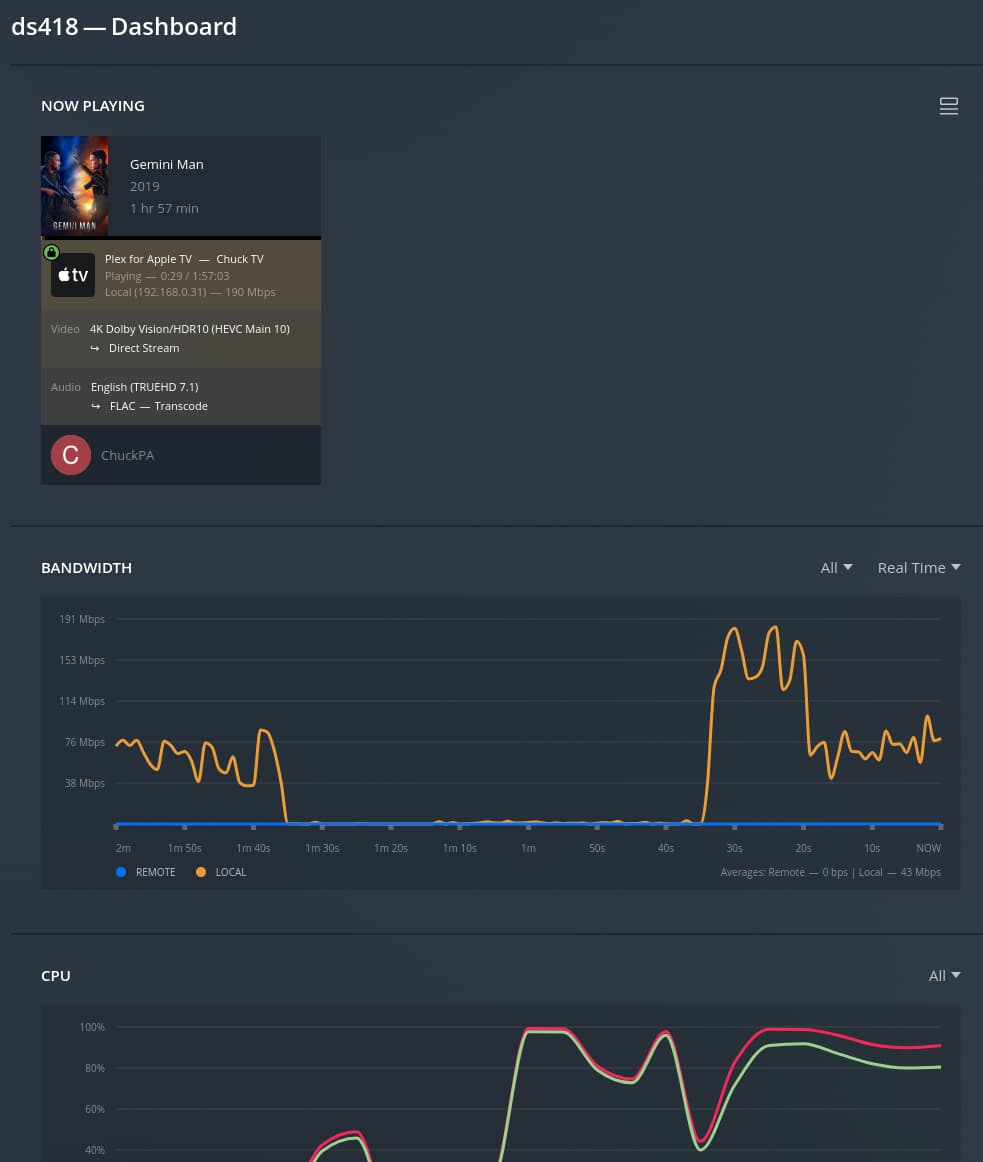

This is forced PGS subtitles, with AppleTV set to Automatic
(Notice the CPU time while it builds the output buffer due to FLAC transcoding)

@ChuckPa he is still having tls handshake issues in his most recent logs.
Which logs? Those of 14 days ago?
Yes you reset his certificate and he restarted pms but he was still having the same certificate issues which you said could be causing his network problems.
I need fresh logs to be certain what’s happening now.
What I see on Plex.tv shows me that PMS has never contacted Plex.tv to get that new certificate.
SSL NO CERTIFICATE AVAILABLE
The server did contact Plex.tv but never asked for the cert.
There is a certificate at Plex.tv waiting to be picked up and used.
Also, we can take that next deeper action into the certificates storage and force PMS to reload it without issuing new.
I believe he asked if you reset the certificate on his ffx account and not the account he initially replied to (which was a different plex account). He said he restarted his server after you reset it and then posted those logs so it looks like he never got the new cert.
At this point, I think we need to wait for @FFX to reply and update us ?
Not pulling a new cert implies user plex:users (DSM 6) doesn’t have RWX control of /var/lib/plexmediaserver/Library/Application Support/Plex Media Server/Cache/cert-v2.dat
Ya he is on dsm 7 so different user I believe. Just noting in case he reads this and tries to correct privileges.
Yes, On DSM 7, the username is PlexMediaServer:PlexMediaServer.
Regarding permissions I have 2 folders. One called Plex which has my media in. Another called PlexMediaServer which has around 16GB of items.
In line with the install prompts I have set the permissions for PlexMediaServer user (system internal user drop down) to R/W to the media folder (Plex):

Regarding the subtitles, they are currently set to automatic but this has never previously been a problem. I tried the other two settings and it made no difference.
compare the bandwidth being utilised on my system and yours for the same film:

To give you an idea of how bad the issue is, I started the matrix last night around 1700. By 0800 this morning it was only an hour and 40 minutes into the movie.
I do note that this movie is playing direct stream and not direct play so another example is as follows (which is exactly the same in terms of performance):

Plex Media Server Logs_2022-06-21_08-04-02.zip (3.1 MB)
Also here is a log I’ve just taken this morning. Thanks for taking a look.
Let’s break this into minutes .
After 13 hours (780 minutes), you played 100 minutes of video.
Your network graph shows network utilization of approx 700 Kbps at idle.
Normal usage at complete idle is 22 Kbps with activity up to 100 Kbps.
Do you see the pattern? A 7x extended elapsed time , a 7x idle bandwidth usage.
Did you, anywhere in your LAN, on any of your network adapters, enable JUMBO frames -OR- set a MTU value to a value other than the default 1500 (This includes all switches and routers)
I am asking this because default MTU = 1500.
Maximum MTU with Jumbo Frames = 9000,
This is a 6x increase.
The resultant fragmentation will easily cause that to expand to more than 7x due to retransmits.

No, there have been no adjustments made to MTU, it is still the default of 1500 - the only thing that has changed is the upgrade to DSM7.
Remember also that the working Plex server is using the same network. The issue is 100% with DSM7 or the way the Plex application is interfacing with the Synology after DSM7
Please do the following for me?
- Using Task Scheduler
- Create a Scheduled Task - User-script
- Set it to run as user
root - Have it email you the results.
- In the “Settings” part, have it execute the following commands
ifconfig
netstat -rn
- Save that task then run it 1 time
- After you get the results, disable the task
- Please share with me what it gives you.
It will look something like this:
chuck@ds418:~$ ifconfig
eth0      Link encap:Ethernet  HWaddr 00:11:32:6D:BC:BF
          inet addr:192.168.0.71  Bcast:192.168.0.255  Mask:255.255.255.0
          inet6 addr: 2601:985:500:360:211:32ff:fe6d:bcbf/64 Scope:Global
          inet6 addr: fe80::211:32ff:fe6d:bcbf/64 Scope:Link
          UP BROADCAST RUNNING MULTICAST  MTU:1500  Metric:1
          RX packets:304800303 errors:0 dropped:0 overruns:0 frame:0
          TX packets:50216109 errors:0 dropped:0 overruns:0 carrier:0
          collisions:0 txqueuelen:1000
          RX bytes:412665282919 (384.3 GiB)  TX bytes:106270129608 (98.9 GiB)
          Interrupt:11

lo        Link encap:Local Loopback
          inet addr:127.0.0.1  Mask:255.0.0.0
          inet6 addr: ::1/128 Scope:Host
          UP LOOPBACK RUNNING  MTU:65536  Metric:1
          RX packets:4485267 errors:0 dropped:0 overruns:0 frame:0
          TX packets:4485267 errors:0 dropped:0 overruns:0 carrier:0
          collisions:0 txqueuelen:1
          RX bytes:3368223415 (3.1 GiB)  TX bytes:3368223415 (3.1 GiB)

chuck@ds418:~$ netstat -rn
Kernel IP routing table
Destination     Gateway         Genmask         Flags   MSS Window  irtt Iface
0.0.0.0         192.168.0.1     0.0.0.0         UG        0 0          0 eth0
192.168.0.0     0.0.0.0         255.255.255.0   U         0 0          0 eth0
chuck@ds418:~$
The reason I’m doing this is to figure out what’s unique about your DSM 7 installation.
Maybe it’s a DSM 7 firmware bug or maybe the upgrade didn’t go correctly.
It can’t be PMS operation on DSM 7 because of how many users are and have been using DSM 7 since the very beginning.
Sorry I was away for a few days.
See below anyway:
Task: Task 5
Start time: Mon, 27 Jun 2022 09:33:52 GMT
Stop time: Mon, 27 Jun 2022 09:33:52 GMT
Current status: 0 (Normal)
Standard output/error:
bond0 Link encap:Ethernet HWaddr 00:11:32:8B:25:B1
inet addr:10.26.45.6 Bcast:10.26.45.255 Mask:255.255.255.0
inet6 addr: fe80::211:32ff:fe8b:25b1/64 Scope:Link
UP BROADCAST RUNNING MASTER MULTICAST MTU:1500 Metric:1
RX packets:235558899 errors:0 dropped:0 overruns:0 frame:0
TX packets:48247270 errors:0 dropped:5 overruns:0 carrier:0
collisions:0 txqueuelen:1000
RX bytes:41177014013 (38.3 GiB) TX bytes:29471915925 (27.4 GiB)
eth0 Link encap:Ethernet HWaddr 00:11:32:8B:25:B2
UP BROADCAST RUNNING SLAVE MULTICAST MTU:1500 Metric:1
RX packets:60099264 errors:0 dropped:0 overruns:0 frame:0
TX packets:14418730 errors:0 dr opped:0 overruns:0 carrier:0
collisions:0 txqueuelen:1000
RX bytes:11656730991 (10.8 GiB) TX bytes:11078545711 (10.3 GiB)
eth1 Link encap:Ethernet HWaddr 00:11:32:8B:25:B1
UP BROADCAST RUNNING SLAVE MULTICAST MTU:1500 Metric:1
RX packets:61130678 errors:0 dropped:0 overruns:0 frame:0
TX packets:10274623 errors:0 dropped:0 overruns:0 carrier:0
collisions:0 txqueuelen:1000
RX bytes:11427160556 (10.6 GiB) TX bytes:4615550473 (4.2 GiB)
eth2 Link encap:Ethernet HWaddr 00:11:32:8B:25:B3
UP BROADCAST RUNNING SLAVE MULTICAST MTU:1500 Metric:1
RX packets:62347378 errors:0 dropped:0 overruns:0 frame:0
TX packets:12116810 errors:0 dropped:0 overruns:0 carrier:0
collisions:0 txqueuelen:1000
RX bytes:9655922910 (8.9 GiB) TX bytes:7489540803 (6.9 GiB)
eth3 Link encap:Ethernet HWaddr 00:11:32 :8B:25:B4
UP BROADCAST RUNNING SLAVE MULTICAST MTU:1500 Metric:1
RX packets:51981586 errors:0 dropped:0 overruns:0 frame:0
TX packets:11437107 errors:0 dropped:0 overruns:0 carrier:0
collisions:0 txqueuelen:1000
RX bytes:8437200006 (7.8 GiB) TX bytes:6288278938 (5.8 GiB)
lo Link encap:Local Loopback
inet addr:127.0.0.1 Mask:255.0.0.0
inet6 addr: ::1/128 Scope:Host
UP LOOPBACK RUNNING MTU:65536 Metric:1
RX packets:5358453 errors:0 dropped:0 overruns:0 frame:0
TX packets:5358453 errors:0 dropped:0 overruns:0 carrier:0
collisions:0 txqueuelen:1
RX bytes:1051244255 (1002.5 MiB) TX bytes:1051244255 (1002.5 MiB)
Kernel IP routing table
Destination Gateway Genmask Flags MSS Window irtt Iface
0.0.0.0 10.26.45.1 0.0.0.0 UG 0 0 0 bond0
10.2 6.45.0 0.0.0.0 255.255.255.0 U 0 0 0 bond0
@ChuckPa did you have any chance to look at the log files?
I’m sorry, something in the forum has been misbehaving.
I didn’t receive notification until you just pinged me.
Your ethernet adapters look right.
Did you attach new logs somewhere?
