Wow you rock, thank you!
1 Like
Once it’s claimed, you can do whatever you want.
It’s that silly “first step of the cliff” that get’s ya 
1 Like
I’m sorry, Did I forget something (humbly asked)?
I helped someone on the phone the other day. wasn’t that you?
GM ChuckPa
Where= on the Synology DSM7 desktop
tried your suggestion below of attaching to “use http://IP_ADDRESS_OF_SYNOLOGY:32400/web”
located the DS920 server but Plex indicated it needed to be claimed
after claiming and attaching a media directory TV Series, Plex was functioning but “using an older version Version 1.23.5.4862 An update is available. Please install manually.”
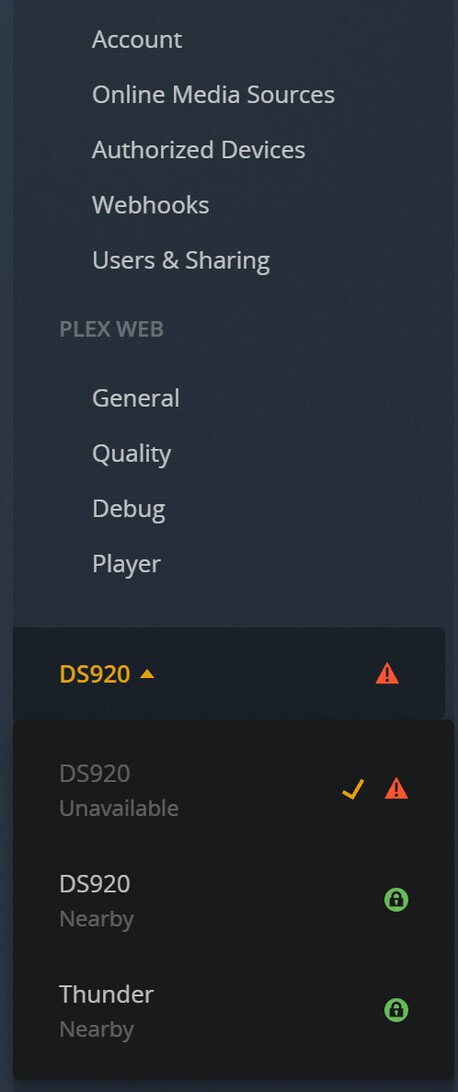

Does this mean that a web version of Plex has seized the older installation of PMS (listing that has TV and TV Shows) and the other non functioning DS920 is trying to start from Synology but can no longer be found
Still unable to install Plex on Synology due to port 32400 issue
Where does the older version Version 1.23.5.4862 need to be updated? or just leave well enough alone??
-
What you’re showing there on your screenshot is what happens when PMS is
– installed, wiped out, installed again
-OR-
–loses its Preferences.xml (both cases are a loss of Preferences.xml) -
What Plex/web is showing you is that it sees ALL the defined servers for your account – even the one(s) that got wiped out.
-
The remedy for the duplication is Settings - Authorized Devices - REMOVE the older of the listed ones
For the moment, I would ignore updating PMS (you can turn that off in “Settings - Server - General - Show Advanced” )
Let’s get this stable and cleaned up.
I have an update coming for the packaging.
GA Chuck
Cleanup in aisle7 - figured out problem!
removed the extra DS920 server instance from Plex menu
had attempted to install an earlier version in Docker as a learning experience several months ago - reviewed setup to ensure done properly and was then able to get Plex to run inside docker - used the latest image file recommended by docker - got it working properly with all media files correctly mapped
then stopped the Plex Docker instance and tried to install the Plex server v1.25.2.5319 and it worked!!! Turns out the earlier error message about port 32400 was due to the Docker Plex utilizing it!
Moral of story…be sure that no other instances of Plex are running in Docker or Portainer!!
Thank you again for all of your insightful help to myself and all of the others with issues! Much appreciated
Cheers
cal


I have tried multiple times to install the plex media server to my synology NAS (DS920+), but every time I try to get it set up, I get an error message when I open plex from my NAS OS. I’ve downloaded the latest version of the media server from the plex website (intel 64-bit), and I also tried using the beta version of plex that can be found on the package center of my NAS OS. Both have resulted in the same message.
When I try opening Plex, I get a message saying:
“Not Authorized. You do not have access to this server.”
I am not sure why this is happening. The first time that I tried opening Plex, it allowed me to sign into my existing account (I already have a plex server that is on my PC that I want to eventually move to the NAS). After the initial sign in, every time I try accessing Plex I get the message.
I also made sure to grant read/write permission to plex through the shared folder containing my media, and that does not seem to have fixed anything.
I love plex, and have been using it successfully on my PC, but I wanted to expand the capacity of my library with the NAS. I am really new to using a NAS, so I don’t know if I messed something up or what. Can someone PLEASE help me?
The FIRST TIME you open the browser to Plex on the Syno
- Don’t use the QuickConect.to URL if it’s showing in Package Center
- Don’t use https://app.plex.tv
Use only http://LAN.IP.of.Syno:32400/web
It’s a quirk in DSM 7 which I’ve not found a way around.
1 Like
Hi ChuckPa,
I have been having an issue since I was forced to upgrade to 7.0.1-42218. The manual installs will complete, but the Package Center shows it Open the few seconds later closes.
I am having to use the Beta Plex from the Package Center, is there any updates compatible with DSM 7.0.1-42218?
The BETA package is incompatible with everything done.
Synology is NOT updating to our production release as promised.
-
Do you have “Plex / Library/Application Support/Plex Media Server” still existing?
-
Did you hit “Repair” when upgrading to DSM 7 because Plex was still installed ?
I am not sure on the first question. Basically I had a defective NAS and had two crashes back to back, so I was forced into going from DSM 6 to 7 and again from 7 to 7.0.1.
When I do attempt to install the latest version of Plex it installs, then shuts down after a few seconds.
Just kinda lost at this point since Synology isn’t playing nice.
Thank you for that history. Now, I’m starting to understand.
You might have a damaged DB which needs recovery.
That would make it shut down very quickly after trying to start.
In your Shared Folders,
do you have “PlexMediaServer/AppData/Plex Media Server” ?
-or-
do you have the older “Plex/Library/Application Support/Plex Media Server” ?
I’m asking so I can give you exact instructions the first time
PlexMediaServer
To be honest the Beta server works fine, no real issues, but I don’t want to depend on old software and I wouldn’t gain anything new that is implemented.
Plus I’m scared to lose everything again and have to create a new server, reorganize everything by hand again. (3xs)
If you have shared folder PlexMediaServer
then, at one point, you had installed 1.24.2.4973 or higher.
You say beta but have “PlexMediaServer” shared folder.
“Beta” didn’t have that. PMS 1.24.2.4973 was the first (after DSM was final release)
This has me confused.
Which version is installed now when you look at Package Center ?
1.21.0.3744 ?
or something else ?
(Please be careful with package center. it will warn about 3rd party software in RED as well as warn about BETA in RED. It’s easily confused)
The link you provided does not work. I am unsure how to go from here. Could you possibly give me a step by step breakdown of what I should do to install and setup the server? I am really confused, and everywhere I turn for help has been unsuccessful thus far. I have deleted all plex data from my NAS. Right now, I have only uploaded one episode of a tv show (for testing purposes) to my designated shared plex media folder on my NAS, and would like to add it to the newly setup plex server on the NAS. If you could provide further help that would be greatly appreciated.
I did not mean to CLICK the link.
I meant for you to use the LAN IP of your Synology (IPv4 address) and hand type the URL
What we will do is start over, from scratch, OK?
Is that what you want?
Have no fear about your media. As long as media is in its own shared folder(s), it is always safe.
I do have step-by-step How-To’s written here.
Yes a step by step how to would be most helpful for me at this point. I’m sorry, I am just becoming frustrated with things not working for some reason. I really appreciate your help and patience.
1 Like
Let me write out for you how I set things up.
You can adapt from here
- Media Storage
-
Moviesshared folder for regular 1080p movies -
UHD Moviesfor all my BluRay rips from the disc -
TV(I have 4 of them - TV, TV2, TV3, TV4 – to allow easy storage management by genre … e.g cartoons, cooking, current tv, classics I want to keep, etc) -
Music- (self defined)
-
With you on DSM 7, and not knowing what might have transpired to get you into this crazy state, MASS RESET
-
If you have Plex installed in Package Center -
– Uninstall and choose the ERASE option to wipe out all of PLEX’s data (not your media) -
Control Panel - Shared Folders.
– HOPING you don’t have any media in the “Plex” shared folder - (move it if you do)
– Delete the “Plex” shared folder
– Delete the “PlexMediaServer” shared folder too -
Download the “DSM7” package for your machine.
-
https://app.plex.tv/desktop/#!/settings/devices/pms
– This is the listing of all the servers attached to your account.
– You can get to it in Settings - Authorized Devices - Server but this is a shortcut
– Find your Synology server(s) and REMOVE them. -
Close the browser and open again fresh
-
Now open the Synology desktop using your LAN IP address (don’t use “QuickConnect” . There’s a problem with it I’ve not been able to work around)
-
Package Center - Manual Install -
– Upload the package (SPK) you just downloaded from Plex.tv/downloads -
The installer will start
– Normal Installation -
The installer will do one of two things:
– If there is no Plex installation hidden in the Package Center area, installation will take 20-30 seconds
– If there is one hidden in there, it will sit at “Installing” while it moves all the server data to the new “PlexMediaServer” shared folder.
– we won’t know until it’s done. -
Now let Plex run a minute, watching your CPU usage widget until the CPU calms down to idle. ( it will get low at one point then jump back up so don’t be fooled )
-
When it is done, using FileStation -
- FileStation - Left Panel - Right-click “PlexMediaServer” → Properties
- You want to see how much space is used.
– If it’s small (few hundred MB) then it was empty
– If more than 500 MB then I suspect there was a partial PMS there and we need to remove it too with one more “Uninstall + ERASE” cycle. (it’s that easy)
Please advise what you find and I’ll direct further,
1 Like
Thank you so much for all of your help! I have finally got my server working, and have transferred all of the files from the server that was on my PC onto my NAS.
I now have another question I could really use some help on. I just need to understand how to download the (legal) torrent files from the internet directly to my NAS. When I did this on my PC, the first thing I would do, is turn on my VPN. Then, I would just go to the website with all the files available for download and click the download link, and it would open in qbittorrent and download the file directly into my plex folder.
If I understand correctly, I can use the download station package on DSM inplace of qbittorent, but I am unsure how to use NordVPN to hide my IP address while I download/upload torrent files. I am sorry if this is a stupid question. I’ve looked in a lot of places for this information, but it seems to pertain to older versions of DSM, so they haven’t been all that helpful.
