Thanks! I’m just answering that i tried with the 6999 version and it works!
It’s not related to the DSM 7.2 version.
Thanks! I’m just answering that i tried with the 6999 version and it works!
It’s not related to the DSM 7.2 version.
no… I tested DSM 7.2 some time ago.
7.2 is a transparent upgrade
Hi, I am a newbie and have been using Plex for a while. I put my media files in a Synology (DSM 7) and recently it just stop connecting. I’ve tried uninstalling and reinstalling. The problem I’m currently facing is that I am unable to claim my server after trying uninstalling and reinstalling.
I followed a tutorial to try installing plex via docker and am still facing the same problem.
I click “Claim Server” and it just doesn’t do anything. It also says:
Version 1.32.2.7100 An update is available. [Please install manually.]
However it seems like I am already on the latest version. Can anyone help/walk me through this, please?
Thank you 
Hi,
I hate to be this person, I know there has been a lot of discussion in this thread about how to solve these issues, but I have been trying to follow @ChuckPa instructions on how to get Plex operational, and I am getting more confused.
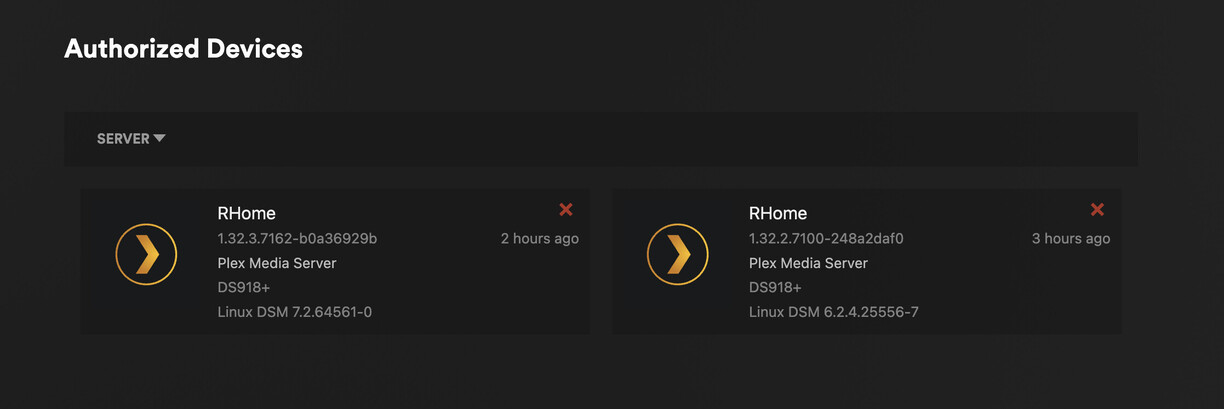
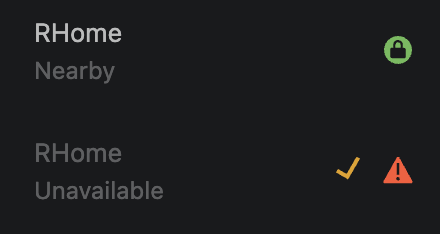
I just upgraded to DSM 7 (I am running DSM 7.2-64561), and prior to that, I had Plex running well. When I finished the upgrade from DSM 6.2.4-25556, I went into the package center and saw that Plex had to be repaired. I clicked repair and then Use Claim Token; I got a token from my account, pasted it in, and then clicked next. Everything seemed to have gone fine, but when I went into Plex it seemed to have made a new server.
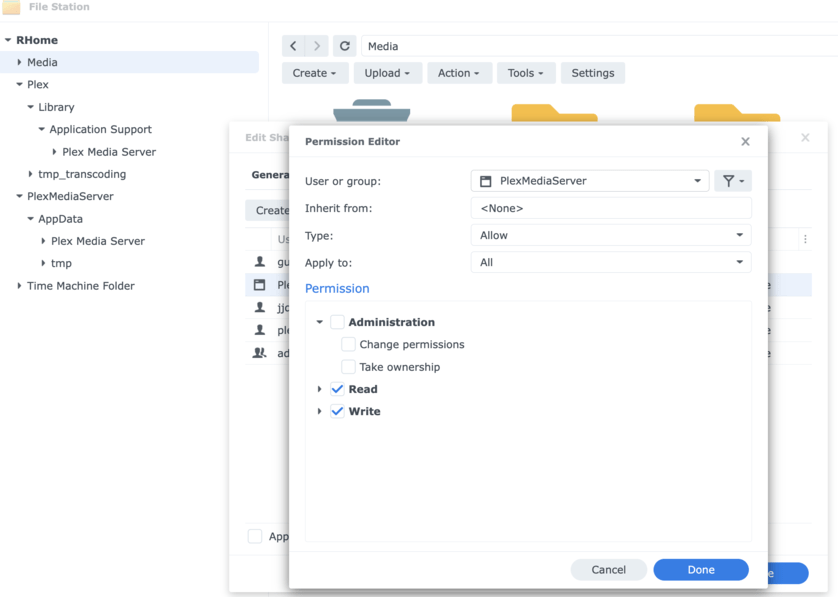
It wanted me to update Plex, so I downloaded the update and put the update manually into the package center. I then followed the instructions here to give Plex permission to view the Media Library, and now Plex is able to read my media, but I still have 2 servers.
I am worried that the changes I made on Plex over the years to specific media metadata on the other server will not be translated to the new one. The new one doesn’t have any libraries in it either. Is there a way for me to get my old server with metadata back and ensure the data I changed there isn’t erased?
While continuing to read, it looks like all my old server data is still here as I have the application support folder, but how do I get that old server back with my metadata?
Thank you for any help!
Fundamentals:
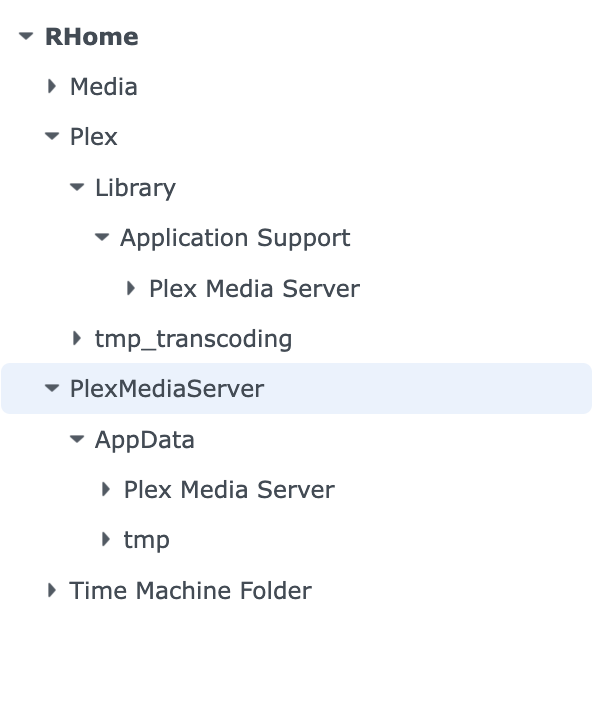
The installer will NOT move anything from the “Plex” shared folder if it finds an existing server in PlexMediaServer (PlexMediaServer/AppData/Plex Media Server) even if it’s unused. It can’t tell if it’s real or rogue so it plays safe.
If you’re 100% certain
– You have your full DSM 6 installation in Plex/Library/Application Support/Plex Media Server
– PlexMediaServer/Appdata/Plex Media Server is unused - rogue
UNINSTALL the DSM 7 app and use the DELETE option to remove the rogue one.
Now verify your “Plex” shared folder grants “FULL CONTROL” (not just Read/Write)
NOW, go here:
“Scenario 2 - Step 4”
This is where you ensure every file in the Plex shared folder grants FULL CONTROL to PlexMediaServer (we reluctantly need this because Synology won’t give us ‘admin’ privilege in the app)
Once you’ve done this step AND made certain to “Apply to this folder, sub-folders and files”
NOW, you can install the Plex DSM 7 package.
It will sit at “Installing” the entire time it works.
It takes about 3 minutes for each 1000 media files you have indexed in Plex.
Do not refresh / navigate away from the Package Center install .. you’ll lose any messages it might print.
Instead, open a fresh tab.
Go to “Plex” shared folder.
You’ll see a ‘migration.log’ file.
In this file, you’ll be able to follow the progress.
It’ll show you when complete.
Got it! Thank you so much for your help! I hope you have a great day 
Is the latest release 1.32.4.7195 still broken for HW transcoding?
There appears to be something wrong for the ApolloLake CPUs
I’m not sure what didn’t happen with this build because I know the fixes work.
I’m waiting for the engineer to get back to me.
VERY SORRY to share –
ApolloLake fixes will be in 1.32.5. They did not make it into the build prior to being submitted to QA.
Just updated my Synology 920+ to Version: 7.1.1-42962 Update 6 from Update 1, and my HW transcoding has completely slowed to a crawl. I then updated to the latest DSM 7 intel 64bit package off plex.tv (1.32.4.7195) with no change. I believe I was on 1.32.3~ before. Im not sure what this synology update did, everything appears to be working fine. Any help would be appreciated.
Hardware accelerated transcoding is currently broken for Celeron J3xxx and J4xxx CPUs (i.e. the DS920+). Plex is aware of the situation and working towards a solution.
Fall back to 1.32.1.6999 until a fix is available.
Synology does not permit direct fallback to prior releases. You must uninstall the current version first. In Synology Package Manager, choose Uninstall → Are You Sure → Uninstall Only.
You can then install 1.32.1.6999.
Download 1.32.1.6999 here:
https://forums.plex.tv/t/synology-dsm-7-0-release-plex-installation-not-operational-issues/719845/4078
Thanks! I thought it was only apollo CPUs. Much appreciated!
Also I guess ill note for anyone wondering.
Its still broken on PMS 1.32.4.7195
Weird situation here.
Running 1.32.0.6973-7000.
Synology DS1019+ with plenty of room.
800+ movies, 100k songs in music
Any upgrade I run after this version, I get the 503 error, as normal, but when things settle, with Plex on the desktop, whenever I open Package Center, then click on installed packages, the Plex icon -disappears- from the desktop. (stops running) Whenever I click on plex during this, it will not connect at all, giving me network issues.(refuses to connect) This has happened in 2 or 3 May 23 releases.
If I downgrade, as I have now, it works fine on this version. Not sure what is happening here, no other changes made, service is stopped to upgrade, and running the latest DSM7.
Edit- Also, if I get plex running, then log out of my 1019+, when i log right back in, plex has stopped. And, it seems that when opening the package center/installed packages, the ‘checking status’ seems to kick plex off. This is working with the .6999 version.
UPdate. after sitting for a minute, plex just stops running, if nothing else is done after it’s started.
Update: I have found a .ratelimit.json file is created after each crash. Don’t know if thats’ supposed to be there. Here’s what is says:
{
nextReset: 1687638572,
uploadsRemaining: 5
}
The text you show is your crash-reporting limit.
There is a 5-crash reports per day limit.
Please do the following
With it at the version which causes the problem (reinstall & start as required to get fresh logs)
Either download the logs ZIP file from PMS -OR- Stop PMS and make a ZIP file of the Logs directory under PlexMediaServer/AppData/Plex Media Server
Attach the ZIP file.
On that now.
SandmanPLEXLogs.zip (520.9 KB)
This is with version 7195.
Thanks!
You have database corruption.
Jun 24, 2023 18:15:13.423 [140644485175952] ERROR - SQLITE3:0x80000001, 11, database corruption at line 69165 of [a29f994989]
Jun 24, 2023 18:15:13.423 [140644485175952] ERROR - SQLITE3:0x80000001, 11, statement aborts at 9: [INSERT INTO vacuum_db.'statistics_media' SELECT*FROM"main".'statistics_media'] database disk image is malformed
Jun 24, 2023 18:15:13.678 [140644485175952] ERROR - SQLITE3:0x80000001, 11, statement aborts at 1: [VACUUM] database disk image is malformed
Are you comfortable with the Linux command line?
If so, you can use Chuck’s PlexDBRepair Utility.
# Download it. This overwrites any existing version.  Remove "-O DBRepair.sh" to not overwrite.
wget -O DBRepair.sh https://github.com/ChuckPa/PlexDBRepair/releases/latest/download/DBRepair.sh
# Make it executable
chmod a+x DBRepair.sh
# Run it.  Must be root (sudo).  Note "." in front of slash.
sudo ./DBRepair.sh stop auto start quit
You can also run it with just sudo ./DBRepair.sh, then issue the stop, start, etc commands individually.
If the repair does not work (the database may be too corrupt), you can try the option to replace the database with a backup. If configured to do so (Settings → Scheduled Tasks), Plex makes a backup copy every three days. The default location is in the same folder as the active database, /var/lib/plexmediaserver/Library/Application Support/Plex Media Server/Plug-in Support/Databases.
Here’s an example of the output. This is from my DS918+ without a corrupt database.
user@host:~$ sudo ./DBRepair.sh stop auto start quit


      Plex Media Server Database Repair Utility (Synology (DSM 7))
                       Version v1.0.8


[2023-06-24 17.53.28] Stopping PMS.
[2023-06-24 17.53.33] Stopped PMS.

[2023-06-24 17.53.34] Automatic Check,Repair,Index started.
[2023-06-24 17.53.34]
[2023-06-24 17.53.34] Checking the PMS databases
[2023-06-24 17.54.55] Check complete.  PMS main database is OK.
[2023-06-24 17.55.10] Check complete.  PMS blobs database is OK.
[2023-06-24 17.55.10]
[2023-06-24 17.55.10] Exporting current databases using timestamp: 2023-06-24_17.53.33
[2023-06-24 17.55.10] Exporting Main DB
[2023-06-24 17.55.20] Exporting Blobs DB
[2023-06-24 17.55.51] Successfully exported the main and blobs databases.  Proceeding to import into new databases.
[2023-06-24 17.55.51] Importing Main DB.
[2023-06-24 17.56.27] Importing Blobs DB.
[2023-06-24 17.56.32] Successfully imported databases.
[2023-06-24 17.56.32] Verifying databases integrity after importing.
[2023-06-24 17.56.38] Verification complete.  PMS main database is OK.
[2023-06-24 17.56.38] Verification complete.  PMS blobs database is OK.
[2023-06-24 17.56.38] Saving current databases with '-BACKUP-2023-06-24_17.53.33'
[2023-06-24 17.56.38] Making repaired databases active
[2023-06-24 17.56.38] Repair complete. Please check your library settings and contents for completeness.
[2023-06-24 17.56.38] Recommend:  Scan Files and Refresh all metadata for each library section.
[2023-06-24 17.56.38]
[2023-06-24 17.56.38] Backing up of databases
[2023-06-24 17.56.38] Backup current databases with '-BACKUP-2023-06-24_17.56.38' timestamp.
[2023-06-24 17.56.38] Reindexing main database
[2023-06-24 17.56.56] Reindexing main database successful.
[2023-06-24 17.56.56] Reindexing blobs database
[2023-06-24 17.56.57] Reindexing blobs database successful.
[2023-06-24 17.56.57] Reindex complete.
[2023-06-24 17.56.57] Automatic Check, Repair/optimize, & Index successful.

[2023-06-24 17.56.57] Starting PMS.
[2023-06-24 17.57.04] Started PMS

[2023-06-24 17.57.04] Retaining all temporary work files.
user@host:~$
Not sure how to even get to the terminal on my 1019. I’m not familiar at all with linux, but not scared to run it either, and good at following instructions. So I have DBrepair.sh and plexdbrepair1.0.8.tar.gz in my plexmediaserver folder.
Where would I go next?
Using putty, I got into terminal mode. reading structions now.
Good. Was typing up where to download…
You can copy / paste the wget and other lines above.
To paste into a putty window, use the right mouse button, not control-v.
I started with ‘automatic’, it’s running now. Says PMS main db is damaged. PMS blobs db is ok. So its still running. waiting to see what happens next.
Never used putty before, had some false starts, enough to unblock my pc ip for firewall purposes but working on it now.