ik93
March 17, 2022, 10:37am
1
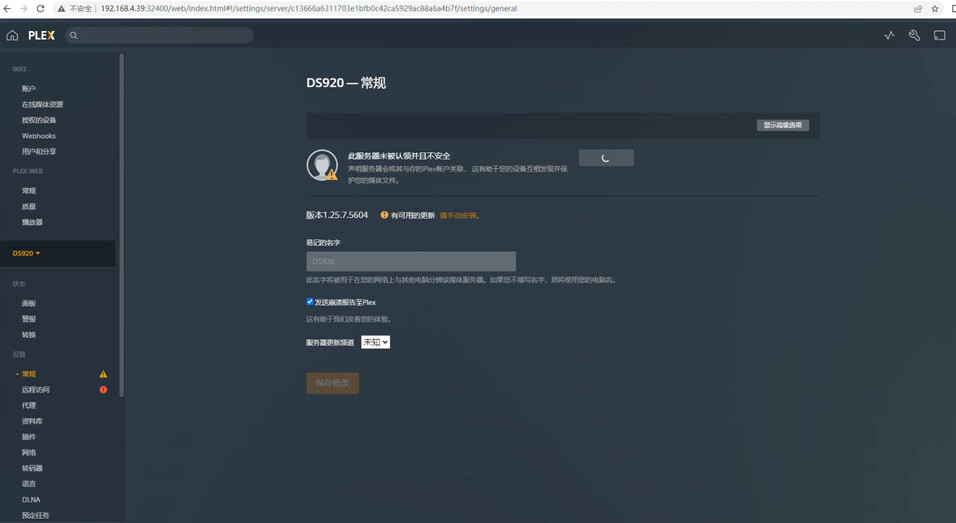
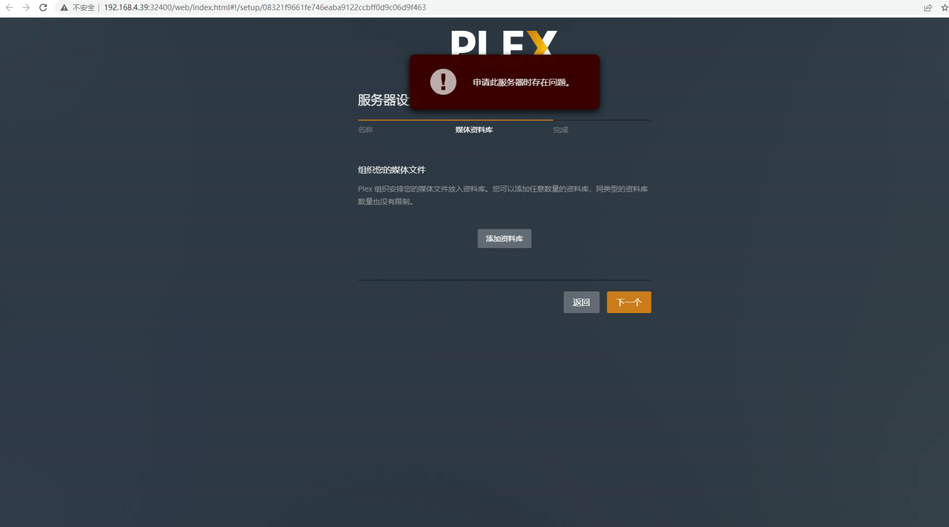
Hi, I am using a Synology 920+ machine with 7.0.1 system and I have a problem when I do a clean uninstall and reinstall of the previously installed PlexMediaServer.
Plex Media Server Databases_2022-03-14_16-26-32.zip (23.9 KB)Plex Media Server Logs_2022-03-14_16-26-36.zip (114.4 KB)
@ik93
The easiest solution to this :
Install the Synology text editor
Stop Plex
Using Filestation, navigate to PlexMediaServer/AppData/Plex Media Server
Right-click Preferences.xml → Open in Text Editor
Find the PlexOnlineToken="" string and carefully remove it.
Save the file
Start PMS.
PMS will repopulate it – IF your communication with Plex.tv is working.
ik93
March 22, 2022, 1:33pm
4
Follow the steps you mentioned to stop plex in Suite Center and delete PlexOnlineToken="" Related content Restart plex, nas server still can’t associate with Plex account, I can access plex.tv normally.
ik93
March 22, 2022, 1:38pm
5
Follow the steps you mentioned to stop plex in Suite Center and delete PlexOnlineToken="" Related content Restart plex, nas server still can’t associate with Plex account, I can access plex.tv normally.
@ik93
Please stop Plex and again check PlexOnlineToken .
If you find it’s still PlexOnlineToken="" then there must be a network problem.
While I know you can communicate with Plex.tv – Can the NAS also?
ik93
March 23, 2022, 6:13am
7
I have installed plex in nas and logged in before, I think there is no problem.
ik93
March 23, 2022, 6:16am
8
If I suddenly can’t connect to Plex.tv, how should I fix it?
@ik93
I don’t know how to fix it until I see what failed.
Can you make a ZIP file of the Logs directory (down in PlexMediaServer shared folder)?
ik93
March 24, 2022, 4:52am
10
This is the Logs directory zip archive.Logs.zip (325.1 KB)
ik93
March 24, 2022, 5:05am
11
This is the Logs after reinstallation, because before not only uninstall the Plex Server application, but also remove the PlexMediaServer shared folder, so the previous Logs are also gone.
There is a configuration error in your networking.
The synology can see your LAN ok but cannot communicate out to the internet.
Mar 20, 2022 18:26:26.356 [0x7fb9fa616b38] DEBUG - Subscription: Refreshed all content in 2 ms.
Mar 20, 2022 18:26:26.522 [0x7fb9faad2b38] DEBUG - NetworkServiceBrowser: Parsing SSDP schema for http://192.168.4.39:8096/dlna/576363dd-481c-4427-8c1f-5c4ac97de162/description.xml
Mar 20, 2022 18:26:26.522 [0x7fb9faad2b38] DEBUG - HTTP requesting GET http://192.168.4.39:8096/dlna/576363dd-481c-4427-8c1f-5c4ac97de162/description.xml
Mar 20, 2022 18:26:26.523 [0x7fb9fadddb38] DEBUG - [HttpClient] HTTP/1.1 (0.0s) 200 response from GET http://192.168.4.39:8096/dlna/576363dd-481c-4427-8c1f-5c4ac97de162/description.xml
Mar 20, 2022 18:26:26.524 [0x7fb9faad2b38] DEBUG - NetworkServiceBrowser: found 1 SSDP devices via http://192.168.4.39:8096/dlna/576363dd-481c-4427-8c1f-5c4ac97de162/description.xml
Mar 20, 2022 18:26:26.524 [0x7fb9faad2b38] DEBUG - NetworkServiceBrowser: SSDP arrived: 192.168.4.39 (Emby - DS920)
Mar 20, 2022 18:26:30.939 [0x7fb9fadddb38] DEBUG - [HttpClient] HTTP simulating 408 after curl timeout
Mar 20, 2022 18:26:30.939 [0x7fb9fadddb38] DEBUG - [HttpClient] HTTP simulating 408 after curl timeout
Mar 20, 2022 18:26:30.939 [0x7fb9fae22b38] ERROR - PublicAddressManager: Unable to get public IP adddress from myPlex (httpCode=408):
Mar 20, 2022 18:26:30.939 [0x7fb9fb0c8b38] ERROR - AutoTagging: unable to retrieve updated word lists
Mar 20, 2022 18:26:31.219 [0x7fb9fadddb38] DEBUG - [HttpClient] HTTP simulating 408 after curl timeout
Mar 20, 2022 18:26:31.219 [0x7fb9faa0db38] WARN - [AutoUpdateRequestHandler] Couldn't get update channels. Trying again soon.
Mar 20, 2022 18:26:31.219 [0x7fb9faa0db38] DEBUG - [DatabaseFixups] Running fix-ups.
Mar 20, 2022 18:26:31.220 [0x7fb9faa0db38] DEBUG - [DatabaseFixups] Destroyed 0 transient items.
Mar 20, 2022 18:26:31.221 [0x7fb9faa0db38] DEBUG - [DatabaseFixups] Running database fix-ups completed in 0.0 seconds.
Mar 20, 2022 18:26:31.221 [0x7fb9faa0db38] DEBUG - HTTP requesting GET https://plex.tv/api/v2/user/privacy?X-Plex-Token=
Mar 20, 2022 18:26:32.380 [0x7fb9fadddb38] DEBUG - [HttpClient] HTTP simulating 408 after curl timeout
Mar 20, 2022 18:26:32.380 [0x7fb9fa92ab38] ERROR - HTTP 408 downloading url https://plex.tv/updater/products/5/check.xml?build=linux-x86_64&channel=16&distribution=synology-dsm7&version=1.25.7.5604-980a13e02
Mar 20, 2022 18:26:32.380 [0x7fb9fa92ab38] INFO - AutoUpdate: error getting data from plex.tv
Error code 408 is a timeout error.
Did you change something with the network / Synology configuration (Control Panel - Network)
ik93
March 25, 2022, 12:52am
13
I thought it was a dns address problem, so I modified the DNS Server to 8.8.8.8, but I couldn’t connect using the dns address provided by my broadband provider before.
ik93
March 25, 2022, 1:32am
15
Whether I am downloading data from the NAS or accessing it or using the public IP to access the NAS remotely, it works.
@ik93
Accessing the NAS (DSM) is independent of Plex because you are the one initiating the connection.
The problem is occurring when PMS attempts to connect to plex.tv.
Alternative DNS addresses for you to try:
8.8.4.4, 1.1.1.1, 9.9.9.9
ik93
March 25, 2022, 3:56am
18
Hello, I have modified the nas and router dns, but it still does not work.
ik93
March 25, 2022, 3:57am
19
The pictures are as follows.
ik93
March 26, 2022, 9:17am
20
@ChuckPa Hello, can I still solve this problem?
@ik93
What is this DNS setting? It is disabled?
What is China’s policy about blocking DNS ?