Server Version#: 1.26.2.5797
Player Version#:
I have a Synology NAS. Using LetsEncrypt and ACME I have setup secure certificates which allow via HAProxy secure access to remote backend servers. Despite setting up my pfSense based router and the certificate (along with settings within the Plex server settings) - I am still getting the connection is not secure error when I try to directly access my plex server remotely. I can connect but it is not a secure connection. I have been sucessful at establishing secure connections remotely to my pfSense router, my Synology DSM, and my webdav server.
Is there something specific to establishing the secure connection directly to the Plex server??
Did you import your PfSense ACME (site cert) with the CA included in the P12) into PMS ?
When you run the configuration you do, you must be careful when handing off from one certificate to another.
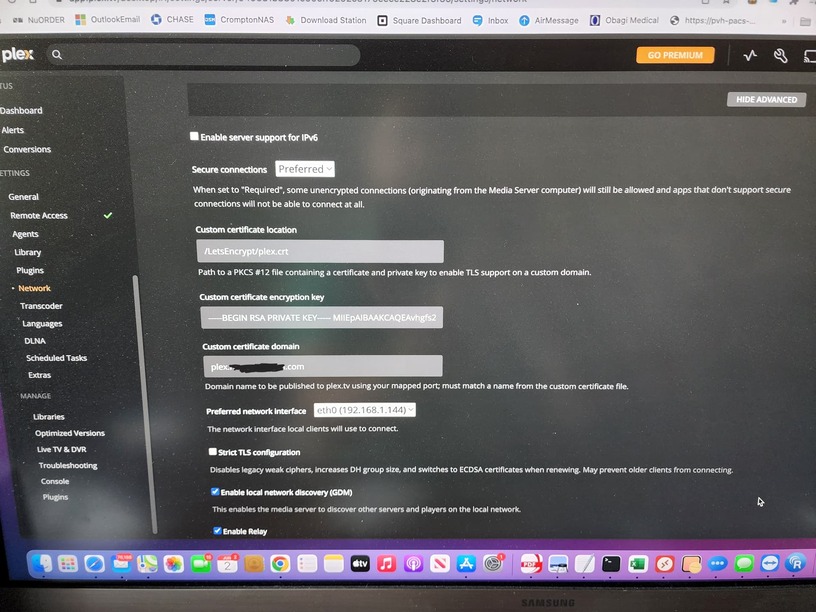
That’s not correct.
It looks like you’ve pasted the entire private cert key into the form.
What you need to put there is the PASSWORD for the P12 (which is the actual certificate P12 encryption password/key) so PMS can decrypt the P12.
What you want:
-
Path to the P12 file created by
opensslat the command line (or whatever P12 generation tool you’re using) -
Password you used when encrypting that P12 file
-
Domain the certificate in the P12 is valid for
One reference: openssl - Creating a .p12 file - Stack Overflow
