I install plex add on synology and when i launch the app i keep getting http://172.16.1.231:32400/web This site can’t be reached. I download the plug in direct from plex and i get the same thing. I also tried deleting the Preferences.xml as in the forum here i someone advise and still not luck
Thanks much for the help Logs.zip (372.6 KB)
I uninstall, deleted folder user etc just as you advice but no luch
attached are the logs
thanks again for the helpLogs.zip (86.5 KB)
one thing to note i am in a six bedroom building share internet with same wan ip, with someone running a plex server already which when i get the site cannot be reached trying to setup my synology, and i change ip to his with same 32400/web etc his own comes up good so
I teamviewer into another synology at my workplace , install the plex plug in and it works. I think my problem has to do with have another plex on same network, i have to figure that out. The other plex server ip is different from my synology ip. I dont know it the plex site is seeing a conflict between the 2 which i think should not be because i am just trying to pull up the setup interface to get started. Thanks much for your help and if you think of anything else do let me know
I had the same problem, opening ports of the firewall solved it! thanks a million! the strange thing is, everything was working fine. how did they change on their own, I have no clue.
How did you open the ports? can you send me a link or explain?
Hi Moderator, I’m having the same problem. Followed the instruction couple of times at no avail. Here are the logs.logs.zip (132.6 KB)
Moderator, thanks for getting back to me. It is just that when opening “Plex Media Server” I get the message “this site can’t be reached”. I tried Firefox, Chrome, Edge and keep getting the same problem. This site can’t be reached:
xxxxxxxs.synology.me refused to connect.
Try:
- Checking the connection
- Checking the proxy and the firewall
ERR_CONNECTION_REFUSED
I see your screen shoot for the firewall ports. My synology box doesn’t have the firewall enable, so I guess thats not my problem. I even turned Windows 10 firewall, defender and antivirus off at no avail. thanks
Mr. Moderator, Sir… you are a GENIUS!
Thank you so much!
Moderator, now I can see my Plex in the web browser, I was able to select folders in my Synology box, then it went to the main screen (home) and “continue watching, on deck”, etc shows as "unreacheable. then I go to my movies and says that it is "unavailable. See screen shoots. Thoughts?

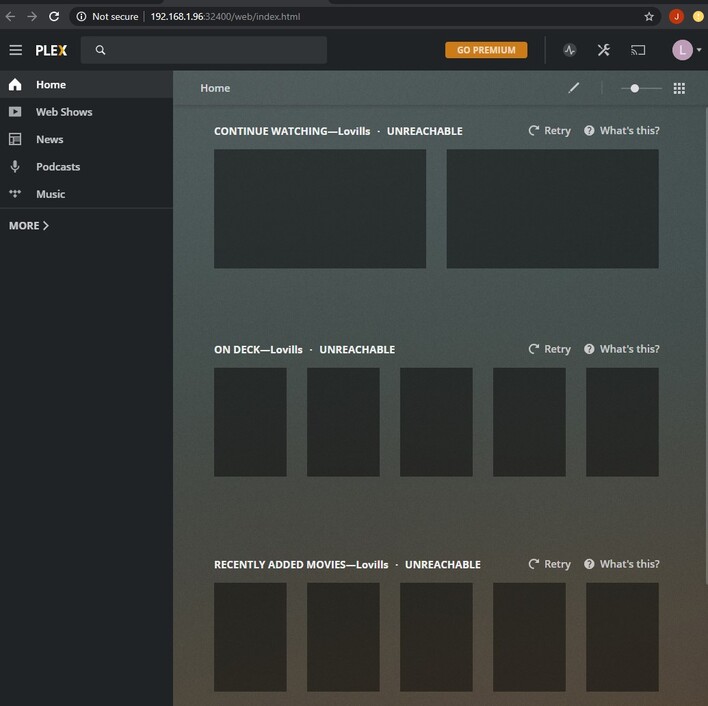
Mr. Moderator, now it works! Thank you! One thing to note is that I wasn’t able to add my library, then I noticed that user Plex and Group User Video didn’t have permissions, I check the box “write/read” and voila! It works like a charm. Thank you again.
This topic was automatically closed 90 days after the last reply. New replies are no longer allowed.
