I’ve been asking around. It appears your server hasn’t been able to connect to Plex’s backend for almost 1 month. So it seems there might be some bigger issue.
Can you verify the DNS and default gateway settings of your WD PR2100 to verify the Plex Media Server on it is able to properly communicate? In case there’s only some hiccup, it might help if you could restart the WD PR2100 to see if that resolves that.
I wrote down my IPv4p IP and IPv4P DNS Server addresses, before I shut down. I verified that in WD PR 2100, if that’s what you mean? I shut down for 10 minutes, restarted checked the addresses in the PR 2100, their still the same values. I signed on to Plex, nothings has changed. Do you need the values to my IPv4p IP and IPv4P DNS Server?
Thanks for asking around. I started a new topic requesting help with PuTTY. I don’t know if you seen it?
Some added information. From my Router:
My WAN address is different from IPv4P IP address, from WD PR 2100. My IPv4P DNS Server address, from WD PR 2100 and LAN address match.
I think Plex is using my WAN address because when I sign on, I get an Email alert, from Plex, stating “Someone is try to sign on to my account” and shows my WAN address. Shouldn’t Plex be accessing my IPvP address, from WD PR 2100. I don’t know?
Server Version#:1.23.6.4881
Player Version#:
WD PR 2100, PMS loaded within
When I do all things below, see attachment, per the instructions, I don’t get the same results. I’m not able to claim my server. Because that toggle never pops up under Setting>Server>General.
Q. 1 How do I get my account to at least do that!
Also I’ve read through “What do I do when I lost my server”. Since my PMS is loaded in my PR 2100. I downloaded a PuTTY editor to access the files and hopefully edit something? I was able to access Host using sshd Root and password. But when I pasted the command
/mnt/HD/HD_a2/plex_conf/Plex Media Server/ . I received a message “That files doesn’t exist” So I tried it like this “/mnt/HD/HD_a2/plex_conf/Plex Media Server/” and received the same error message. This is my first experience with PuTTY.
Q. 2 If someone could give me step by step advice how to succeed with PuTTY and edit/delete the appropriate files I would appreciated it.
Thank you
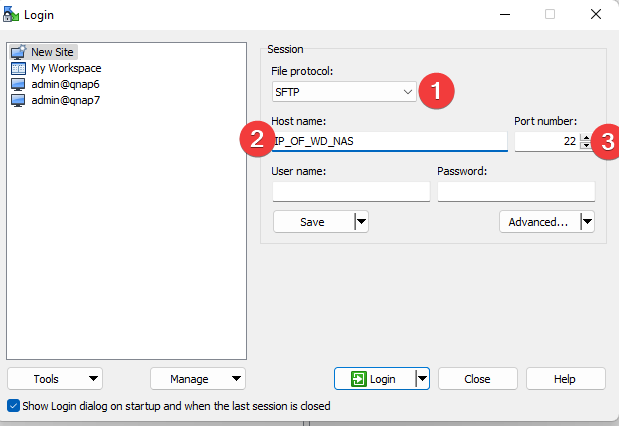
Then make a connection via that to your WD, and make sure you use SFTP as the protocol, and port 22
Then navigate to this path: /mnt/HD/HD_a2/Nas_Prog/plex_conf/Plex Media Server
In there, make a back copy of the file named Preferences.xml
Make sure PMS is stopped, and then edit the file in WinSCP by selecting it, and hit Ctrl Alt F4