Server Version: My Cloud EX2 Ultra 5.27.157
Plex Version: 1.32.7.7621
Selected Language: Hungarian (magyar)
Hi Guys,
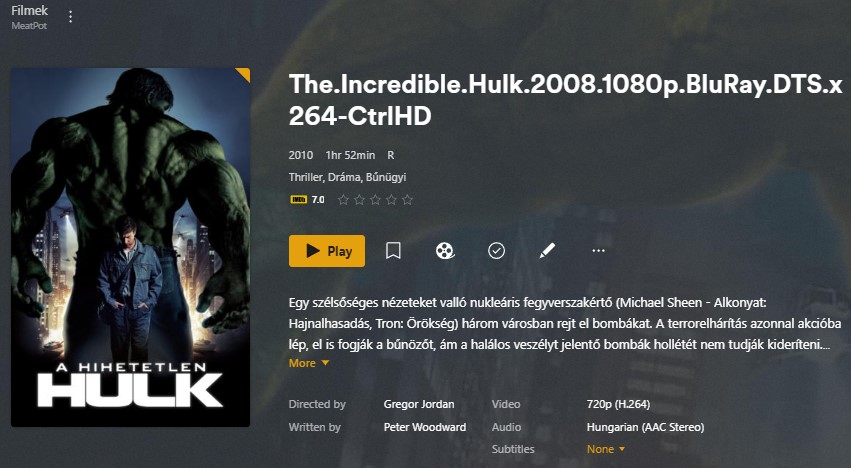
I noticed that in some cases the movie title uses the file name. I think this is only justified if no agent can find any information.
if the agent finds information, using the file name is not correct.
If I refine the result and select the appropriate movie, the name of the movie is not updated either.
Moreover, if I select a completely different movie, neither the title of the movie nor the poster will be updated automatically.
Manual intervention is then required.
It is quite difficult to check this for each new movie and manually rewrite the title if necessary.
The selection of posters does not work properly either. In several cases, the poster corresponding to the selected language (Hungarian) is not automatically downloaded.
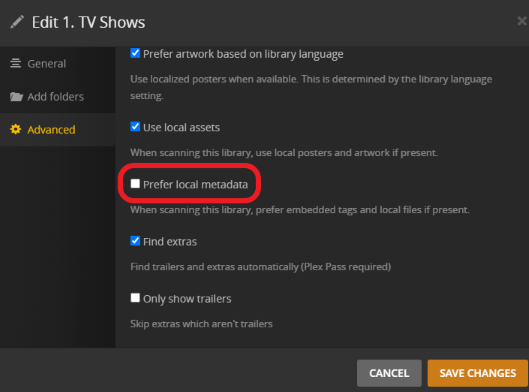
It looks like your file has embedded metadata and your library is configured to use/prefer that. Hence Plex isn’t using the title of the matched movie but the embedded title instead.
Might be the same if your file contains local or embedded posters.
Uncheck this box 3 dots next to the library → Manage Library → Edit → Advanced
If it doesn’t happen automatically, refresh the metadata for the library
If that is exactly how the file itself is named you may still have some matching problems
Movies need to have the date in parenthesis and any extra info like file information should be contained inside of [square brackets] so the scanner doesn’t mistake it as part of the movie name
The Incredible Hulk (2008) [BluRay.DTS.x264-CtrlHD].mp4
Thanks for the quick answers and help.
I removed all local data from the movie, made the necessary settings and thus the title of the movie is changed perfectly.
I’m just asking for your help to have a poster for the film that matches the language.
In the picture below, you can see that in the case of a match, the language of the poster in the hit list is correct, but it is not added to the movie