The new video player on Plex for Android TV does not play 4K videos

Server Version#: 1.18.4.2171
Player Version#: 7.27.0.15018 (57fc93ee)

It has been a few months since the new video player is out on android TV and it has never played all of my 4K videos that are working perfectly on the old video player. I was patient but it’s been a few months now without any fixing. I want to make sure that they will fix it before deleting the old video player.

My device is an Android Mi Box 3 with android 8.0.0. I thinkthe problem may be that the new video player is forcing a transcode instead of direct play. My server is not powerfull enough to transcode 4K. The video I am trying to play in this log is: Spider-Man: Far from Home (2019) 4K HDR. All my 4k videos are in HDR and have an other version in 1080p that works perfectly in the new video player. He are the logs:LOGS.txt (79.7 KB)

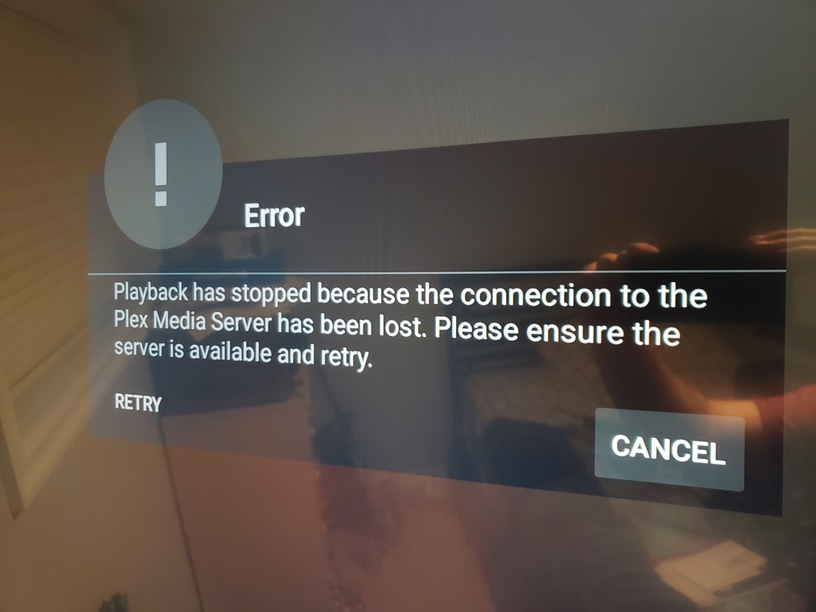
When the 4K video doesn’t start playing I recieve this message on my screen:

As said previously in this post, all of my 4K videos are working perfectly in the old video player but none of them work in the new one.

you should post the android tv log after you played/failed that file with the new player

LOGS smaller.txt (46.9 KB) This is a smaller log file where I only kept 10 sec of logs but I cannot assert the problem will be visible in this smaller one.

Your server is trying to transcode the video.

Please play the video without subtitles. Also, with an audio track that direct plays, if one is available.

What happens?

Does the Plex dashboard indicate if the video is direct playing or transcoding?
Plex Web -> Status -> Dashboard

Please attach the Plex XML for the movie. Attach as a .txt file. The forum does not accept .xml attachements.

No subtitles are selected. The video crash before even appearing in the dashboard. Here is the XML file. The 4K one has the Media id =“11189” Plex XML .txt (68.0 KB)

thats not the android tv log its the PMS log.

I didn’t know there was Android TV logs. Here it is, from the moment I select the movie. AndroidTV LOGS.txt (75.1 KB)

Thanks for the client logs.

How are things connected? Does the Mi Box attach to a TV, soundbar, receiver, etc?

What make/model of TV?

Regarding the client logs:

The client tried to direct play, but something went wrong and it fell back to transcoding.
Player error not known by server, likely to be a client configuration error

Can you double check the MiBox and the Plex client settings?

How closely do your Plex client settings align with these? They’re from my Nvidia Shield. The settings in a Mi Box should be similar since they both run AndroidTV.

Video Quality
  Adjust Automatically = Off  <-- change to Off if enabled.
  Home streaming = Maximum  <-- change to Maximum if different.
Video
  Burn Subtitles = Automatic
  Display Information = On
Advanced
  Passthrough = HDMI

Please pull a new set of server logs. The logs above are from Jan 17th, and subtitles were enabled during playback.

Play the movie with the AAC audio track. Make sure subtitles are not enabled (there is a forced track, which is enabled automatically).

Then play the movie with the AC3 audio track, making sure subtitles are not enabled. Plex sometimes auto-picks a subtitle track when you change audio tracks.

Pull the logs and attach. You can attach the entire zip file.

If you play the 1080p version of the movie, does the video or audio transcode with either the AAC or AC3 track chosen?

Check the Plex Dashboard during playback to see status. Plex Web -> Activity -> Dashboard. Click the gold toggle icon to the right to expand the view if necessary.

On AndroidTV devices, if the audio is transcoding and SRT subtitles are enabled, the video will also transcode.

Looking at the XML, the video should direct play.

Given the log messages, I’m wondering if there is a configuration or setup issue that forces the transcode.


From Plex client logs:

01-22 23:29:10.478  i: [TranscodeSession] Direct Play
01-22 23:29:10.484  i: Fetching [method:GET] https://192.168.1.22:32400/:/timeline?bufferedTime=334&duration=7763943&guid=com.plexapp.agents.imdb%3A%2F%2Ftt6320628%3Flang%3Dfr&key=%2Flibrary%2Fmetadata%2F5797&playbackTime=0&playQueueItemID=Delay--295766938&ratingKey=5797&state=stopped&time=0&timeStalled=3&timeToFirstFrame=0&token=...8Deq-x&X-Plex-Client-Identifier=ee7b346667a929fa-com-plexapp-android&X-Plex-Token=...8Deq-x
01-22 23:29:10.540  i: [ExoPlayer][EventLogger] decoderDisabled [3.77, 0.00, window=0, video]
01-22 23:29:10.543  i: [ExoPlayer][EventLogger] decoderDisabled [3.78, 0.00, window=0, audio]
01-22 23:29:10.608  i: [Player][Timeline] Player error not known by server, likely to be a client configuration error
01-22 23:29:10.609  i: [Player] Error reported: PlaybackInterrupted (null)
01-22 23:29:10.610  i: [Player][Timeline] Playback stopped (error: false)
01-22 23:29:10.610  i: [FFmpeg] [WARN] [https @ 0xd368aa80] Will reconnect at 8526611 in 0 second(s), error=I/O error.

01-22 23:29:10.611  i: [FFmpeg] [ERROR] [tls @ 0xcdd4b540] Error in the pull function.

01-22 23:29:10.611  i: [PlaybackTimeBehaviour] Time: 0 IsStarted: false
01-22 23:29:10.622  i: Fetching [method:GET] https://192.168.1.22:32400/:/timeline?bufferedTime=334&duration=7763943&guid=com.plexapp.agents.imdb%3A%2F%2Ftt6320628%3Flang%3Dfr&key=%2Flibrary%2Fmetadata%2F5797&playbackTime=0&playQueueItemID=Delay--295766938&ratingKey=5797&state=stopped&time=0&timeStalled=3&token=...8Deq-x&X-Plex-Client-Identifier=ee7b346667a929fa-com-plexapp-android&X-Plex-Token=...8Deq-x
01-22 23:29:10.653  i: [TranscodeFallbackBehaviour] Detected direct play failed, falling back to transcode
that is the correct logs. i have pointed the devs at your log hopefully they will look into it

e: Stacktrace: com.google.android.exoplayer2.i: java.lang.IllegalArgumentException

I have a similar problem with the new video player on an Nvidia Shield TV (2nd model) with a server running on a separate linux x86 machine - in my case it’s mostly a library of 1080p video all of which play fine using the ‘old’ video player, but a lot don’t work with the new one!

I get the same error “playback has stopped …” - i disable the new player and the same file then works.

In my case is seems that forcing transcoding solves it but i’ve not studied the pattern much since i realised that changing over to old fixed things :slight_smile: PLEASE DON’T REMOVE OLD PLAYER!

Let me know what logs you’d want me to supply if you need any help sorting this out - but i believe lot’s would have similar issues.

its a generic message, and lots of people can play 1080p perfectly fine.

you shoud post your android tv logs after recreating the issue

@simon36 - the dev looked at you log, he asked if you can create a sample of the file he can test, instructions here (its best to test the sample and make sure you have the same issue too on your mibox)

Hey - some more info. I believe I’ve found what the issue is with the new player in my case.

It related to audio passthrough - I have historically disabled passthrough (even thou’ i would rather not) due to the audio sync delay on my amp when i pause/resume. With passthrough disabled, i.e. with plex/shield doing the audio decoding, audio continues immediately when i resume from pause.

It turns our that with passthrough disabled a lot of my media files are failing to play with the new player - as soon as i set passthrough to HDMI the new player works fine.

Log attached.

fail-passthru-disabled.txt (56.7 KB)

I have my sample ready of 23 sec under 50 MB, but it’s not uploading on the site. I tried archiving it in in ZIP and 7z but both were not uploading. Upload is closing after 30-35%. So I uploaded a 30 sec clip to an external site. It may take 3-4 min to download. https://easyupload.io/n6twa8. If the dev prefer, he can send me an email and I’ll send the sample to him.

I tested it and it’s not working on the new player but it’s working on the old player player. Same issue as before.

sample works fine on my nvidia shield with the new player, have passed sample onto the dev and linked him to this thread

This topic was automatically closed 90 days after the last reply. New replies are no longer allowed.
