I have plex media server setup on my Nvidia Shield and watch movies/TV Shows in my home theater setup. All of my content that I watch is on my Synology NAS DS1621+ In the past there were only certain 4K mkv files every once in a while I get the message that says the server is not powerful enough… The interesting thing is that I do not want any transcoding to occur but rather pass-through video and audio without being processed and in settings I set this. Maybe I missed something? A few days ago I changed the file system on the Synology NAS from ext 4 to BTRFS so I can enable data scrubbing. Now all 4K mkv movies have this problem. I have the settings set for pass-through and again this wasn’t a problem in the past.
I am also noticing overall performance degradation:
1.) A lot of buffering through when trying to initially play or fast forward etc. through a movie
2.) Trying to scroll through the plex menu with the Shield remote is suddenly very slow and delayed in responding to the scrolling I’m doing.
Please advise.
First, you did not need to convert to BTRFS for scrubbing. DSM has provided volume scrubbing for all volumes since DSM 4 (ext3/ext4).
IMHO, BTRFS gains nothing because it still must scrub to ‘detect bit rot’ on a RAID volume.
That said, on single-drive volumes, BTRFS contains parity in the filesystem itself so that’s far better than having no protection at all.
Is the volume still converting or scrubbing ? Depending on how big the volume(s) are, i/o latency (which is what you seem to be describing) is very typical when scrubbing / conversion is active.
Interesting. From what I’ve read online it was the complete opposite. In fact, data scrubbing is grayed out with EXT two. I finished converting the file system several days ago. There is no data scrubbing or anything else going on. I have a Raid 6 set up with four 8TB drives. So I have roughly 14 TB of usable space that is being backed up. But not only can’t I play any 4K movies without the error saying the server is not powerful enough… But also everything from the shield remote is very slow navigating through the Plex menu.
Is all of this being caused by the new file system on the Synology? When I spoke to some other folks in other forums and spoke to tech-support from Synology, I expressed my concern of buffering and problems and everybody that responded to my concern said they have not had any issues at all because even though the file system is a bit slower, it shouldn’t be slow that I notice a difference.
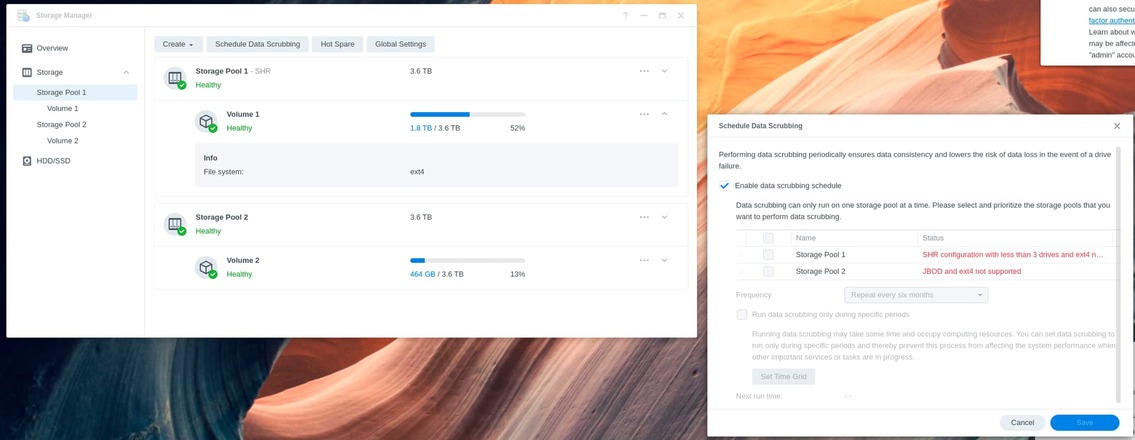
If you look at Storage Manager, you will find:
DSM 6
DSM 7
– Volume 1 needs 3 drives in the volume to enable,
Not fast enough
As for your movies and playback & the not fast enough –
Very first question: Is it attempting to burn subtitles ?
I wasn’t aware of ext4. I will get on the phone with Synology tomorrow and ask about it. I don’t think it is attempting to burn subtitles in but how would I check? In terms of Plex, there are some areas I find daunting because I’m relatively new to this setup being an exclusive Apple TV guy for years. Earlier tonight I was able to get a 4K avengers movie to play but the picture was pixeling/very choppy and not smooth at all where we couldn’t even watch the movie. Before I changed the file system on the Diskstation everything was working fine. I had none of these issues with the exception of only a couple of rogue 4K movies that was trying to transcode.
I have a couple of other questions about Plex:
1.) Why is Plex trying to convert/Transcode a video when my settings have disabled it?
2.) How do I see the current version of Plex media server and the player on the web app and also from the Nvidia Shield menu?
-
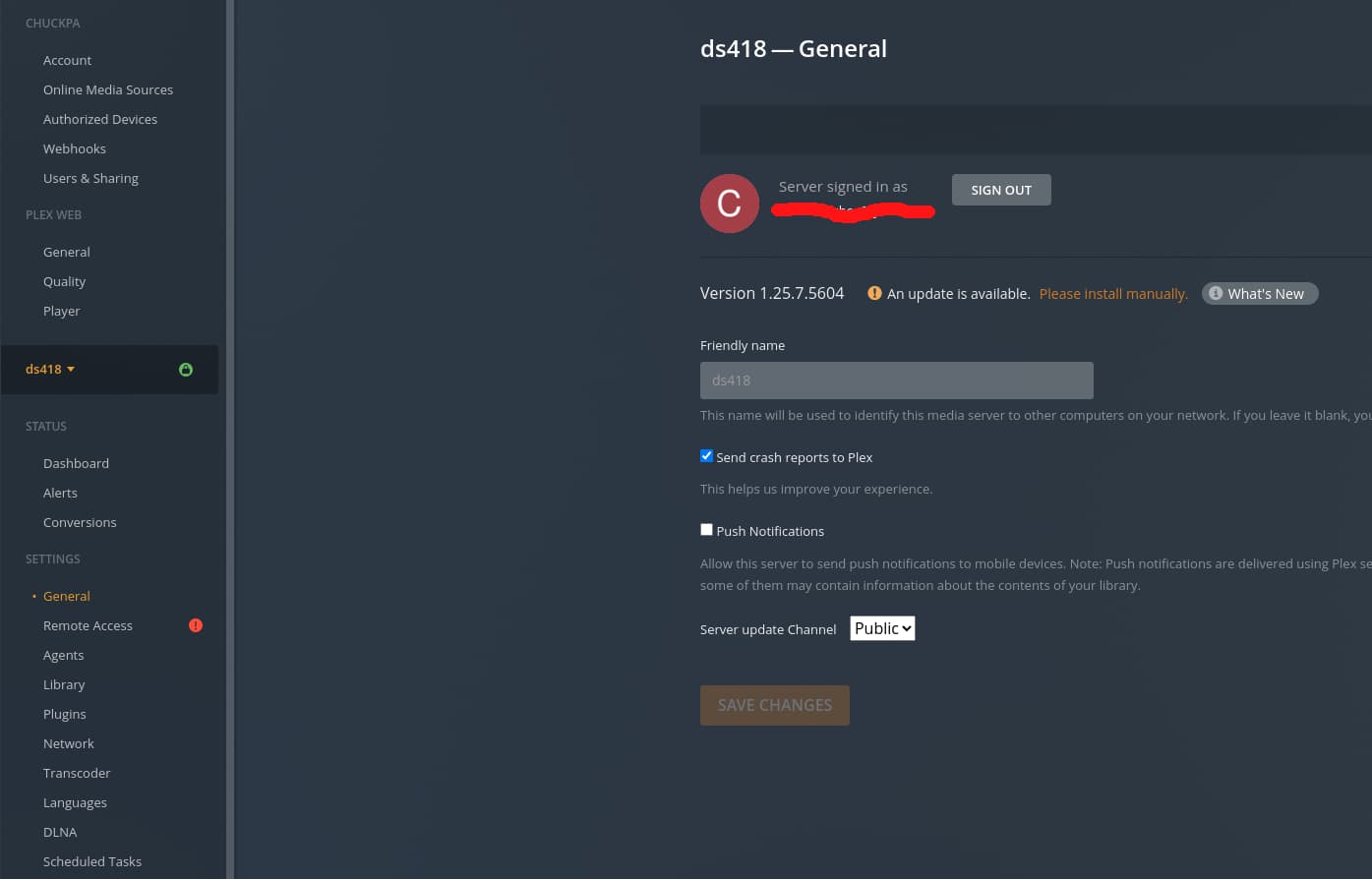
Server version - Settings - Server - General (Be careful as there is Plex/web version and Server version. You’ll see the server name above the server version)
-
There can be many reasons PMS is transcoding. The log files will definitively show it.
When you disabled transcoding, did you click SAVE?
 Disable video stream transcoding
Disable transcoding of the video stream in transcoder operations. With this set, the transcoder may still transcode audio as well as remux video.
For both of your questions:
-
Settings - Server - General - SHOW ADVANCED
– Make certain DEBUG logging is enabled
– Make certain VERBOSE logging is disabled (not checked)
– SAVE if you make changes
-
Start the playback
-
Wait 20 seconds then stop playback
-
Settings - Server - Troubleshooting (lower left corner of Plex/web) – Download Logs
-
Attach the ZIP file it gives you here and we’ll look at why it decided to do what it did.
Great! When it comes to disabling transcoding, changing the server settings, start playback then send the debug log, do I do that on the web from my computer or on the shield?
Do that all from Plex/web
The only changes you’re making on the Shield are the player settings
On the shield, you can verify Subtitle handling is Automatic.
You don’t want it to burn any subtitles the server doesn’t have to.
(The shield is a very strong player)
Will do. Going to bed now where I am. Thank you. Will try this tomm. and get back to you. Thanks.
First, I am trying to see what version of plex media server on the shield as well as the player:
Maybe I am missing something but I am on the Plex/Web on my computer. I click settings in the upper right corner and then on the left side I do not see anything that says Server.
Second, when you say start the payback, I assume you want me to try to play the 4K version of a movie on the plex/web. Ever since I installed Plex about almost a year ago I have never been able to playback a 4K version of a movie because I get an error that says
Playback Error: This Server is not powerful enough to convert video
When you connect to your Shield IP address,
Settings - Server - General
will show you the server version.
You posted in the Synology forum but ask about Plex Media Server on the Shield.
Are you using the Synology for media storage only or are you running PMS on the Synology?
So Settings - Server - General is under Shield Settings not Plex settings?
I have a Synology 1621+ that I am using for media storage ONLY. On the NVIDIA Shield Pro I mapped this drive and I thought I set everything to Passthrough. My 4K movies have TrueHD 7.1 Atmos as audio. For a while just until recent I was able to play the video and audio without transcoding.
-
Use your browser to open https://ip.addr.of.shield:32400/web
– This opens it in the normal Plex/web app.
-
In the upper right, click the wrench (Settings)
-
In the left pane, you see the server name
-
Underneath it, you see ‘General’.
This is my DS418. You will have this on your Shield’s server as well.
Here we can see PMS 1.25.7.5604 is installed.
Your Shield Player app can DirectPlay.
If you recently got an update, and it stopped working, Check the Player settings.
In Plex, the player tells the server what to do.
Open the Plex player app on the Shield .
Scroll down to the bottom → Settings
Now scroll down to Quality and make certain everything is as it should be.
I suspect something changed.
I was able to update Plex Media Server and Player on the Shield. Then tried playing a couple of Avengers and Iron Man movies (All 4K mkv) that played absolutely fine in the past with no issues. The playback was choppy/not smooth. I then tried bakcing out of plex with the Shield remote and the Shield completely froze on me (First time this ever happened). I had to physically unplug and plug back in the power cord to the Shield. Then did a Factory Reset on the Shield and now setting up Plex again completely from scratch. WHAT A NIGHTMARE.
I wish you had grabbed the logs .
In the future, factory reset on the shield is RARELY needed.
Uninstalling the app(s) will clear out everything.
To make setup easier, Don’t forget to go to https://app.plex.tv
From there, launch the desktop, Settings - Authorized Devices → Server (dropdown).
REMOVE the old Nvidia Shield server. (you can see which one is which by the “Last Seen” time).
I couldn’t get the logs because there are multiple problems going on. From what I said earlier from day one since I set up Plex I have never been able to play a 4K movie from the Plex/Web from my computer because it says Playback Error: This Server is not powerful enough to convert video. I have an overclocked Threadripper 1950X build that I tried playing this on with that message. Therefore I couldn’t create a log. By the way, why is the plex/web trying to convert a 4K movie when I disabled transcoding? Is this a separate issue or related to the mess on the Shield?
When I was setting up Plex again on the shield it noticed two servers both named Shield TV. Since I don’t need these starting from scratch, how do I go in and delete these previous servers?
My bad. You answered the question about previous servers. Getting late where I am now and I’m spent with these Plex playback issues…Giving me a headache. Will set it up again tomorrow. I hope I didn’t make a mistake with getting the Shield and running Plex. There are a many other media servers for home theater setups. I have an 85" 4K Sony TV supporting Dolby Vision HDR. The Shield and TV are connected to my receiver (Yamaha AVENTAGE RX-A2A) I have a 5.1.2 setup with two height speakers in the ceiling. When things are working fine I can pass-through uncompressed 4K Dolby Vision HDR video and TrueHD 7.1 Atmos through the receiver and the movie experience is VERY SATISFYING. The problem is there are many issues with this stuff from what I have noticed.
@dhpriest
You didn’t make a mistake getting the Shield Pro 2019. I have one. It’s by far the best set top box/player going. I have a very old Synology which still can run PMS. When I play from it, the Shield takes it all in, handles ALL the video (and subtitles if needed) then displays on my LG C1 OLED. I also pass it through my Onkyo TX-RZ and have a perfect 5.1 (no Atmos yet.  ) I absolutely agree that the HDR & DoVi content is incredible when paired with a good AVR setup.
Using the shield as a server is another issue. (The server module and player modules are distinct). You need to enable all the hardware. I have a Xeon E5-2690v4 w/ Nvidia P2200 GPU in my server. The Nvidia does all the video work (converting 4K → Web browsers in tablets, etc) and the CPU converts the audio. On those occasions I need to burn-in the subtitles, it’s got the power to do that with ease as well. (Again, the Shield is “DirectPlay” from the server so the server does nothing but send the data as-is.)
I did look at your account and don’t see a PlexPass associated with it. Do you have the server signed into another account and, if so, do you have a PlexPass on that account (which gives you access to all the Hardware Acceleration) ?
Before we go too far, After you get it setup again, I’d like to see the server logs from a failed playback attempt.
With that info, we can figure out what is really happening and how to move forward.
You’re a good man Charlie Brown. Thanks for helping me along the way.
When I was first wanting to move away from the Apple TV I thoroughly researched all media player/server options. What was important to me was being able to play mkv files and other audio types since I beefed up my home theater room. Apple TV is limited to only being able to play .mp4 files and cannot play DTS or TrueHD Atmos audio. I used to encode mkv movie files to mp4 with an overclocked Threadripper 1950X rig I built 4 years ago to save space and to be compatible with Apple TV. I was considering upgrading my processor and building a Threadripper 3970X to encode 4K faster since I wanted to watch movies and TV Shows in 4K whenever possible. The 3970X alone is over $2,500 for roughly a 20-25% performance difference from the 1950X. Instead of going that route I decided to beef up my storage capacity to handle 50-70GB mkv file sizes. I upgraded my Synology from the 220+ to the 1621+ with four 8TB Red Drives set up as Raid 6. Now I do not need to encode mkv movies anymore except if it is a remastered version of an older movie and I encode it to clean up picture grain/noise with filters.
When looking into an alternate players/Servers to ATV, I not only researched other options but jumped on some forums to ask how to set this up as to have a user interface similar to ATV and PASS-THROUGH video and audio. I jumped on audio video forums such as audioholics. You want to talk about home theater nerds. These guys live this stuff 24/7 and have home theater setups in the tens of thousands of dollars. When many of them recommended the NVIDIA Shield TV Pro 2019 running Plex for the cost and quality I went that route. When asking the best way to set this up since this was brand new to me I was advised to run Plex media server ON THE SHIELD AND NOT THE SYNOLOGY NAS OR DESKTOP to prevent any transcoding. I am trying to get AWAY from transcoding for the best picture and audio quality. I set it up this way about a year ago and for the most part things worked perfect.
You as well as others have mentioned running Plex Media server on the Synology. I am open to anything as long as I can turn on my Shield, navigate to a movie, sit back on the couch and have a great cinematic experience watching a 4K movie with uncompressed video and audio.
Regarding PlexPass. Again, I have not dove into the Plex trying to understand everything about it. Maybe my problem is setting up an account the wrong way. Part of the confusion is signing in with an email address. I thought my account was set up with my hotmail account which is dhpriest@hotmail.com. Then I noticed my account was dpriest3 or something like that. I have no idea where or how that name came to exist. I didn’t rename it. Since I have not set up my Plex again since the factory reset of the Shield, I will wait for your response as to guide me from the BEGINNING since I have to set up Plex all over again.
I have another problem. Since the factory reset on the Shield my Apple TV cannot access the network to any of my content. It is telling me to turn on Home Sharing. Awhile ago when I set all this up including Kodi someone mentioned that once I set up another server the Apple TV will be able to connect as long as something else is in place. What do I need to do to at least be able to get the ATV back online?