The Witcher

Server Version#: 1.18.3.2156
Player Version#:

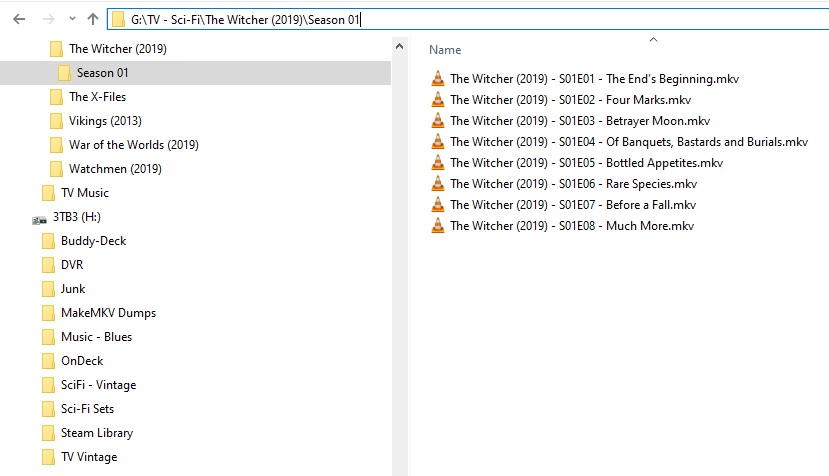
I have a “The Witcher” show folder. there seems to be no way, for plex, to find it on thetvdb. It keeps giving me only the “The Witcher (2002)” even if i specify 2019 as the year in the manual search.

Why?
The show (the 2019 one) is in thetvdb with the same name…

2 Likes

I manually matched it. In the title search that pops up, don’t put the year in the title. Put just The Witcher; not The Witcher (2019).

It’s odd to me that it automatches to the older one when the newer one (without the year) is the closer match.

I dont even find it with only the name, without the year.

image

Huh. You’re right - my bad. I manually matched with TBDB and it found both.

For me, TBDB shows only the 2019
The strange things is that Sonarr does find it right, from TVDB

I can’t type today. Grr lol. I meant TMDB (The Movie Database)

Hi,

I also have matching problem with the new Witcher. I already had The Witcher (2002) in my library and when I tried to add The Witcher (2019), Plex just matched it to the old one and offers the two files as different versions of the same episode - so there’s still only The Witcher (2002) in my library but it shows that there are 2 file versions for the episodes. I can’t find the way to match the new ones manually to The Witcher (2019). I followed the Plex TV Shows naming guidelines and included the year in both the folder and file names but it didn’t help.

Does someone know how to force Plex to split these two versions of the same episode, so I can match the new ones manually?

‘Split’ is available in the ellipsis ⋮ menu, if you go to the top level of The Witcher show.

Aah, great, thanks. I had to match it manually then using TMDB as suggested above (TheTVDB didn’t find it at all) and now it all works fine.

Put 2019 in the “Anno” field, my plex found it then.

Edit: Correction, my plex does not find it anymore either. (worked yesterday)

i had to search by the database # which is 362696
no matter what i typed it wouldn’t find it.

4 Likes

That helped me (using the database# 362696,) Thank you!

1 Like

I got a natural, first time instant match with this:


(FileBot to the rescue)

But, yea… that TVDB ID# works like magic otherwise…

2 Likes

Yeah, there are some workarounds (2019 in the year was something i tried already, but it didn’t work)., but i’m more worried about why it does not get listed as an alternative when manual searching “The Witcher”

There must be somthing wrong in the search…

Also had great issues. When fixing match, changing to The Movie Database was the key.

Cannot get it to work, all properly named. Have thrown 2019 in titles, switched between agents.

I also have no fix match option available to me to manually fix this.

Why isn’t fix match an option always?

It always is – at the show level.

1 Like

Interestingly mine were named identical to yours including the year in the show and episodes.
Plex still saw it as the older show.

1 Like

I always find it so hard to remember ‘what level’ I have to be at for ‘Fix Match’ to become available.

Baffles me that I can’t be on the Home screen, select a Show and have ‘Fix Match’ available at that ‘level’.

I recently did a Fix Match anyway to switch to TMDB - cause TVDB’s material is woefully inadequate.

TVDB is, unfortunately, being run by the people responsible for having everything locked up so tight nobody can use it. When ‘Joe User’ can’t log in and update items in real time - the service is non-existent.

I’ve started adding stuff to TMDB. Then switching to it. A show at a time. There’s still some hope, but it’s dwindling fast.