Server Version#: 1.29.1.6316
Player Version#: 4.87.2 (Chrome)
I’ve read quite a few of the threads about this message and they’ve all been dead ends for me. I get the message “This server is not powerful enough to convert video” only in Chrome. The Desktop player on Mac and Windows both work fine and so does Safari on macOS.

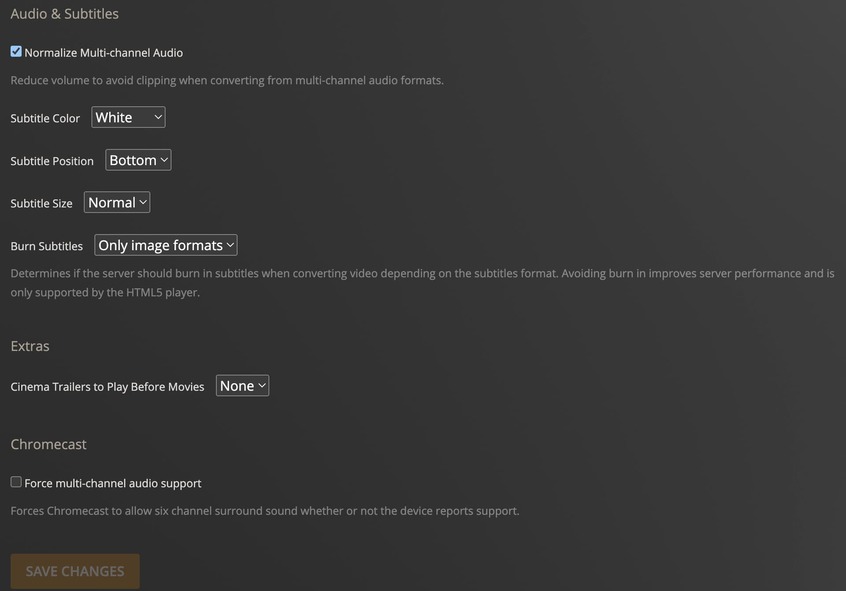
I have matched the browser player settings between Safari (working) and Chrome (throws the error) and they’re the same.
It appears to be specifically 4K MKV files. 1080p MKVs work and other 4K files work.
Details for one of the files that has the issue.
Media
- Duration 1:46:38
- Bitrate 13280 kbps
- Width 3840
- Height 2160
- Aspect Ratio 1.78
- Video Resolution 4K
- Container MKV
- Video Frame Rate 24p
- Video Profile main 10
Part
-
Duration 1:46:38
-
File Your Name. (2016) {imdb-tt5311514} [Bluray-2160p][HDR10][AC3 5.1][x265].mkv
-
Size 9.88 GB
-
Container MKV
-
Video Profile main 10
-
Codec HEVC
-
Bitrate 11963 kbps
-
Language English
-
Language Tag en
-
Bit Depth 10
-
Chroma Location topleft
-
Chroma Subsampling 4:2:0
-
Coded Height 2160
-
Coded Width 3840
-
Color Primaries bt2020
-
Color Range tv
-
Color Space bt2020nc
-
Color Trc smpte2084
-
Frame Rate 23.976 fps
-
Height 2160
-
Level 5.1
-
Profile main 10
-
Ref Frames 1
-
Title Your Name (2016) - BluRay 2160p HDR x265 - SacReD
-
Width 3840
-
Display Title 4K HDR10 (HEVC Main 10)
-
Extended Display Title Your Name (2016) - BluRay 2160p HDR x265 - SacReD (HEVC Main 10)
-
Codec AC3
-
Channels 6
-
Bitrate 640 kbps
-
Language English
-
Language Tag en
-
Audio Channel Layout 5.1(side)
-
Sampling Rate 48000 Hz
-
Title AC-3 5.1 (English Dialogue, English Songs)
-
Display Title English (AC3 5.1)
-
Extended Display Title AC-3 5.1 (English Dialogue, English Songs)
-
Codec AC3
-
Channels 6
-
Bitrate 639 kbps
-
Language English
-
Language Tag en
-
Audio Channel Layout 5.1(side)
-
Sampling Rate 48000 Hz
-
Title AC-3 5.1 (English Dialogue, Japanese Songs)
-
Display Title English (AC3 5.1)
-
Extended Display Title AC-3 5.1 (English Dialogue, Japanese Songs)
-
Codec SRT
-
Language English
-
Language Tag en
-
Title English - SRT
-
Display Title English (SRT)
-
Extended Display Title English - SRT
-
Codec PGS
-
Bitrate 38 kbps
-
Language English
-
Language Tag en
-
Header Compression true
-
Title English
-
Display Title English (PGS)
-
Extended Display Title English (PGS)
Player settings in Chrome (again same as Safari which is working)

 try play on ios device or android box or android TV11.