I checked and the IP address is 99.163.117.174 is same in config as it is in plex
Except in plex it it follows by “:32400”
Right, but it shouldn’t be, it should be 192.168.1.xxx (where xxx is a number anywhere from 1 - 3 digits in length)
So do I change it in my router or in windows?
Right now windows is set to auto assign IP addresses
When you setup the Static IP you mentioned earlier, did you by chance enter that number into the router?
If you have Discord, I could walk you through this through voice chat… It might be faster, I used to do tech support for AT&T, Time Warner, and Brighthouse 
Not sure what discord is - probably don’t have it?
It’s a free voice chat application for Windows, if you don’t know what it is you probably don’t have it… What about skype? you got that?
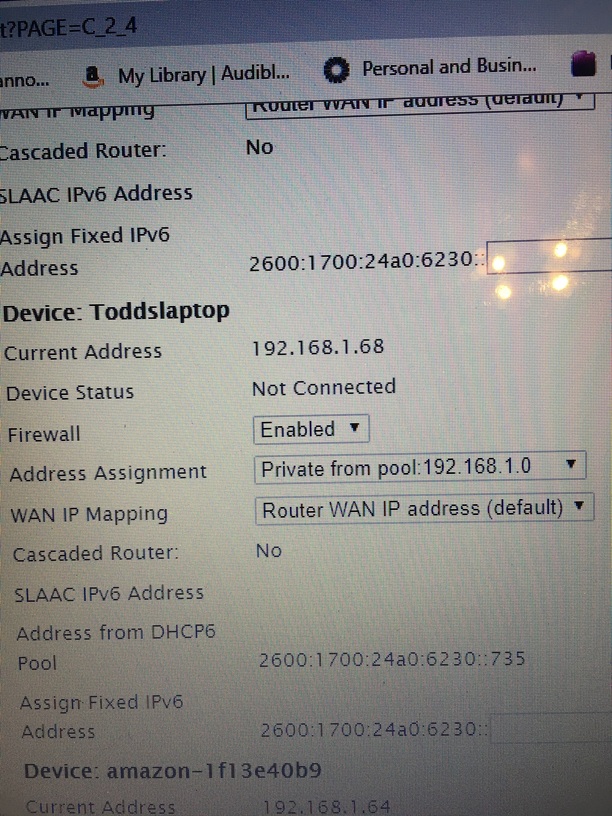
Did you log into the Mesh at all when you were going through your previous setup?
No…
Checking on skype now.
Have skype - haven’t used it in years
add me on skype: digitalhallucinations
Then call using a voice call
Callong
Alright, after talking with Todd, and remoting into his PC using TeamViewer, we got it sorted. What’s curious is his ISP provided AT&T router is choosing to give his PC the Public IP address… Everything is still able to communicate via LAN, so… whatever there… But, after port forwarding to his machine, using the included “PLEX” and “PLEX IP” configs in his ISP’s router, things are working just fine. It was not as plug-n-play as it should have been, that’s for sure…
Huge shoutout to Jason for all his help. He went WAY above helping me sort it all out!
I might have a related issue. I’ve run a Plex server for years with no trouble. I’m also on AT&T and think I have the same AT&T gateway discussed here. I haven’t changed anything about my setup (except a Plex server update that ran last week), but I discovered today that my server isn’t accessible outside my network anymore. It’s just happened in the past week or so, possibly since the last server update ran.
The IP is still the correct 192.x.x.x.:32400 in both Plex and on my home network, but it is no longer accessible. When I try to reconnect the server, it gives me the same succession of “trying to connect” followed by “fully accessible” followed by “Not accessible” messages as pictured above in this thread. I checked my router settings and the IP and port forwarding look fine there.
Any suggestions?
Probably the nicest thing I have ever seen anyone do for someone on the Internet. Good man!
@waharris007 sorry, I didn’t see this before… While you’re having a similar issue, it’s definitely not the same. if you’ve checked your port forwarding settings, that should be it. That’s all todd needed as well, it was just more complicated because of the fact that his modem/router was giving his PC the WAN side IP address.
One thing you can check though is that the Windows firewall settings didn’t get changed. The other thing I’d do is tell you to go to www.canyouseeme.org and punch in 32400 and see if it can see that port open.
If not, you may want to make your own thread about the issue.
Thanks. I dug into it more and found that many people people are having the same issue. Several people have mentioned it on the Plex subreddit on Reddit. I started a new thread here, as well, but no one replied. At this point, I’m just assuming it’s a bug in the last update. I’m just cooling my jets until the next server update to see if that fixes it.
