Server Version#: 1.20.1.3252
Player Version#: 4.34.4
I have Plex installed as a Plugin on my Freenas system (ver FreeNAS-11.3-U4.1). Watching some content (in this case: Quantum of Solace) with SRT subtitles turned on throws up the error “Playback Error. Conversion failed. The transcoder exited due to an error.” This happens when watching on my LG TV and on the Plex App on Chrome on my desktop. Strangely, my Android app works fine and shows no errors. Also, no errors on an episode of Desparate Housewives I’ve just tried.
Things I’ve tried:
Updating Plex Plugin on Freenas
Restarting Plex
Changing the library scan to daily
I feel this may be to do with permissions with a transcode folder, but I’ll be honest - I’ve no idea where to start with that…
Happy to provide any other info/screenshots/more logs. Thanks in advance.
Oct 01, 2020 12:54:57.002 [0x810ca0300] DEBUG - Content-Length of /media/Movies/James Bond/007.James.Bond.Complete.Set.1962-2015.1080p.BluRay.x264-ETRG/23. Quantum.of.Solace.2008/007.James.Bond.Quantum.of.Solace.2008.1080p.BluRay.x264.AAC-Ozlem.mp4 is 59 (of total: 1678075310).
Oct 01, 2020 12:54:57.003 [0x80bf0f600] DEBUG - Completed: [192.168.0.135:45062] 206 GET /library/parts/65/1540177254/file.mp4?autoAdjustQuality=0&hasMDE=1&location=lan&mediaBufferSize=74944 (13 live) TLS 1ms 59 bytes (range: bytes=1678075251-)
Oct 01, 2020 12:54:57.057 [0x80bf0f600] DEBUG - Failed to stream media, client probably disconnected after 6553600 bytes: 32 - Broken pipe
Oct 01, 2020 12:54:57.057 [0x80bf0f600] DEBUG - Completed after connection close: [192.168.0.135:45058] 206 GET /library/parts/65/1540177254/file.mp4?autoAdjustQuality=0&hasMDE=1&location=lan&mediaBufferSize=74944 (13 live) TLS 567ms 6553600 bytes (range: bytes=0-)
This reads like there is a network connection failure here.
I think this error message is itself in error. if you file naming is accurate and has not been altered, this movie is 8-bit h264 and has AAC audio. You also mentioned SRT subs. There’s no reason this should be transcoding unless you have something set wrong on the LG’s settings. This is like lowest-common-denominator level file codec as far as being Direct Playable.
Do you have a sample of this file you can provide? I’d be willing to test it here.
You may wish to read this on how to generate a sample file. Sample files should less than 30 second in length for multiple reasons.
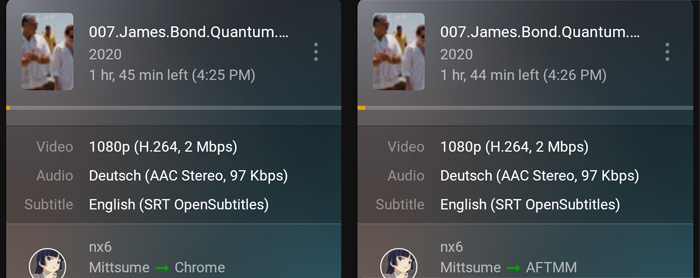
You mentioned you were having trouble transcoding with subtitles but your file didn’t have subtitles at all, so I had Plex search some out to use. The audio is actually the original English but is mislabeled as German.
I haven’t had a chance to test yet this on the LG, but so far I haven’t needed to transcode it, which is a good thing. This file is very low bandwidth for the codec, so transcoding would only make the picture worse.
So far I’ve tried Chrome on macOS and an Amazon Fire Stick 4K.
No transcoding needed on either.
When I get the opportunity later tonight I’ll try the LG. I’ll also change the subtitle burning option on it to “always” so I can see what happens when it’s being told to transcode for the subs.
An opportunity came sooner than I was expecting, and I found – nothing wrong.
I’ve tried both the old player and the new preview client experience on the LG smart TV. If I have the player controls set to handle subs as normal, there is no transcoding. It direct plays.
When I set the player to always burn subtitles I started to have playback issues, but that’s not because of your issue. It’s because of this bug Plex isn’t fixing. So I restarted the movie from the beginning and it played fine with transcoding.
Going back to my original response, I don’t think this is an issue with the file or transcoding, it seems more like an issue with the playback client dropping the connection to the server and the player doesn’t have an appropriate error message to display, so it displays an incorrect one. I don’t know the cause, though.
You should start with all the standard things:
Unplug the power to your TV.
Reboot your local network, starting with the main unit of your router.
And then rebooting any extenders after that.
Also reboot your Plex Media Server.
Once that is all back up reconnect the TV’s power.
Based on my own personal experiences with LG smart TVs I suggest you don’t use the wi-fi on it. Since you mentioned you were using a mesh system, if you can’t wire the TV directly to the router, wiring the LG to the LAN port on one of your mesh units will allow the TV to function as a “wired connection” and still be wireless in reality.
 .
.
 So I restarted the movie from the beginning and it played fine with transcoding.
