The picture is part of my TV library. None of the files are deleted from the library drive that it is pointed to. I’m not sure why this is the only one with a trash icon. How do I get rid of it?

The picture is part of my TV library. None of the files are deleted from the library drive that it is pointed to. I’m not sure why this is the only one with a trash icon. How do I get rid of it?
Dive down into the show.
identify a season which shows the trash can, dive down into this season.
identify an episode with trash can, call up its Plex media info
Take a look at the path and file names under which Plex is expecting to find the files.
Compare them to the actual drive letter, folder and file names.
If they are identical, perform a ‘Scan Library Files’. This should clear the trash cans.
If they are not identical, investigate what has changed.
I have tried all the suggestions on Plex Forums with no good results. Over and over the Scanner would delete all of my TV files. I would reload them and after 5 or 6 were shown in the library the next one would delete all of the previous ones. These files have been there for many, many months. Worked perfect all that time. Uncheck trash. Check trash. Not working. Red Trash cans on 20 TV series. Click on them and none played. Finally after a couple of days I was ready to remove Plex from my computer. And then I looked at a file and made a change in all 20 folders and episodes. They reloaded and all are still there. Days later. When I added an episode to a folder I cringed waiting for the red trash cans to reappear. So here is what I did.
The downloaded episode file would look like this.
Perry Mason 2020 BluRay x264-LEGi0N.mkv
I changed all 20 series episodes files to…
Perry Mason.mkv
Once again they all worked fine for a longtime. An update must have changed it.
Once I reloaded all 20 series one by one… I once again cringed waiting for the red trash cans to appear. They are still there working five days later.
It never affected my Movie Library. My files look like this.
Black Panther (2018) [BluRay] [1080p].mkv

It is no wonder that Plex will give you erratic results, if you are trying to add files named like this into a TV Shows library.
https://support.plex.tv/articles/naming-and-organizing-your-tv-show-files/
That was just a quick sample I grabbed while I had something to do. it was the actual file I downloaded. It is actually - Perry Mason S01E01.mkv and up to Perry Mason S01E08.mkv. Thanks for your reply. I hope the next answer you give advice it illustrates the proper way to fix a problem.
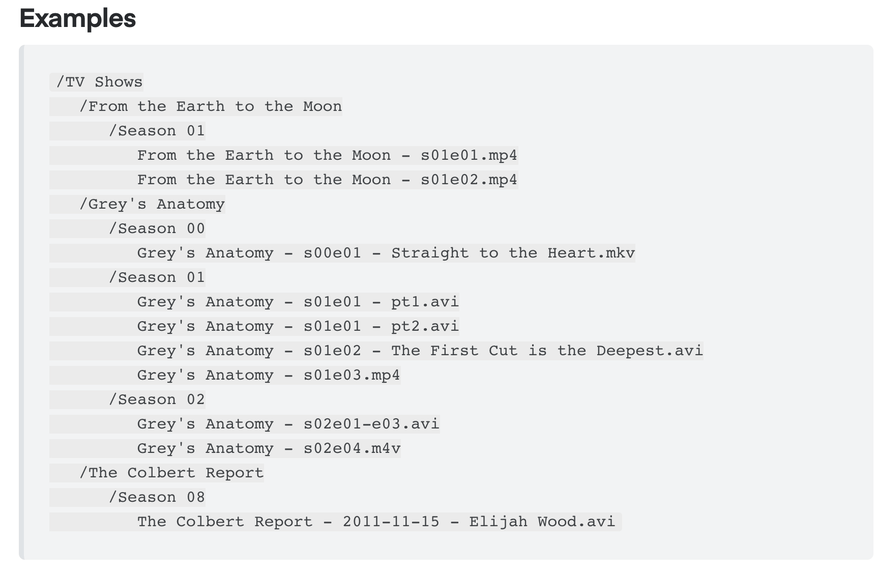
If you have corrected your file naming as per Example:
You will have to perform the Plex dance to correct your library.
If you follow these instructions your trash cans will disappear.
I hope this illustrates your requirements for filled