Server Version#:1.13.5.5332
Player Version#:
Hello. I am running a Plex server on my Nvidia Shield TV Pro. I have my media on a WD Passport Ext drive. I am able to watch my videos, TV shows and movies, with no problem. Using a windows 10 Plex server on my laptop, I added a music folder and added files.
Upon reconnecting the drive to my Shield TV, i looked for the music and couldn’t find anything. I went to the music icon and while in there, clicked on “Update Library”. After it was done, there still was no music. Not sure what try. This is how I usually add movies. Through my laptop, reconnect to the Shield, click on update library from within the movies folder. The additions always show up.
How can I get the added music folder(s) to show up in the Plex server on my Shield? Is there a way to add the music through the server on the Shield? It is a different interface than on the Windows 10 server. Any help will be appreciated.
I would load something like ES Explorer from the Google Play store and see you can see any of the files/folders in the music folder. It could be a permissions issue for the music folder.
If you can’t see inside the music folder via ES Explorer, then Plex won’t be able to either.
I am able to see the music folder, and its contents, from within ES Explorer. Now what?
Did you reboot your Nvidia Shield post reconnecting the USB drive? If not, I would try doing that just to be safe.
I would enable the debug logging then try to add the music folder to the library. Dump the debug logs and upload them here.
Yes, the Shield was rebooted several times. The music is still not seen. When you suggest adding the music folder, what exactly do you mean? Other than just plugging in the external drive, what should I do? Also, on the Shield, where do I go to enable the debug logging? How do I “dump” the debug logs? I accessed the logs through my laptop. Should I just copy and paste the information in here?
It seems like I haven’t found a foolproof way to add media. What has worked for me when adding movies, lately, is attaching the drive to my laptop, run the Plex server, add movies to the folders, then attach the drive to the Shield TV. I guess what I am asking is, how do I add media to the external drive without having to use my laptop? Is there more than one way that WILL work?
For each of the various media types, you need the tell Plex what folders they are in and the type of media.
So if you haven’t told Plex WHERE to find the music files, it isn’t going to automatically just add them because you copied some files to a drive and plugged them in.
See here to working with your Library in Plex.
https://support.plex.tv/articles/200288926-creating-libraries/
Thank you. I am going to start from scratch and leave the external drive attached to the Shield. I do have another question. When first selecting the server on which to add the music, how will I be able to differentiate between the internal storage on the Shield and the external drive attached to it?
They will have different paths. I would rename the top level folders if you want on the usbbto something like movies_usb, etc.
OK, I see it. In my case, I chose “My Passport.” Let’s see how it goes. I appreciate all the information.
Glad we got it all straightened out.
Another question. I am adding music to the Shield through the Plex server on my laptop. Why can I not add music from my laptop to the Shield? I can only add music from the Shield-connected external drive. Does that mean that the music is being duplicated? Meaning the music from the original location AND in the new Plex/Shield directory?
I think that you have some misconceptions of how Plex works. There are 2 parts to Plex; the PMS Server (which has the Library) and the PLex client (the player).
The PLex client can connect to multiple server, but the media that each server is pointed at is only known about by the specific server itself. So if you add music files to a PMS instance on your Mac, only your Mac instance knows about those music files.
Now if you setup an SMB share on your Mac that points to the music files, you could mount that on the ShieldTV and then add that to the music library folders.
OK, that makes sense. I did misinterpret that. How else can I add media? Do I always have to use my laptop? Is there a way to use the Plex server on the Shield in the same way that it is used on the laptop version?
At the end of the day it isn’t about “adding music”, but where/how you are storing the music.
If the “how” is an external USB drive, then you would need to share out the drive (which can be done from the Shield TV itself). Then you’d need to copy any music files from your PC to that shared folder. https://nvidia.custhelp.com/app/answers/detail/a_id/4172/~/how-do-i-share-shield-tv-folders-with-a-pc
Once you have copied the music, in the right folder structure, to the USB drive on the Nvidia Shield, then Plex should be able to pick up the changes, etc. But again you are faced with duplication of data between your PC/NVShield.
That is where many people with the Nvidia Shields instead use a small NAS as their storage platform. I have a couple different QNAP NAS’s in my house and I use one of them as my main media storage device. I can connect to it from my PC/NVShield, etc., but I only have 1 copy of the data regardless of who/how it is being access (whether PC/NVShield,etc.)
As for managing the NVShield PMS, best way is to go in is via https://app.plex.tv. From there, you should see your PMS server listed, and any management options available.
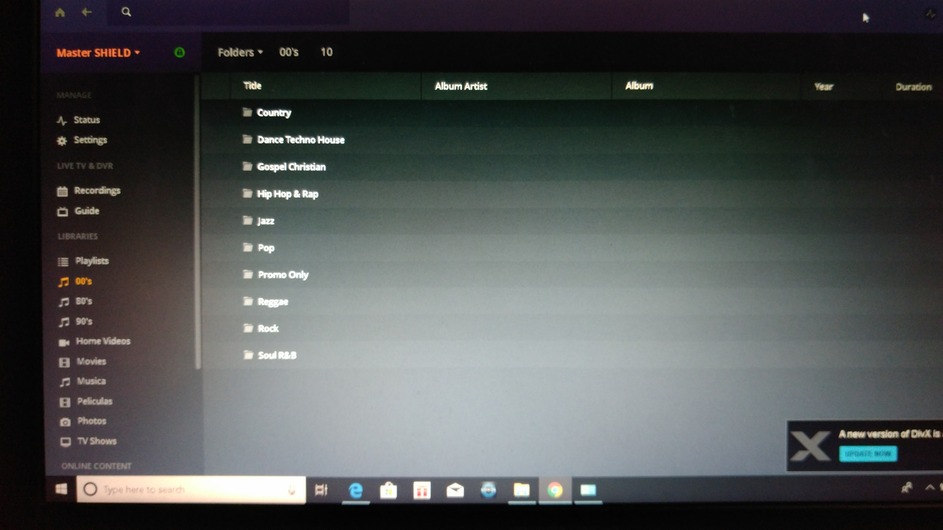
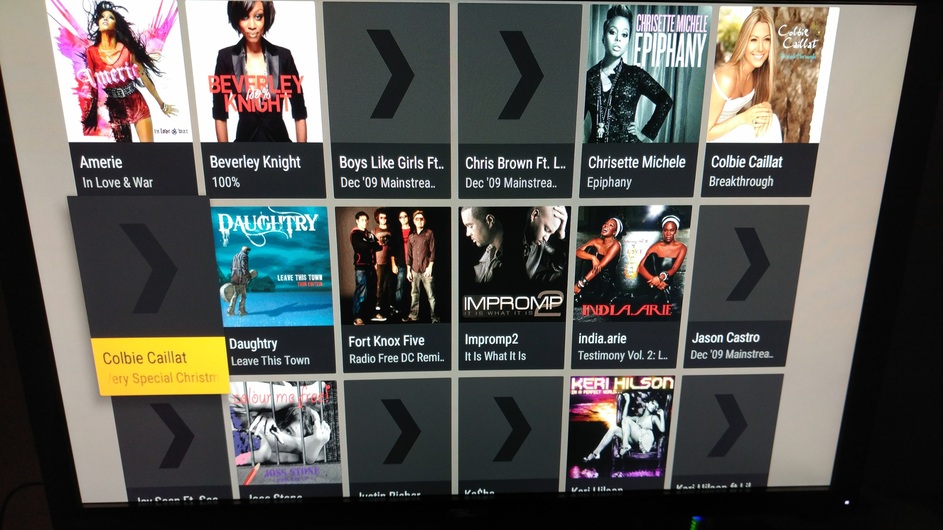
Thanks for your help, thus far, MwC_Trexx. I may have to consider an NAS. This Shield/Plex combo is frustrating. The interface keeps changing on my Shield. I added music by decades, and that was fine. I was able to select the view by folders. Now that option is gone, even though the music is still there. On my laptop, however, I can still search by the folders. Why can all the interfaces have the same features/functions? I’m attaching 2 pics. The one with the folder structure is the laptop interface. Preferable. The other is the Shield/Plex Combo. Cumbersome. Why would the folders option disappear on the Shield?
There is not a material difference on the Shield Music option. You just have the Shield view showing by Folders (which is basically a filesystem type view), instead of Artists/Albums which give you the pretty cover information.
Also realize that the view you will get via the web interface (i.e. laptop view) is generally different that will be on the Plex Clients on say set-top boxes, Apple TV, Shield TV, etc.
There are going to be things on this web/laptop inferface that aren’t in the other Plex clients as you are looking at more management view (web interface) vs. playback view (tv screens).
That isn’t a Shield Specific issue, but more of a different viewing/control interface design decision.
On the external drive, it is structured by decade/genre. With in the genre i have a folder for individual albums and a folder for individual tracks. Tha is how it is shown in the PC interface. In the Shield interface, all the tracks are lumped in. regardless of genre. It makes exploring a lot harder. Like I mentioned, at one point, in the Shield interface, the folders view was an option. It just randomly disappeared.
Which Shield client version are you running?
I understand and have accepted that the view will be different. I’m just baffled by the folders view disappearing in the Shield interface. I didn’t changed any settings. It just makes looking for music cumbersome. It’s like I am forced to created playlists. I can’t even select an album because Plex will just look to the individual tracks and create an album. It actually ignores the album folder and creates its own.