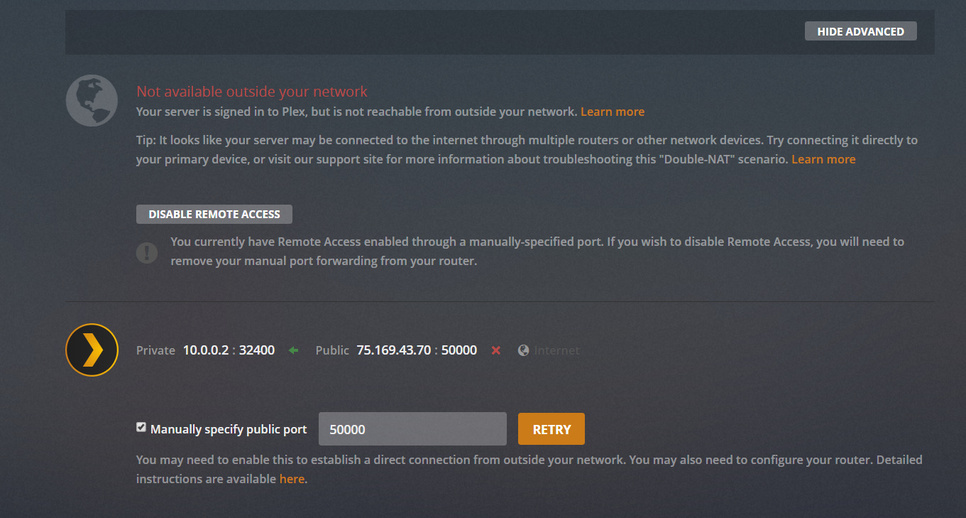
Server Version#:1.15.3.876-ad6e39743
Player Version#:3.95.1
I’ve setup my computer with a static IP as well as port forwarding on my router (netgear wndr3400v3)
my latest attempt at port forwarding set my external port as 50000 and my internal port as 32400. I’ve also tried setting both internal and external as 32400, but that didn’t work either. I’m on windows 10.
currently remote access will appear to be working for 3-4 seconds but then shows the error in the screenshot.
I think i screwed up the port forwarding somehow because when i use CanYouSeeMe.org it’s not able to see me on ports 50000, 32400, or even port 80. CanYouSeeMe.org also displays my public IP, rather than the static IP assigned to my computer, not sure if that matters.
Plex says I may be behind a “doubl-nat” scenario but i don’t believe that’s correct (although i’m not 100% on the definition). My computer is directly hardwired to my router, which is directly connected to the wall/internet. I also have an “AirApple” router connected to my netgear router, but i don’t interact with the air apple (my room mates are apple nerds, i’m not)
Is is your firewall on computer on? That may be blocking it. Here is info on how to open port on firewall (here you need to open 32400 and TCP is protocol)
Hmm, that’s a good question. The router is plugged right into an ethernet port in the wall, if we have a modem i’m not sure where it is.
Assuming that wall port feeds to the modem than the netgear router is connected to it.
is this a dorm or something? most houses don’t really have ethernet ports in the walls so just want to make sure. do you guys pay for your own internet (cable, fiber, whatever)
It’s a house but in a closed community…maybe they work with centurylink through a switch or something? I’m not sure, my friend isn’t currently here to answer these questions.
ya, that’s a private address. so you have some double nat going on. private ips aren’t internet routable (hence the nat) so there’s literally nothing i can do with that information
so your best case is to find whoever manages the device that is handing out the 192.168 address and see if they can port forward for you. then you could stick your pc in your routers dmz, or just plug into the wall directly with the pc.
set your router to bridge mode (if supported) and remove your static ip and pull dhcp from the main unknown router. then remove the manually specified public port in plex and see if upnp works
plug pc directly into wall, remove static ip, and remove manually specified port to test upnp
It looks like my router doesn’t support a bridge mode so I’m pretty sure this just went into the “more hassle than it’s worth” territory which is a shame cause i was really looking forward to remote access.
Thank you for your help I really appreciate it, especially the quick responses.