TV Can't Play HD Channels Post Upgrade of Ubuntu from 19.04 to 19.10

Server Version#: 1.18.1.1973
Player Version#: web client 4.8.3
I’ve had the TV DVR running really well so far, it’s been playing and recording TV solidly.
I updated my Ubuntu server which it’s running on from 19.04 to 19.10 and now it won’t record.
It will play Live TV, but scheduled recordings have failed and when I ask it to record they fail as well.
I’m assuming it’s permissions or something that happened during the upgrade but I’m not sure what. Can someone help me pin this down please?

In the log I can see an http_streamer issues with end of file and http write error, but I don’t how to fix these
Excerpt from Plex Tuner Service.log

Oct 28, 2019 20:11:06.577 [0x7f1d63fff700] INFO - [I] CTVSStreamSource::AddPID. Requesting PID 0, client triplet://9018:16517:17472
Oct 28, 2019 20:11:06.578 [0x7f1d7b7fe700] INFO - [I] tuner 0, demux 0. adding PID 0
Oct 28, 2019 20:11:06.628 [0x7f1d63fff700] INFO - [I] CTVSStreamSource::AddPID. Requesting PID 1, client triplet://9018:16517:17472
Oct 28, 2019 20:11:06.629 [0x7f1d7b7fe700] INFO - [I] tuner 0, demux 0. adding PID 1
Oct 28, 2019 20:11:31.400 [0x7f1da3fff700] WARN - [E] http_streamer_t::handle_read: read_error: End of file (2)
Oct 28, 2019 20:11:31.400 [0x7f1da2ffd700] WARN - [E] http_streamer_t: http write error
Oct 28, 2019 20:11:31.400 [0x7f1d61ffb700] INFO - [I] http_streamer_t::send_thread_func: removing http client
Oct 28, 2019 20:11:31.401 [0x7f1d61ffb700] INFO - [I] http_streamer_t::send_thread_func: all clients are deleted. Setting exit flag
Oct 28, 2019 20:11:31.408 [0x7f1d7bfff700] INFO - [I] streamer_container_t::control_thread. Removed disconnected streamer 3ce050e6-7451-475a-99be-cc7df74c62ea
Oct 28, 2019 20:11:31.408 [0x7f1d7bfff700] INFO - [I] streamer_container_t::delete_streamer. Last streamer was deleted. Stop program streamer
Oct 28, 2019 20:11:31.408 [0x7f1d7bfff700] INFO - [I] dvb_program_streamer_t::stop. Stoping program streamer for channel triplet://9018:16517:17472
Oct 28, 2019 20:11:31.408 [0x7f1d7bfff700] INFO - [I] transponder_streamer::stop_channel. Stop request for channel triplet://9018:16517:17472
Oct 28, 2019 20:11:31.449 [0x7f1d7affd700] INFO - [I] tvs_program_streamer::tuning_thread. Finished tuning thread for program triplet://9018:16517:17472
Oct 28, 2019 20:11:31.450 [0x7f1d63fff700] INFO - [I] CTVSStreamSource::RemoveAllPids. Removing PIDs for client triplet://9018:16517:17472
Oct 28, 2019 20:11:31.450 [0x7f1d7bfff700] INFO - [I] transponder_streamer::start_idle_timer
Oct 28, 2019 20:11:31.458 [0x7f1d7b7fe700] INFO - [I] tuner 0, demux 0. Deleting PID 0
Oct 28, 2019 20:11:31.469 [0x7f1d7b7fe700] INFO - [I] tuner 0, demux 0. Deleting PID 1
Oct 28, 2019 20:11:33.379 [0x7f1daa7e1700] INFO - [I] device_manager_t::idle_timer_func. Stream container for channel triplet://9018:16517:17472 on device dvb#v4l#0#/sys/devices/pci0000:00/0000:00:14.0/usb3/3-2/3-2:1.0:0 is idle. Deleting it.
Oct 28, 2019 20:11:36.414 [0x7f1d637fe700] INFO - [I] Stopping graph
Oct 28, 2019 20:11:36.415 [0x7f1d63fff700] INFO - [I] Stop device request for tuner 0, frontend 0
Oct 28, 2019 20:11:36.417 [0x7f1d7b7fe700] INFO - [I] Exiting streaming thread for tuner 0, frontend 0
Oct 28, 2019 20:11:39.399 [0x7f1daa7e1700] INFO - [I] device_manager_t::idle_timer_func. Device dvb#v4l#0#/sys/devices/pci0000:00/0000:00:14.0/usb3/3-2/3-2:1.0:0 is idle. Unloading it.
Oct 28, 2019 20:11:39.400 [0x7f1daa7e1700] INFO - [I] transponder_streamer::stop_idle_timer
Oct 28, 2019 20:11:39.400 [0x7f1daa7e1700] INFO - [I] CTVSStreamSource::Term. Waiting for streaming thread to stop
Oct 28, 2019 20:11:39.427 [0x7f1d63fff700] INFO - [I] Stop device request for tuner 65535, frontend 0
Oct 28, 2019 20:11:39.428 [0x7f1daa7e1700] INFO - [I] CTVSStreamSource::Term. Streaming is stopped
Oct 28, 2019 20:11:39.428 [0x7f1daa7e1700] INFO - [I] CTVSStreamSource::Term. Stream source is stopped
Oct 28, 2019 20:11:40.418 [0x7f1d637fe700] INFO - [I] transponder_streamer::idle_thread_func finished

Hmm, I’ve just managed to record something live off one of my channels and that worked fine. It appears to be having issues tuning some of the other channels though…
The error in the log file is the same as above when it can’t play a channel, which seems to be a lot of them

Something else I should have mentioned is that I upgraded PMS before the upgrade of Ubuntu but didn’t check Live TV functionality. I can’t remember which version of PMS I was running before, I’ll see if I can dig that up…
Edit it was on v1.18.0.1944-f2cae8d6b - Ubuntu PC x86_64 - build: linux-x86_64 debian and I think that had issues, I upgraded to v1.18.1.1973 last night and that didn’t help

I’ve tried removing the DVR device and adding it again and still no joy.
I’ve tried going back to the earlier PMS version and even a version 17 but nothing.
Rescanning the channels seems to have issues finding HD sources which were fine before.

(I’ve updated the post title to more accurately reflect the issue)

I think I’m finally narrowing down the issue (although it’s been inconsistent).
I’ve now got most SD channels working OK for playback - not tried recording much so far though.
Last night it stopped playing back a lot of my SD channels too, so it’s progress.
However the channel search no longer finds any HD channels. I can assign HD channels to the guide in SD positions but they won’t tune.
I’ve seen a few posts about issues with the Hauppauge WinTV DualHD firmware causing this issue in the past, so I’ll try and find if the firmware was updated during the move to Ubuntu 19.10 and see if I can reverse that.

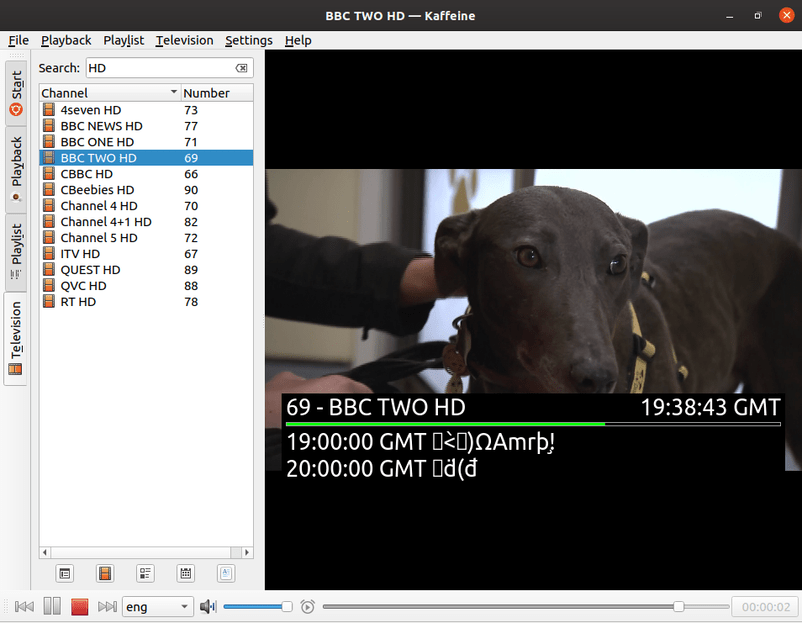
Kaffeine TV player plays HD channels fine, so the hardware and probably the firmware seem OK.

I removed PMS completely and the database and then reinstalled it and still the channels are wrong. I don’t know how I can fix this now :frowning:
The Hauppauge PPA doesn’t have a distro for 19.10 yet (eoan), so maybe that needs to be updated for it to work properly in Plex…

http://www.hauppauge.com/pages/support/support_linux.html?#plex

Hi, I’m b-rad. There will be an Eoan kernel soon, but it’s doubtful this will solve your issue depending on what it really is. Eoan will only contain an analog tuner series, DVB-T/T2 auto, and support for a new DVB-S demodulator. Everything else is already upstreamed.

1 Like

Hi, many thanks for your reply. I’ll keep playing with it to see if I can fix it, but it’s really confusing, and there seems to be very little I can do with Plex to force it to find the HD channels or make it work with them.

Are you a DVB-T user? Have you tried scanning on command line to see if you find all the channels you’re looking for?

DVB-T2 - I’ve not done that (didn’t know how) but I’ll have a look for some instructions. Thanks

If you’re a DVB-T2 you might likely depend on the T/T2 auto patch that will be part of the Eoan kernel. Your w_scan command line should be very simple.

1 Like

w_scan doesn’t seem to find the HD channels either.
w_scan GB result.txt (67.3 KB)
However I can play the HD channels fine in Kaffeine (and see the different IDs etc for each channel which is useful - I can’t even find those against the ones without names in the w_scan output).
I don’t know what the difference is between Kaffeine and Plex/w_scan but something isn’t right somewhere.
The interesting thing in Kaffeine is that the EPG titles come back as strange characters where the SD channels are fine.


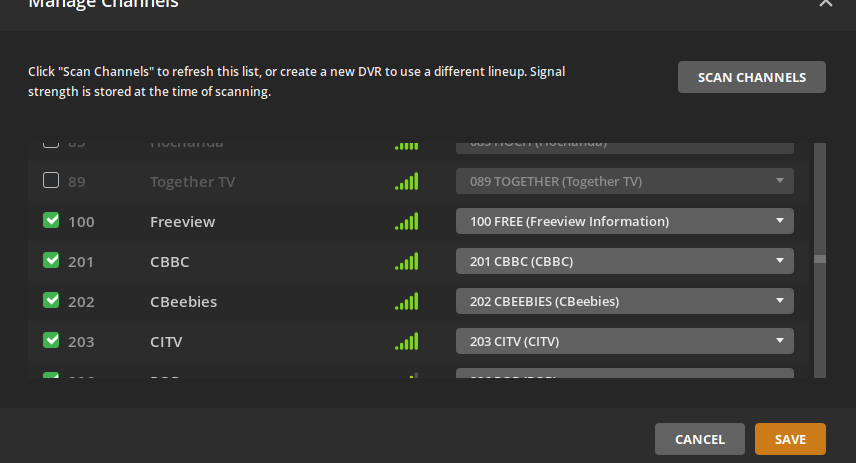
For comparison here’s what I see in Plex (Missing HD channels 101, 102 etc)

Although you can seem to select HD channels from the allocation drop down - they don’t work when trying to tune to them.

1 Like

I’m having the exact same problem with HD channels. Working on Kaffeine but not plex ? :frowning:

1 Like

The difference is the library that Plex, and lots of other embedded software uses, chooses not to explicitly set the PLP in DVB-T. w_scan does not support this either, but as you’ve found Kaffeine does. That’s why a lot of platforms require the DVB-T demodulator set in “T/T2 auto mode”.

1 Like

What do you think the issue we’re having is? It’s it something I can fix?

The issue is the lack of my patch in your kernel. When there’s an Eoan release you’ll be good to go again.

2 Likes

Ah perfect, thank you. Look forward to the release when you get chance to implement it

great thanks, I’m running Ubuntu 18.04.3 LTS does that make a difference? Will I need to upgrade to 19.10 to use the patch when it’s released?

All previous versions of Ubuntu are supported in my ppa. If you’re running any of my builds the functionality is included.
The following should have “mediatree” in the version string if you’re running my kernel:
uname -a

2 Likes