Ok, i will try that.
Trust me - I DO understand the issue…lol:
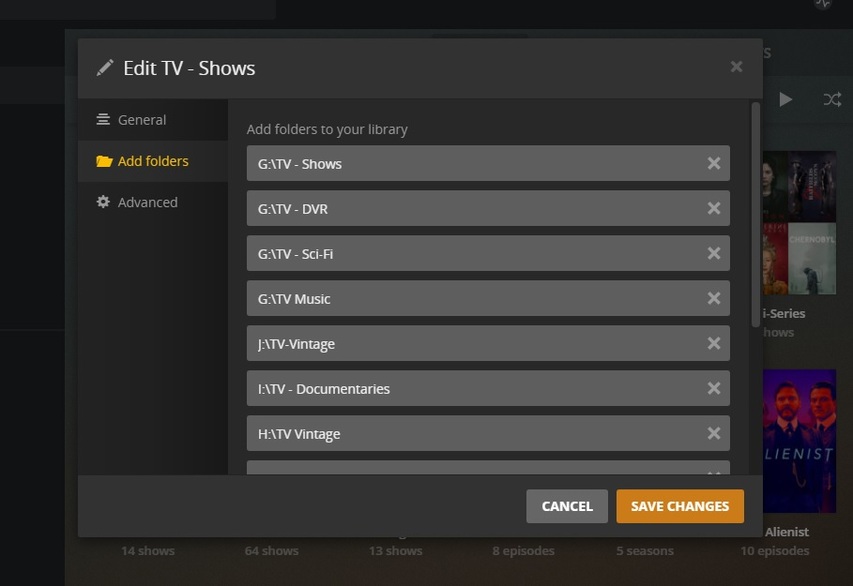
Yea, that list goes way down that page - and across 5 HDDs - festooned with Library Folders… everywhere!
@JuiceWSA If i would do that, make a new folder and put like one part of the Shows (with all their Subfolders) into that Subfolder, technically all my TV Shows that were with the “Shared Folder” as it was before, would not work anymore. Then I would need to change the folder in the Library Setting and just scan and check it allllllllll over again. (Which would take days LOL) …
Correct ?
Probably should disable Plex Server in that time completely before I do that.
Uhhh… no, I don’t think so.
I just recently (kicking and screaming) brought all 29 of my ‘Genre Libraries’ under one main Library (to make actor search work) and, really it didn’t take that long. I didn’t want to move all the media I had already - in smaller library folders scattered hither and yon… so I just started adding folders to the one main library.
Just do this for now as a test.
Remove Picard - the whole thing.
Scan Library
Empty Trash
Clean Bundles
Create a Library Folder on a drive. <—with all the proper permissions!
Put Picard in it.
Aim Plex at another (an ADDITIONAL) Library Folder - the one you just created with Picard in it.
Save…
Stand back (or behind something)… and let us know what happened…lol
Ok, it worked that way. But i noticed its different if you use a subfolder for series or movies.
As example. I created a new shared folder, on that (since you told me to not put it in the root), i created another folder called “TEST” just for testing.
In “TEST”, i put in my previous Star Trek Picard series folder, including its Season subfolder. Now when I added that folder to my library in Plesk, it was finding it.
But also, Picard was called TEST in Plesk at first. I had to manually sort it to the actual Show, for Plex to know what it was.
If i do it with the rootfolder, it finds things the correct way from the start.
Anyways, now that I have done it with Picard and know that it at least works with that, technically i would have to do that with all my TV Shows, if I dont want to end up with a similiar problem soon. Right ?
Oh man, thats going to be some work…
Ok… we’re not done testing…
Ideally you want the new Library Folder to be on a drive that is NOT already a Library.
Know what I mean?
You have S and T set up as libraries. In error, but we’re gonna fix that (eventually).
Do you have a drive that isn’t involved in library storage in it’s root?
If so - use that one as the drive for this new Test Library.
Set it - Move Picard again - scanning, cleaning, as before.
Add the new ‘legal’ library folder (we can’t put library folders in libraries - can we?)
Let’s see what happens this time.
No, that test folder was on a different drive (and a new shared folder) on the NAS.
Ok… that’s exactly right.
So… you do have some work cut out for you.
Trust me, I know all about it.
The reason I consolidated all those Genre Libraries under just one for Shows and Movies is so Plex would work as expected when I click an Actor Image.
If you want Plex to work as we all expect - you have some work to do.
How do you eat an elephant?
That’s right - one bite at a time.
… and let’s do get @ChuckPa in here to oversee this mess I’m making - to make sure you don’t do something you don’t have to - 'cause I really don’t know what should happen in a NAS environment, but I know who does.
So, technically (since I want to use the same drives aka Shared Drives again) I would need to remove the libraries in Plex Server, and then add new with Subfolders like “TV Shows 1” , “TV Shows 2” etc…
But btw, its still not right with Picard. Yes, Plex did find the show again, and it added it. But it does only show me 8 Episodes, although 10 are in the folder (and yes, named correctly!). Does it never end ? 
P.S: Fixed it. But thats the issue with using yet another Folder on top. It was trying to make some of those episodes work with “TEST” as a TV Show or whatever. Doesnt matter if the folder name would be test or something else, but it adds yet another problem with sorting it for Plex.
I’m almost 70 and it’s been a wild ride for most of those, so… no… it never ends…
Hold up doing much else other than ‘planning’ until we hear from Chuck.
Ideally you want to move ‘manageable’ chunks to new library folders in a way so that you clear one of those big drives so you can start moving stuff back there in folders.
You don’t want to ‘unplug’ anything at this point.
Unless advised by Chuck - some one that knows more than I do.
Folder View?
Never used it myself. <—but you can name these folders anything you want.
I tend to stick with Collection Abuse to get where I need to be:

Yea, remember all those Genre Libraries I had? ^There they are.^

As we stand on the loading dock smoking cigarettes - …
You want to do this in a way so Plex will ‘share’ the metadata you have already. We blew Picard out of the water. We don’t want to do that again if we can help it.
You want to Create Library Folders, but you want to ‘Copy’ shows there - while Plex is off - then start Plex so it finds duplicates, shares the metadata (you’ll see the 'Blue 2) - then when things are all done you can whack the original.
You can Create the Folder and copy some shows to it while Plex is on.
Add the folder and save and the material in that folder will be found and duplicated. Then you can delete the originals from the file system and rescan.
The NEXT BATCH of shows/movies for that folder needs to be done while Plex is sleeping. We don’t want her watching while we copy stuff to another active library. We just want her to wake up and deal with it suddenly…like ‘we’ did with the Wife about that boat purchase (and after all that noise she loves that thing)…lol
Lather - Rinse - Repeat - As Necessary.
OK, I have the same issue with the same show/episode mentioned above - Star Trek: Picard S01E01. All the others in the series appear in Plex, but the first episode doesn’t/won’t. The naming convention is the same on all files/episodes. I have replaced the file with a different rip and I have done the Plex dance. I am running the current version of Plex (as of 2 days ago). The files are not on the root of the drive - there is a folder named “share” on the root and under that are folders for TV, Movies, Music, Pictures to which the Plex libraries point. Anyone have any helpful thoughts?
Never mind. I finally tried just having the first episode in a folder by itself and pointed my Plex TV library to it. Plex found it, but identified it as Star Trek: Voyager. I corrected that match and the first episode was still in my library as a 1 episode season of :Picard. Then I added the other episodes to the same folder and re-scanned the TV library. Plex picked up the remaining episodes, but once again misidentified them as :Voyager. I corrected the match again and it combined the two shows in to a single :Picard series with all of the episodes. Problem solved for now.
1 Like
To process a bunch at a time I used the title plus the TVDB number “Star Trek Picard 364093” it added an unrecognized show season and episodes (Star Trek Picard 364093>>Season 01>>Star Trek Picard 364093 SxxExx - Show name). I fixed the match at the show level and all the episodes fell into line nicely. I’ve done this for other troublesome shows.
Wait so it’s best to move new movies & tv shows onto my NAS when Plex is ‘OFF’ to avoid odd issues with metadata and recognition?
In the past sometimes I’ve done it while Plex is on so I can monitor and watch it recognize new additions in real time, but other times I’ve done it without Plex running.
Could this be the reason why I also have about 10% of the media I add to plex never get recognized by Plex!?!!?!
In a way I hope it is as the ‘Plex dance’ rarely works for me with unrecognized media.
This topic was automatically closed 90 days after the last reply. New replies are no longer allowed.
