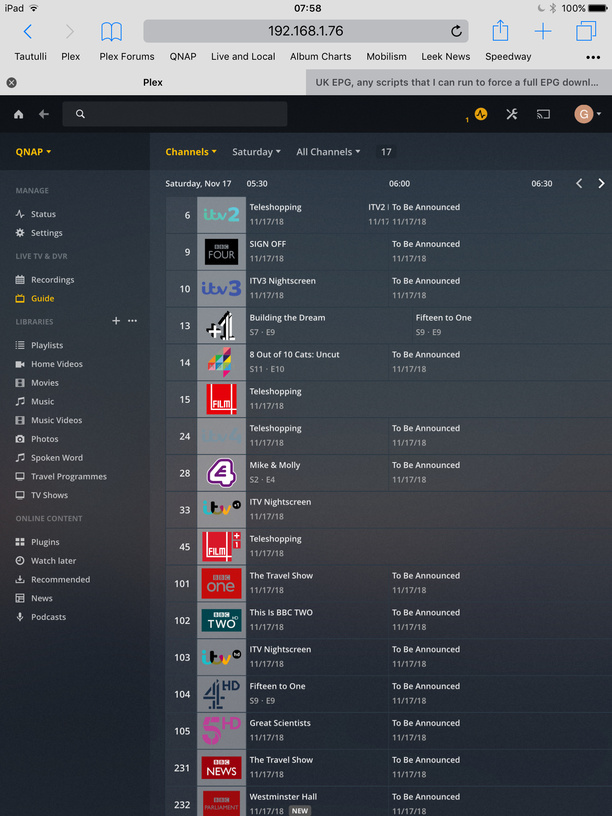
My Plex server currently only downloads a couple of days of EPG in the UK, used to be two weeks, but if I do a full download, then I get a lot more than the next two days.
Does anyone know any way to have a script that every-night, would force a full download?
Ideally, I would like Plex to fix this, as well as the current issue that Plex thinks channels are HD channels when they are not in the UK, but as no response to this from Plex I’m looking for a workaround
I’ve found the Refresh EPG call, I’ve created a python 3 script for it, but it should be trivial to convert to another language. Just get a plexToken and your DVRID
Thanks for this, got everything working except cannot work out what the DVRID is for my server. How do I find this, and thanks again for the script?
I notice that Plex does have a Scheduled Task that Perform refresh of program guide data would be nice if a Scheduled Task for a full EPG download could be included as an option.
I am wondering if someone could write a “Dummies” guide to implementing this. The issue of the EPG failing to update is widespread across the UK and clearly Plex are not interested in either fixing it or giving the option for a full reload in the scheduled tasks.
I’m sure a lot of users would like to implement this fix but are at a loss in how to apply a script, token, etc.
Hopefully someone can give some simple instructions to implement this.
If there are widespread issues, would like to see evidence of them - so please screenshots / logs with debug logging enabled beforehand
It is now designed to gradually build the EPG incrementally after the initial load - with an incremental refresh every 4 hours adding another 4 hours set of guide data. Incremental updates were introduced to reduce the load on the backend systems
I’m happy to supply logs, screenshots etc. I have recently completed a manual refresh so at the moment there is no issue. From experience I expect the first issues to arise tomorrow at 6.00am - it usually starts with the BBC channels and then spreads to other channels.
I will grab the logs and screenshots tomorrow and upload them.
The code still works, but be mindful that these Plex token change overtime, so make sure that you have the current Plex Token in your script and the DVRID for you system is not “A2” but just the number “2”, i.e. ignore %3A.
If anyone is good with Python, would be great if you could adapt the script so that it always get the correct Plex Token when it runs
It could be timeouts on accessing the provider - point me to post where the issue has been described and full logs zip provided. Unfortunately I cannot and do not investigate issues from log extracts and need to see the whole picture - so full logs zip please - ideally going back to the time the server was last launched
I found the URL by looking in developer tools on Chrome, so I’d recommend checking yours manually.
Using Chrome…
Head to Live TV & DVR in settings
Press Ctrl, Shift, I to open the developer tools
Change to the Network tab
Hit refresh EPG in the Plex Settings
Look for the URL in Developer Tools
Use that in the script
This morning I have “To Be Announced” from 6.00am on Saturday. Screenshots and Logs uploaded. I will do another screenshot/upload this afternoon and this evening as Plex should have tried to update the EPG further over these periods. If you require anything else let me know.
@sa2000 - let me monitor and provide you with a complete set of logs; as I’m running a guide refresh daily I want to wait a few days before grabbing the logs as otherwise I won’t be able to tell if the issue is still there or not.