Since Plex changed the EPG stuff I’ve been completely unable to use my Plex Live TV DVR. So I tried removing the HD Home Run and re-adding it. However, I can’t seem to successfully actually add the HD Homerun at all. First it won’t find it on the lan, so I put the IP address in, then I get through the channel page to the language screen for the program guide and at that point I can’t get any further. I’ve tried using an xml file I downloaded from https://freepg.tv (Australia), which I simply stuck in my /media folder (I’ll automate downloading it if I can get the actual DVR working first). I then tried continuing without the xml file but regardless I can’t get past this point. I get error “unknown status”. Screenshots attached.


I’m running Plex 1.16.2.1297
Even if I don’t put in an xml file, I can’t proceed past this screen (continue is disabled):

Just to chime in - I’ve had this same problem as well. Just cancelled my plex pass because I’ve been stuck on this for weeks. 
Hi,
All I had to do is register and add the link sent to me and it worked.
Example below:
Hi,
Thanks for registering for the freEPG.tv xmltv feed for ‘QLD - Sunshine Coast’.
To access this feed here’s the URL you’ll need to punch into your system.
http://au.freepg.tv/xmltv/oztivo/QLD.SunshineCoast.gz?UID=CDF4FF34&K=92C12C24045D6BDB894BE386F11FD
Please note the above is not the correct address, it’s just for illustration purposes
hi @SE56, I tried putting that link into the xml TV guide field but that didn’t work. When you say you punched it in, where exactly did you punch the link in?
@se56 like for example can you show me a screenshot? I won’t use your url, I have my own (they’re free and region specific).
Server Version: 1.16.3.1402
Were it says path add URL.
From there FAQ, the following is found.
Q) What channels are provided?
A) In most cases the freepg.tv feeds contain most of the important FTA (Free To Air) channels you’d want to watch and record from*.
There’s a few ommisions though (depending on what region you are in) - currently known missing channels are ‘Imparja’ (broadcast in regional SA, NT, WA) - and some of the community/shopping channels we can’t source data for (Aspire, iShopTV, 44 Adelaide, 31 Brisbane). Maybe someone will provide these for us one day, however right now you’ll need to work out some other way to get those ones. Please view the regional listing page to see what channels are (and aren’t) provided.
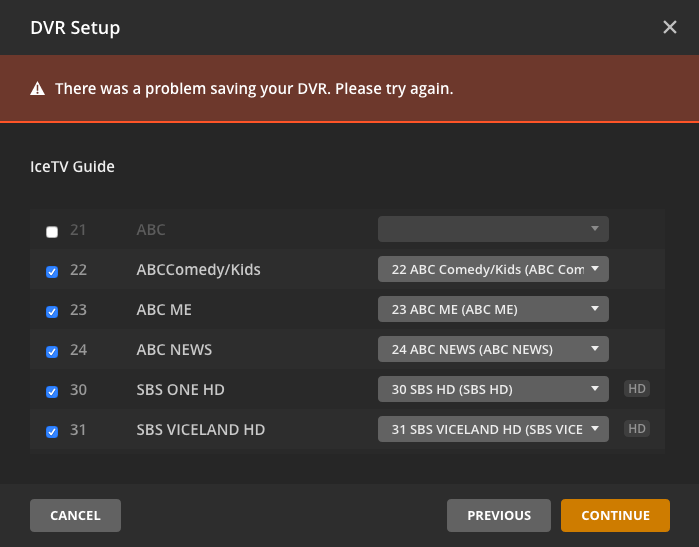
@SE56 I actually tried that first but for whatever reason it didn’t work. Now it does… it progresses to the next screen where you map the channels to the EPG however, it doesn’t work past there. So I tried signing up for the free 3 month icetv.com.au trail, using their URL instead. Admittedly it does have quite a lot more channel data than freeing.tv however, that doesn’t work either. It basically sits there after you press the continue button and the little circle spins forever. Then eventually (like an hour later) you get the message "there was a problem saving your DVR. Please Try Again.
I updated plex to 1.16.3.1433 (it’s in a binhex-docker on my Unraid server)
I also installed the HDHomeRun app on my computer which seemed to do a firmware update of the device. The device is working fine using the desktop app. It was working just fine when Plex used the terrestrial EPG.
I even tried setting up only 1 channel (20 - ABC), and even that failed.
Screenshots:

Plex Media Server Logs_2019-07-28_21-10-12.zip (4.0 MB)
Logs attached. Hopefully someone can point out the problem.
Thanks again @Plex . Turns out this is a known issue: Is Anyone's Plex Live TV/DVR Function Working?
I’ve wasted hours on this, you could have at least put a link to the known issue here: https://support.plex.tv/articles/225877347-live-tv-dvr/ or https://support.plex.tv/articles/using-an-xmltv-guide/
Very unimpressed. Kudos to @SE56 for trying to help. Severely negative kudos to @Plex for very poor forum management (I’m a paid up plex pass user asking for help) and for not making it known there is an issue and most of all for wasting hours of my time.
@dgwharrison
Like you, I’ve struggled with this and tried everything I could think of.
I have 2 Plex servers. One is NAS WD MyCloud PR2100 which I don’t suggest using for a Plex Server. In my opinion, it doesn’t have enough computing power for HD videos so I keep it running as my music server. My second Plex server is a dedicated i7 Windows desktop with plenty of computer power. I use the 12 TB on the NAS as my main storage for both servers. Both of these servers have the latest Plex software.
My HD Homerun Prime box works perfectly over wifi but like you have stated Plex won’t see it on either server unless I put the IP address in. Once I enter the address, it at least knows the box is there but spins it’s wheels trying to find channels and finally times out with an error message. So I’m glad to know they are aware of it and working on the issue. I’ve been using the Live TV & DVR ever since Plex first made it available and it worked great. The “remove commercial” feature is GREAT (when it works) but now I’m left without anything except the movies I’ve recorded over time. So I sure hope they come up with a solution soon. I’d be glad to beta test it if Plex is reading this.
hi @tlctimfl, honestly I doubt @Plex is actually watching. Their staff “used to be” really good at monitoring the forums but in the last couple of years that has gone down hill.
I suggest you report your issue over here: Is Anyone's Plex Live TV/DVR Function Working? provide @DaveBinM with the make, model and version of your NAS and as much detail on your pc as possible. It should be working from your PC. Also they’ll probably want to know which XML provider you’re using.
@Plex stop charging ahead with new features and get your core product working. Plex Pass users pay so we can have live TV / DVR features, now we have to pay more to services like IceTV and you haven’t even got it working properly. Many of us Plex Pass users spend good money on rigs making sure they are suitable for plex hosting and then you get this sort of thing. Leaves a very bad taste in
the mouth.
Oh and fix HDR mapping already.
I spent a day unable to get beyond the postcode screen to use the HD HomeRun with Plex. It was frustrating there was no phone number for Plex support, even though I had just signed up for paid membership. No way would it work with my valid UK postcode (first part). I finally found I could click on the XMLTV option and type: http://www.xmltv.co.uk/feed/6743 . Then I could continue and it loaded the EPG for UK Freeview using that online data feed. As I type it now appears to be downloading the EPG data successfully.
Has anyone had any luck with this yet? I am looking at buying a HDHomeRun Connect Quatro, but if it won’t work when I get it I may hold off.
Thanks!
I eventually solved this by doing a manual update to Plex in the Synology Software and then choosing the correct version of the Plex update for my Diskstation. After that, it accepted my UK postcode with no problem and it is now working fine.
This topic was automatically closed 90 days after the last reply. New replies are no longer allowed.
