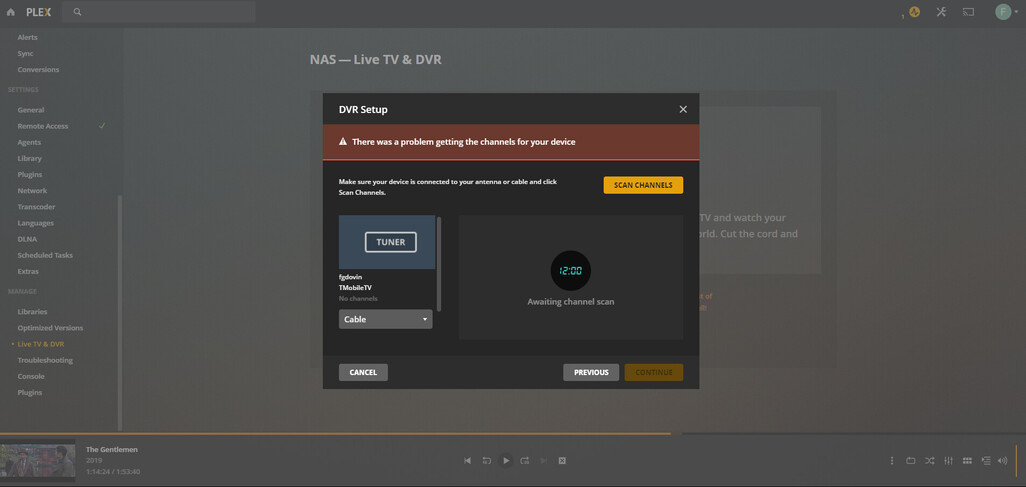
Unable to use tuner - problem getting channels from my IPTV

Server Version#: 1.21.1.3830
Player Version#: 4.47.3

I am trying to use my xTeVe-like proxy as a tuner in order to be able to watch my IPTV in Plex.
However, I am unable to get pass this error which shows up whenever I select my tuner (even before clicking on Scan channels), see screenshot.

Full logs attached, I see the relevant part as:

Dec 22, 2020 14:21:19.566 [0x7ffabbfff700] DEBUG - [Grabber] Grabber: Channel scan finished with 0 channels.
Dec 22, 2020 14:21:19.566 [0x7ffabbfff700] DEBUG - [Grabber] Activity: Ended activity e2445ebf-d720-426c-be56-3f2590d5c752.
Dec 22, 2020 14:21:19.637 [0x7ffb17fff700] DEBUG - Auth: authenticated user 1 as fifisvk
Dec 22, 2020 14:21:19.637 [0x7ffb15ffb700] DEBUG - Request: [172.21.0.13:35244 (Subnet)] GET /media/grabbers/devices/8/channels (6 live) GZIP Signed-in Token (fifisvk)
Dec 22, 2020 14:21:19.638 [0x7ffb15ffb700] DEBUG - HTTP requesting GET http://192.168.1.63:4000/lineup.json
Dec 22, 2020 14:21:19.644 [0x7ffb15ffb700] DEBUG - HTTP 200 response from GET http://192.168.1.63:4000/lineup.json
Dec 22, 2020 14:21:19.645 [0x7ffb15ffb700] ERROR - Exception handled: **basic_string::_M_construct null not valid**
Dec 22, 2020 14:21:19.645 [0x7ffb17fff700] DEBUG - Completed: [172.21.0.13:35244] 500 GET /media/grabbers/devices/8/channels (6 live) GZIP 8ms 405 bytes (pipelined: 5)

(File removed)

I am more than happy to provide any additional logs.

Did you load the channels and guide data as well as make sure the channels are mapped to the guide data? Also make sure that port 34400 is open on the machine running xteve.

I used xTeve in the first place, but could not get it to working as I was missing an auth before starting the stream (I needed Bearer token auth and xTeVe only supports username+password auth passed directly in URL AFAIK), so I checked the API xTeVe uses and mimicked it in my own tuner.

My whole project runs on a different port (4000) but I must have done something wrong to cause 500 status code in PMS (as seen in original logs).

So my question is: what am I doing wrong/missing in order to get this running just like xTeVe would? It’s a shame PLEX does not support adding .m3u files directly. IPTV is the reason I bought plexpass for and I hope I will be able to use the extra features I paid for.

These are my responses to various calls.

GET /discover.json

{
    "BaseURL": "http://mydomain",
    "LineupURL":"http://mydomain/lineup.json",
    "DeviceAuth": "tmobiletv",
    "DeviceID":"2020-13-RN23-18B5KE",
    "FirmwareName":"bin_1.0.0",
    "FirmwareVersion":"1.0.0",
    "FriendlyName":"TMobileTV",
    "Manufacturer":"fifisvk",
    "ModelNumber":"1.0.0",
    "TunerCount":1
}

GET /device.xml OR GET /capability OR any unmatched call:

(equivalent to https://github.com/xteve-project/xTeVe/blob/71dfe912722f3aa7cf10a3764bcd86867ee32fa4/src/webserver.go#L101 )

<?xml version="1.0"?>
<root xmlns="urn:schemas-upnp-org:device-1-0">
  <URLBase>http://mydomain</URLBase>
  <specVersion>
    <major>1</major>
    <minor>0</minor>
  </specVersion>
  <device>
    <deviceType>urn:schemas-upnp-org:device:MediaServer:1</deviceType>
    <friendlyName>TMobileTV</friendlyName>
    <manufacturer>Silicondust</manufacturer>
    <modelName>HDTC-2US</modelName>
    <modelNumber>HDTC-2US</modelNumber>
    <serialNumber/>
    <UDN>uuid:2020-13-RN23-18B5KE</UDN>
  </device>
</root>

GET /lineup_status.json

{"ScanInProgress":0,"ScanPossible":1,"Source":"Cable","SourceList":["Cable"]}

These are called during adding of tuner and I believe they are correct (copy+paste from xTeVe), because tuner appears in Plex and can be added.

The interesting part is this:

GET /lineup.json (redacted, there are 99 channels in total)

[{"GuideName":"ăT1 HD","GuideNumber":6054,"URL":"http://mydomain/stream/6054"},{"GuideName":"ăT2 HD","GuideNumber":6053,"URL":"http://mydomain/stream/6053"},{"GuideName":"Nova HD","GuideNumber":4451,"URL":"http://mydomain/stream/4451"},{"GuideName":"Prima HD","GuideNumber":4452,"URL":"http://mydomain/stream/4452"},{"GuideName":"Prima LOVE HD","GuideNumber":6031,"URL":"http://mydomain/stream/6031"},{"GuideName":"Prima Cool HD","GuideNumber":6032,"URL":"http://mydomain/stream/6032"},{"GuideName":"Nova 2 HD","GuideNumber":4453,"URL":"http://mydomain/stream/4453"},{"GuideName":"Nova Gold HD","GuideNumber":4454,"URL":"http://mydomain/stream/4454"},{"GuideName":"Nova Action HD","GuideNumber":4455,"URL":"http://mydomain/stream/4455"},{"GuideName":"Barrandov TV HD","GuideNumber":4456,"URL":"http://mydomain/stream/4456"},{"GuideName":"Barrandov Krimi","GuideNumber":6066,"URL":"http://mydomain/stream/6066"},{"GuideName":"Prima Krimi","GuideNumber":4338,"URL":"http://mydomain/stream/4338"},{"GuideName":"ăT3 HD","GuideNumber":4522,"URL":"http://mydomain/stream/4522"},{"GuideName":"ăT24 HD","GuideNumber":6024,"URL":"http://mydomain/stream/6024"},{"GuideName":"CNN Prima News HD","GuideNumber":6115,"URL":"http://mydomain/stream/6115"}]

GET /stream/channelId

makes an authorized call to fetch stream URL for given channel id, returning 302 redirect to said URL. When I try this locally by pasting my URL into VLC, I am able to get the stream and watch it.

The following two calls were never used as I am stuck on that error message from my original post, but I am including these just to be complete:

GET /playlist.m3u (redacted, there are 99 channels in total)

#EXTM3U
#EXTINF:-1 tvg-id="6054" tvg-logo="https://files.cdn.magio.tv/tv_logos/ct1-hd.png",ČT1 HD
http://mydomain/stream/6054
#EXTINF:-1 tvg-id="6053" tvg-logo="https://files.cdn.magio.tv/tv_logos/ct2-hd.png",ČT2 HD
http://mydomain/stream/6053
#EXTINF:-1 tvg-id="4451" tvg-logo="https://files.cdn.magio.tv/tv_logos/nova-hd.png",Nova HD
http://mydomain/stream/4451
#EXTINF:-1 tvg-id="4452" tvg-logo="https://files.cdn.magio.tv/tv_logos/prima-hd.png",Prima HD
http://mydomain/stream/4452
#EXTINF:-1 tvg-id="6031" tvg-logo="https://files.cdn.magio.tv/tv_logos/prima-love-hd.png",Prima LOVE HD
http://mydomain/stream/6031
#EXTINF:-1 tvg-id="6032" tvg-logo="https://files.cdn.magio.tv/tv_logos/prima-cool-hd.png",Prima Cool HD
http://mydomain/stream/6032
#EXTINF:-1 tvg-id="4453" tvg-logo="https://files.cdn.magio.tv/tv_logos/nova-2-hd.png",Nova 2 HD
http://mydomain/stream/4453
#EXTINF:-1 tvg-id="4454" tvg-logo="https://files.cdn.magio.tv/tv_logos/nova-gold-hd.png",Nova Gold HD
http://mydomain/stream/4454
#EXTINF:-1 tvg-id="4455" tvg-logo="https://files.cdn.magio.tv/tv_logos/nova-action-hd.png",Nova Action HD
http://mydomain/stream/4455
#EXTINF:-1 tvg-id="4456" tvg-logo="https://files.cdn.magio.tv/tv_logos/barrandov-tv-hd.png",Barrandov TV HD
http://mydomain/stream/4456
#EXTINF:-1 tvg-id="6066" tvg-logo="https://files.cdn.magio.tv/tv_logos/barrandov-krimi.png",Barrandov Krimi
http://mydomain/stream/6066
#EXTINF:-1 tvg-id="4338" tvg-logo="https://files.cdn.magio.tv/tv_logos/prima-krimi.png",Prima Krimi
http://mydomain/stream/4338
#EXTINF:-1 tvg-id="4522" tvg-logo="https://files.cdn.magio.tv/tv_logos/ct3-hd.png",ČT3 HD
http://mydomain/stream/4522
#EXTINF:-1 tvg-id="6024" tvg-logo="https://files.cdn.magio.tv/tv_logos/ct24-hd.png",ČT24 HD
http://mydomain/stream/6024

GET guide.xml (heavily redacted, 20k lines in total)

<?xml version="1.0"?>
<tv generator-info-name="fifisvk-tmobiletv">
  <channel id="6054">
    <display-name lang="cs">ČT1 HD</display-name>
    <url>http://mydomain/stream/6054</url>
  </channel>
  <programme channel="6054" start="20201222001500 +2000" stop="20201222005500 +2000">
    <title lang="cs">BanĂĄnovĂ© rybičky</title>
  </programme>
  <programme channel="6054" start="20201222005500 +2000" stop="20201222012500 +2000">
    <title lang="cs">ToulavĂĄ kamera</title>
  </programme>
  <programme channel="6054" start="20201222012500 +2000" stop="20201222015000 +2000">
    <title lang="cs">Z metropole</title>
  </programme>
  <programme channel="6054" start="20201222015000 +2000" stop="20201222020500 +2000">
    <title lang="cs">KalendĂĄrium</title>
  </programme>
</tv>

So a bit confused, are you saying you are writing your own app or using xteve? If you need basic auth, you should be able to add the auth to each of your playlist urls that you import in to xteve. Typically you would download the playlist your from your provider for your account and it should already include your auth.

Sorry for the confusion, I mentioned xTeVe-like app to help set up the context here, but it kinda backfired. I am writing my own tuner as the xTeVe API seemed very simple.

I cannot use xTeVe because I need basic auth to fetch access token for bearer token (sry, that last part didn’t make it to my previous post and probably confused you as for why I am not using xTeVe - I edited it now).

My problem is that I don’t see any failed request in my tuner app but PMS failed on something with 500 status code and I cannot see anything else which might lead me to the actual issue.

OK, gatcha. Now I have not dug in to the code so I may be off base. Did you write your code to allow Plex to find it automatically on the network? I did notice that xteve is discovered and always starts off on port 80 not the 34400. So I assume that the initial request on port 80 may be what your missing and probably returns some type of information that plex is looking for.

Well, as I said, it’s all running on one port (3000 by default but configurable) and it has a /discover.json endpoint, which I suppose handles the initial discovery of the tuner in the PMS.
This works neatly and I even have /* endpoint which catches every non-specified route, logs the request and returns 200 OK so I can see in logs which endpoints are called. But I don’t see anything unusual here, just the endpoints described above returning the exact same response as xTeVe would (except some device ID, I changed that to be really really sure).

ok i decided to look it to this and you are missing some info in your discover.json so I am not sure if it is needed or not. The other thing is that you are not escaping your json strings and is probably your biggest problem so you may want to read up on that.

Here is what the discover.json is from my TV tuner.
{
“FriendlyName”:“HDHomeRun PRIME”,
“ModelNumber”:“HDHR3-CC”,
“FirmwareName”:“hdhomerun3_cablecard”,
“FirmwareVersion”:“20160630atest2”,
“DeviceID”:“1317EC45”,
“DeviceAuth”:“abcdefg”,
“TunerCount”:4,
“BaseURL”:“http://192.168.0.181:5004”,
“LineupURL”:“http://192.168.0.181:5004/lineup.json”
}

I believe my discover.json posted above has all this info,
I reformatted it to be more clear but all the fields are there.

Where do you see not escaped strings?

Anyway, million thanks for looking into this.

lol, sorry the forum removed the escapes in the post. Your / should be \/ in your URLs.
http:\/\/127.0.0.1:3000\/discover.json

Since the forum cleaned this up I am not sure you are doing this.

Please excuse me jumping in?

You can use code format bracketing to preserve things:

``` (back-tick / grave character)
will preserve \ when entered
```

Looks like:

will preserve \ when entered

Hmm, I will get to verify this tomorrow, but I don’t think this will be the issue, as I copied all the responses from xTeVe to see the payload and structure and there were no escaped characters, I am 120% sure. But I will try it to be really really sure. From my POV, it looks like PMS received an empty value/response somewhere. I am attaching the logs from my tuner so that you can see what has been called by PMS.

2020-12-25T08:26:18.590849772Z T-Mobile TV Tuner started on port 4000
2020-12-25T08:26:18.609246860Z Generating 'lineup_status.json'...
2020-12-25T08:26:18.609286391Z 'lineup_status.json' generated.
2020-12-25T08:26:18.627133408Z Generating 'capability.xml'...
2020-12-25T08:26:18.643920555Z 'capability.xml' generated.
2020-12-25T08:26:42.369139956Z GET /discover.json 200 - 8.907 ms
2020-12-25T08:26:42.374596639Z GET /lineup_status.json 200 - 1.567 ms
2020-12-25T08:26:52.873823506Z GET /discover.json 200 - 1.392 ms
2020-12-25T08:26:52.878227329Z GET /lineup_status.json 200 - 1.394 ms
// here, I called my endpoint which generates playlist.m3u and guide.xml with EPG for a day (otherwise this run on schedule at 2AM every day)
2020-12-25T18:43:00.186611810Z Generating all the required files...
2020-12-25T18:43:00.188762485Z Fetching channels...
2020-12-25T18:43:00.188990279Z We don't have token, initialising & logging in...
2020-12-25T18:43:26.650016175Z Fetching EPG, this might take a while...
2020-12-25T18:43:26.651235872Z Fetching EPG, part 1...
2020-12-25T18:43:59.996752067Z Fetching EPG, part 2...
2020-12-25T18:44:05.654715654Z Fetching EPG, part 3...
2020-12-25T18:44:14.111572941Z Fetching EPG, part 4...
2020-12-25T18:44:20.816721593Z Fetching EPG, part 5...
2020-12-25T18:44:28.972433143Z Generating 'playlist.m3u'...
2020-12-25T18:44:28.973603804Z 'playlist.m3u' generated.
2020-12-25T18:44:28.973710213Z Generating 'lineup.json'...
2020-12-25T18:44:28.974168752Z 'lineup.json' generated.
2020-12-25T18:44:28.974553590Z 'Generating 'guide.xml'...'
2020-12-25T18:44:28.983109385Z Generating guide with 99 channels...
2020-12-25T18:44:29.759953519Z 'guide.xml' generated.
2020-12-25T18:44:30.000973626Z All files generated successfully.
2020-12-25T18:44:30.012004127Z GET /generate 200 - 89825.104 ms
2020-12-25T18:44:30.266287348Z GET /favicon.ico 200 - 12.413 ms
// I went to PMS -> Live TV & DVR -> clicked on my tuner -> lineup.json gets fetched as /discover.json points at it, 
this is successful but nothing more happens no more HTTP calls to my tuner after this point :(
2020-12-25T18:44:50.461137396Z GET /lineup.json 200 - 1.522 ms

hmm, I just pulled the discover.json from xteve that I have setup and you are correct, it is not being escaped. This is what I got from xteve.

http://192.168.0.59:34400 1 0 urn:schemas-upnp-org:device:MediaServer:1 xTeVe Silicondust HDTC-2US HDTC-2US uuid:2020-08-OGEU-YV7KEO:5

Can someone from dev team respond to this, please? I think 500 status code suggests something is off and should be addressed.

@ChuckPa sorry for tagging you directly, but I would like to get this sorted out.
Would you require something from me? Can I try anything?
I cannot proceed on my own as I simply don’t know what might be the root cause.

Thank you in advance for looking into it.

Plex does not officially support third part emulation of a tuner device. I have retagged your post with the other-third-party tag. You might find other user support in the xTeVe - IPTV for Plex DVR thread.

1 Like

@fifisvk

I’m not really able to help here and probably should not have said anything.

I lost DVR capability over 2 years ago.
I live in a very rural area and internet is not the greatest either (DSL)

Hi @ChuckPa and @johnm_ColaSC , thank you for your replies, I understand it is hard to guess what might be the problem. Would it be possible to at least share which API is called on tuners?
It would help me tremendously if I knew what I want to implement and I think it is not that secret information. I came across some desperately outdated HdHomeRun API docs and it seemed quite accurate, but not 100%.

Many thanks in advance,
Filip

Plex does not use any API with the HDHR tuners. All interaction with the tuner is as outlined in the HDHomeRun HTTP Development Guide that SiliconDust provides.

Yeah that’s what I meant, I considered this to be an API of the tuner.
Anyway, there are just two/three URLs defined in that document:

http://<device ip>/lineup.json
http://<device ip>/lineup.xml

and then URL referred to in these files, namely in the ‘URL’ field.
I believe I have this set up correctly, yet I receive 500 status code in PMS.

I am able to make my app available from the Internet if you would like to debug
the integration somehow, or I can provide more logs.