Docker is virtualizing only the application in a namespace on the host.
LXC (LinuX Container) virtualizes an entire OS context in a namespace on the host without the overhead of a VM.
Ok, thanks for explaining that.
Is what you’re testing out in your LXC going to be helpful to those of us that aren’t using it, and running in a full unraid os environment?
I’m just not understanding why more people aren’t experiencing this issue (or at least not complaining about it). Is it a Plex or is it an unraid issue that is causing the GPU to not be utilized?
Hey! It’s working!!
I had a version update, now I’m running Version 1.32.5.7349. I have my NVIDIA drivers updated to the latest v535.86.05. I now see options under settings>transcoder where I have a dropdown to select which hardware I want to use.
And when I play and transcode something, it is showing up on my NVIDIA dashboard again!
I can only assume that something was fixed in that Plex version update. I’m pretty excited that it all works properly again!!
But then is there something I can do to fix it? must be fixed from plex side?
This is my kernel and the options I have to downgrade nvidia driver. But I downgraded to some of them and it didn’t work
I don’t know enough about unRaid to answer that one.
I do know the issue is in unRaid.
As confirmation, put this file in an “Other Videos” type library section.
Restart Plex
Set the playback to something which will force transcoding.
Do the playback (it’s 30 seconds).
Download the logs ZIP so I can see everything from PMS start → Playback.
As for other things I can do, I have an unRaid NUC7 here.
If I could stand up a VM with unRaid in it then I’d be able to do more.
Please forgive me but I can’t remember whether it’s unRaid or ProxMox which requires blacklisting of drivers. I think it’s ProxMox and only applies to the Intel QSV GPU.
I saw in another post that you mention that my card P620 does not support HDR, most of my movies now if now all have are 4K HDR10 (HEVC Main 10). Could this be the problem?
Oct 03, 2023 22:37:12.141 [23183723871032] DEBUG - Selected a foreign audio track: en
Oct 03, 2023 22:37:12.141 [23183723871032] DEBUG - Subtitles: Found a candidate subtitle language [es] for a foreign film
Oct 03, 2023 22:37:12.141 [23183723871032] DEBUG - Audio Stream: 89887, Subtitle Stream: 89889
please look at the subtitle type – Is it SRT (OK) or is it PGS/VOBSUB/DVDRIP ?
In my case it fails when the video has a format not supported by HW transcoding.
Maybe plex could implement a kind of bypass, so if hardware transcoding is not supported for a specific format then either do transcoding via CPU or show a more detailed error message to understand what is going on.
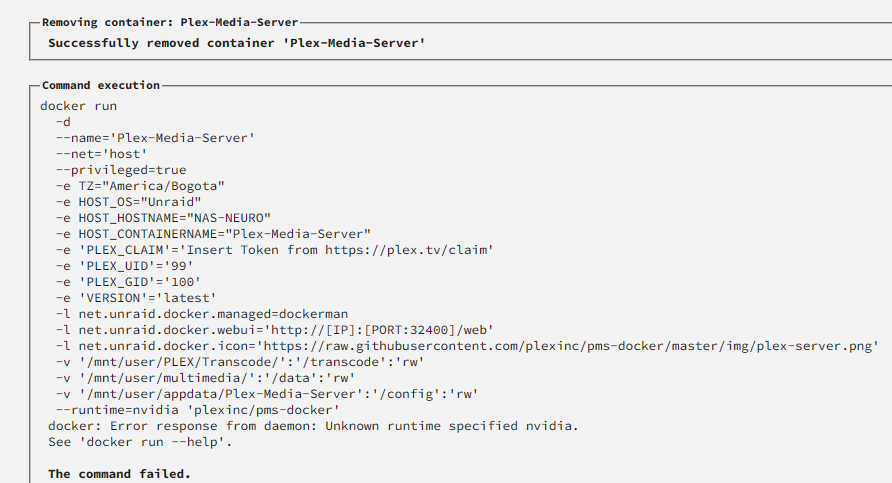
Hello friends I’m looking for help I just moved my Windows 11 server to Unraid I already have official Plex Media Server running but web I want to run my GPU I get an error