Running
Server Version#: QNAP TVS-1282T3, running QNAP firmware 4.5.4.1723
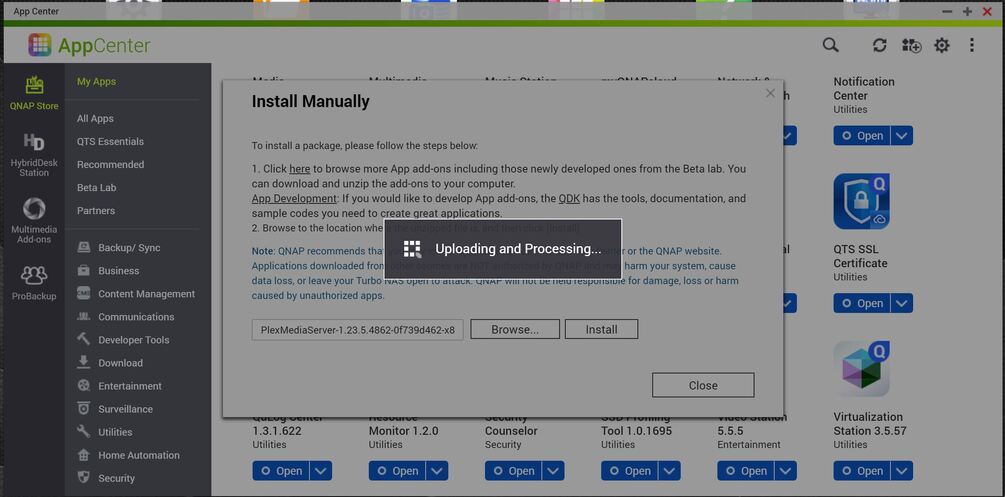
Installed PlexMediaServer-1.23.6.4810-15ce0e21a-x86_64.qpkg this morning.
The package sits in “Uploading and processing” state for 5 minutes, then I get a failed import error.
Plex then becomes completely unresponsive. QNAP indicates the service is running, but none of my media is accessible (via app.plex.tv in web browser).
Subsequent reboots of the NAS haven’t fixed anything.
I backed up everything in the PlexData folder. Do I need to remove Plex altogether and then do a fresh package install or will there be a new package that ships that will actually complete the “Uploading and Processing” process?
QNAP just did a firmware update last week which I installed. I’m wondering if the newest version of QNAP’s firmware has issues with the way it handle’s Plex’s packages.
@ChuckPa If you see anything, let me know. Will turn off verbose and give it a couple days before trying a 1.23.6 build.
Direct automatic access to the PMS install – wherever it is.
Create shared folder named PlexData anywhere you want
Attempt to start PMS
Stop PMS
File Station → PlexData → Plex Media Server will now always point to where PMS is installed. ( this works for all versions since 1.15 )
Uninstalling the app does not remove the data like it does for other QNAP apps.
I made this custom change because, while Synology works that way, QNAP doesn’t and folks were losing ALL their customizations.
If you truly want to force it to start over, the PlexData share is how you can without getting into the QPKG directory via SSH.
To change logging options, specifically turn VERBOSE off
Install QNAP Text Editor app.
PlexData → Plex Media Server
Right-click Preferences.xml
On the last line, cursor right to the />
Inside that closing marker type logVerbose="0"
It should look like: somePref="value" logVerbose="0" />
Think you call it “Chicago style” (or upside down); thinner crust with the cheese on the bottom, then the thinned-out (a bit) sauce with Shallots, Sausage, and Shrooms on top. It droops a bit but still a light crunch as you bite in.
Just getting back. I took some much needed time away… I found 350+ posts to respond to.
TVS-1282T3 ships out Monday. 12-14 day ETA on the turnaround time.