So, about 10 years of running plex server. I sit down and see there’s an update (yes, I’m doing the beta updates). I update and… uh oh… It looks like plex (program) has been deleted. Now I’m dead in the water. Thought I’d just re-install but that’s not so simple.
I don’t know where it was installed before - hey, it’s been 10 years! I see my plex appdata is on my F: Drive.
I have the update logs which tell me that the update occurred but that startup failed??
Sep 07, 2021 16:07:28.833 [666832] INFO - Plex Update Service Launcher v1.24.2.4973-2b1b51db9 - Microsoft PC x64 - build: windows-x86
Sep 07, 2021 16:07:28.833 [666832] INFO - Windows version: 6.2 (Build 9200), language en-US
Sep 07, 2021 16:07:28.834 [666832] INFO - 8 4000 MHz processor(s): Architecture=0, Level=21, Revision=512 Processor Identifier=AMD64 Family 21 Model 2 Stepping 0, AuthenticAMD
Sep 07, 2021 16:13:50.261 [669280] ERROR - Bundle Exit Code: 0 - The operation completed successfully.
Sep 07, 2021 16:13:50.261 [669280] ERROR - PMS Startup: Failure
cannot find the program itself and have verified that plex is no longer in my services list. I have error logs if any are needed by anyone.
I’m afraid to make a move without some sage advice. With around 70TB of movies, TV & Music, my heart is stopped just a wee bit…
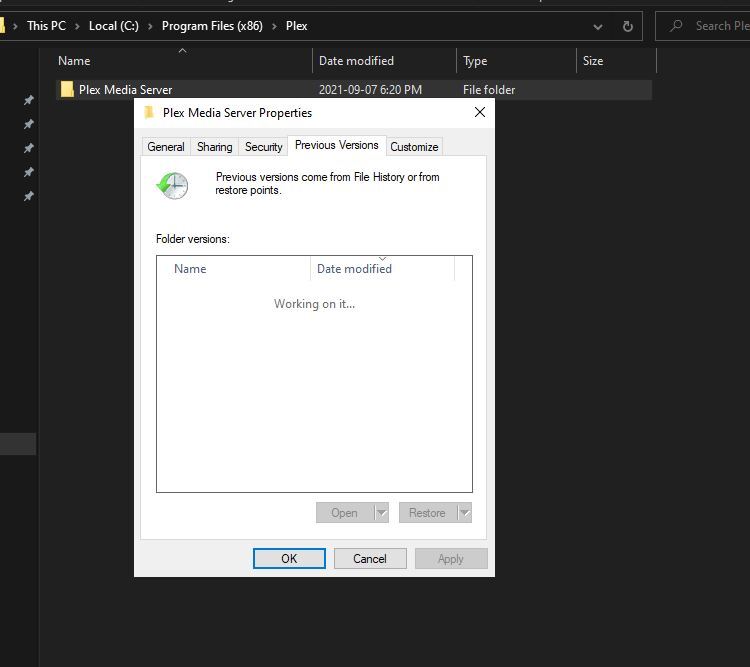
I was able to copy and paste a previous ver over the empty folder and restart, and plex is working again, I hope you all are as lucky as I was to have a recent backup
Right click on your plex folder and click properties and see if you have anything under the “previous versions” tab you can restore or open, if you can only open and not restore, copy the contents to an empty folder, then add them to the empty plex folder
Ok. I won’t guarantee this, but it worked. I couldn’t handle my heart-stopping situation any longer…
I went into my …/AppData/Local/Plex Media Server
In there was an “Updates” folder. (Every update you’ve ever done).
I gambled & re-ran this update - It gave me a recover option.
–Recover sat for 30 seconds (give or take) waiting to stop the service (which obviously wasn’t running).
Ok… I cancelled the recovery, now wondering what would happen if I reran the prior update from a week ago.
–No “recover” option on this earlier update. It wanted install information/location — again I was too afraid to proceed.
Back to retry this update/Recover AGAIN. Figured I’d wait for some sort of timeout on trying to shut down plex service. Instead, it buzzed right by and did a recovery. I’m up and all is good.
– Makes me wonder if my first attempt would have worked had I played the waiting game with it.
Note to Plex. A recovery option should be able to determine that plex is actually running BEFORE trying to shut it down… Note to the fool behind the computer. (me)…Keep a record of my layout so if I have another problem ten years from now, I have a record of my plex layout.
Thanks @EricD1973. That worked. After selecting “repair,” it asked me which package to instal. Beta .5000 was the only one listed in the package directory. I said “F It” and selected that. I’m back up and running now.
Well, that was fun. I woke up this morning to see all my Plex servers (I have 5) telling me that there is a new update. Dutifully I click the button to say go ahead and update. Bam! 5 dead Plex servers.
After some light reading on this thread I downloaded the latest build (for Windows) and manually run it on each server. Chose the Repair option when prompted and this seems to have fixed it.
What a total stuff up. Did Plex have somebody new putting this release together ?