Mine does. The screen stays on whilst it’s actually downloading but then goes off instantly when one episode finishes downloading and the next is initialising. I unlock the screen again, the inititialisng download starts and the screen won’t lock then for the 40 odd minutes it takes to download.
It wouldn’t be an issue if the download speeds to SD card issue was fixed. I have enough download speed to do several episodes in under 30 minutes. It’s only because each episode is taking so bloody long.
Exactly. It’s like the episode downloading is keeping the screen on beyond the maximum time of 30 minutes as it should but then as soon as that download finishes the screen goes off before the next has a chance to start.
CAn’t delete shows after viewing either. When you released this crap update you said you thought the kinks were worked out. This thing isn’t close to acceptable.
Yea im guessing its going off because plex is keeping it on beyond the timeout setting on the tablet but then when you’re in-between episodes downloading plex is letting it go to sleep because it’s not active.
Just wanted to say that changing my PC to use Google’s DNS servers has completely fixed downloads for me.
I haven’t done any conversion downloads yet but an old SD TV show from years ago download in 1:1 quality seemed extremely fast and has kept me going on my night shift at work.
Thanks for the tip.
Never mind.
I missed the comment that with direct downloads at full quality works…It does. Extremely slowly.
However anything involving conversion first never downloads the converted file.
@anon18523487 have you got a rough time frame for fixing issue #5? That one issue is the biggest pita. All the other glitches are minor in comparison, #5 causes havoc for Android 11 users.
I switched to the new downloads feature a few weeks ago after getting a new iPad. The Sync function doesn’t seem to be available at all…
I’ve been using sync for years with great success and I’m very frustrated with downloads… It takes FOREVER for content to sync. There’s no real way to see what progress has been made. It literally takes days for content to sync (e.g. three episodes of a TV show).
The Plex server interface only reports on ongoing transcoding jobs - there doesn’t seem to be a way to track what’s being downloaded to which devices…
Thanks for the update! I’m glad to hear that Downloads are being worked on, but I’m sad to hear that my three most painful issues are not on the list. In order of annoyance/how much they break my workflow and enjoyment of Plex, from highest to lowest:
Plex on iOS cannot display subtitles contained in the Matroska container as soon as the video file is downloaded. For streaming, there’s no issue, it only affects downloads. Plex can see that there’s a subtitle track on the episode overview screen, but as soon as you start playing an episode and transition into the video playback screen, no subtitles can be selected and no subtitles are displayed. The only workaround is to play the episode from the Downloads section of the iOS tab rather than from its respective library (which doesn’t trigger webhooks). There are more details about this issue in the previous thread, though IIRC, I accidentally reported this issue in the Android thread.
Plex on iOS breaks all records when it comes to the slowest download speeds ever recorded. When Plex for Mac and Plex for iOS are on the same WiFi network, measuring roughly the same speed in a speed test, with the same network settings (as much as possible), Plex for Mac can easily download ten episodes in the same time Plex for iOS struggles to reach 25% on first episode’s download. Remote Plex server, not on the local network.
Playlists have to be synced in full, there’s no option to only sync the next N unwatched episodes of a playlist.
Bonus round: when playing episodes from the Downloads tab, the episode is often not marked as watched, rather its watch progress is stuck at ~90% despite watching the episode in full. I think this might happen more often when the Internet connection is spotty when finishing the episode, or when skipping the last ~90-100 seconds of the episode (skipping through the ending theme), but I think it happened a few times even outside of these conditions. Doesn’t happen always though, so it’s difficult to figure out the root cause.
Ive read alot but dont see an answer for this. Delete option? Im using an Ipad to watch. I used to just deleted syncd stuff from the server. Worked great. Now i can find no way from the ipad or the server to delete syncd or downloaded items. (half of each, some only half way downloaded so cant exactly watch a season that way)
Im behind hundred of feet of concrete every day so I would usually just sync at night, watch during the day. Now that I am half way through my shows and wanted to sync (or download for that matter) others Im at an impasse.
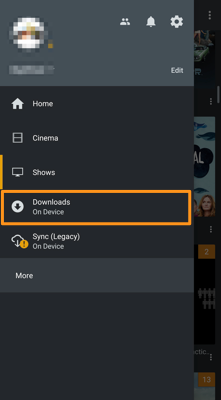
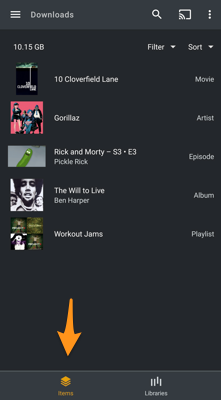
The support article shows how you have to “entry points” when opening the downloads section. There’s Items and Library. Once you click Library and select a library, those tabs will be replaced by the classic library view (recommendations, library, collections, playlists).
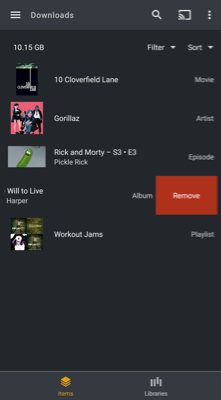
You can delete downloads from the Items view… so make sure not to drill down too much.
Keep in mind that this thread is for issues we’ve identified and are focusing getting fixed fast. There are still other issues and we are not forgetting those.
Something is wrong. It works for me. Can you check the version of the app you are using, just wondering if you might be using an old one with a bug.
Plex on iOS breaks all records when it comes to the slowest download speeds ever recorded.
We are still looking into this, but no one over here can reproduce the issue.
Playlists have to be synced in full
Yes, we are aware of this. To make things stable and quick, the ability to do partial downloads is not supported at this time. It is something we hope to provide in the future.
when playing episodes from the Downloads tab, the episode is often not marked as watched, rather its watch progress is stuck at ~90%
Is this on iOS? I have not seen this. I know there is an issue with Android where this happens quite often. That issue affects the entire app, not just Downloads. That is on the Android team’s todo list to get fixed. If this is iOS, I’m going to need more details. Please create a new post with details and logs.
Oh really? I thought we confirmed in the previous thread that this is a known issue in Plex for iOS. Link to the particular discussion is here (I accidentally posted it to Android thread but it’s about iOS), and video demonstrating the issue is here. I could reproduce the problem today on Plex for iOS 7.26 (1822) from TestFlight.
Oh, that’s unfortunate… If it would help to test directly against my server (in case it’s a partially server-related issue), I can invite you for sure.
Yup, that’s on iOS! Just to clarify, the next time this happens, I should collect logs from the iOS app? Do I need to first enable the “Detailed logging”, or should it be turned off?
Oh, I thought you meant subtitles in general. The one from that discussion is specifically to resuming from the Home page. This is also on the todo list, just not as high a priority as the ones in this list.
I can invite you for sure.
Sure, send me an invite.
Just to clarify, the next time this happens, I should collect logs from the iOS app? Do I need to first enable the “Detailed logging”, or should it be turned off?
Both server and ios logs would be great. For server, enable debug logging (this should always be on), for the app regular logging (not debug). Only ever use debug when told to specifically by someone you are working with to solve an issue.
It’s not only when resuming or starting playback from the home screen, it happens when starting or resuming content from anywhere, incl. various libraries, as reported here, clarified here and confirmed here. The video recording in particular should show that it doesn’t matter where the episode is played from, the app gets confused about available data streams.
Okay! What e-mail address should I use?
And understood about the logs – might take a while to hit this scenario then because I usually play downloaded content when outside the house, and at that time, I won’t be able to collect server logs immediately. But I’ll try!