Thanks for the detailed instructions - appreciate it!
I did let DBRepair do its thing and was able to get it up and running again. As of right now everything seems back to normal. Although, my main library database is still sitting at 21GB which may be normal I have a rather large movie, music TV library with previews on etc. Right now just happy it’s back up and running!
I do not know if the Update option will work. The name was changed from “Plex DBRepair” to “DBRepair” which also means a new location at GitHub.
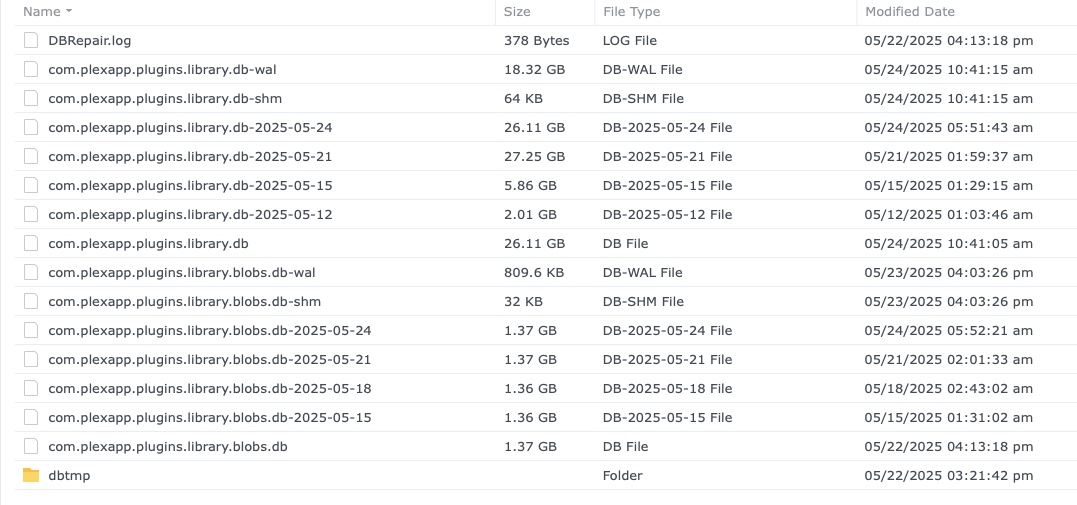
Looking at your db files, it seems the first run did not work for some reason. Notice the backup from May 12 is only 2.01 GB.
If you restore a backup, use the one from 05-15. There is no blobs.db backup for 05-12, and the backups from 05-21 and 05-24 are just as large as the active db.
You can re-run DBRepair with the updated version. It will take just as long as the first time (limited by CPU speed and hard drive read/write speed).
There is another option. If you’ve a faster system - PC, Mac, etc. - you can use it to clean the database files.
Install and claim PMS on a PC/Mac. Do not create libraries. In Settings → Library, disable Empty trash automatically after every scan.
Stop PMS. Toss the (empty) database files and replace them with com.plexapp.plugins.library.db and com.plexapp.plugins.library.blogs.db from the NAS.
Monitor db size for a few days. If the abnormal growth returns, you can fall back to 1.41.6 or earlier until Plex fully resolves the problem (or re-run DBRepair). I’ve not noticed any growth on my server running 1.41.7.9823, but it has not had much traffic either.
Suggest you stop Plex and make a manual copy of the database files as a backup. This gives you a current backup that is not bloated.
You can then delete the other backups and recover the space (no need to keep the bloated backups).
Once Plex makes its own backup (every 3 days), you can delete the manual copy if desired.