Verizon has removed the ability to set the ports this way.
This was all set off by the replacement of a faulty ONT and router. They seem to work fine but the router’s firmware now seems to have features removed.
Specifically, you can now only set one device per port number.
In the previous post, I had X.X.X.110 port 32402 forward to 32400 and X.X.X.110 port 32401 forward to 32400.
This is now banned as the router complains that you can’t use “32400” more than once. In-fact you can’t use any number more than once.
I was on with Verizon CS for over an hour over chat (I have a medical condition that precludes talking on the phone) and ultimately gave up as the only solution offered was to call advanced tech support on the phone, no email or chat, which at this point just isn’t happening.
They tried the basics but that isn’t good enough as I have two servers and their CS script (along with all the instructions I found by googling) assume only one is in use and needs to be forwarded.
So an open question, is there anyone out there that has success in programming port forwarding on a Quantum Gateway (newest version) in getting two IP addresses assigned with the same destination port?
Does anyone know of a hidden settings page that would allow this?
Right now my option seems to dump the Quantum gateway for something like a Dream Machine Pro. Any thoughts on that?
Can you share screenshots of the gateway’s configuration? Maybe there’s something you’ve just looked at too long.
Have you tried removing the manual port forwards from the Gateway, so each Plex server uses UPnP/IGD? That’s been useful on a variety of routers over the years.
Enable UPnP on the Gateway if you previously disabled it
Leave the different manual port values configured on each Plex server
Surely, after poking around this is what I have got. The VCS didn’t help much and I don’t know if it is any better than what I was trying to do but here you go.
I also noticed that Upnp doesn’t seem to have the same restrictions. The rest of the list not shown here as the address followed by “X.X.X.some_address**:5000**” and there are several of those. That’s what leads me to believe that there is some hidden settings page or some super secret code that WILL allow reusing of numbers. Just not if it was manually entered.
Like I said, they pretty much threw up their hands and said I had to call. Which at this time is painful and difficult (I have a throat problem that the doctors are working on.) so that is just a no go. I asked for an email or chat contact and was told no. Those smart folks are only available via phone though a normal customer service rep. It seems very odd to me that for a tech company such as Verizon, their upper echelon folks don’t have email.
They also tried the “why don’t you upgrade” line, but I am hesitant unless they can PROVE that the upgrade will fix the problem. It’s expensive too at $3 more a month to turn on full port forwarding and static internal addresses(a different issue unrelated to Plex.) That’s why I’m thinking of moving to my own gateway in the Dream Machine Pro.
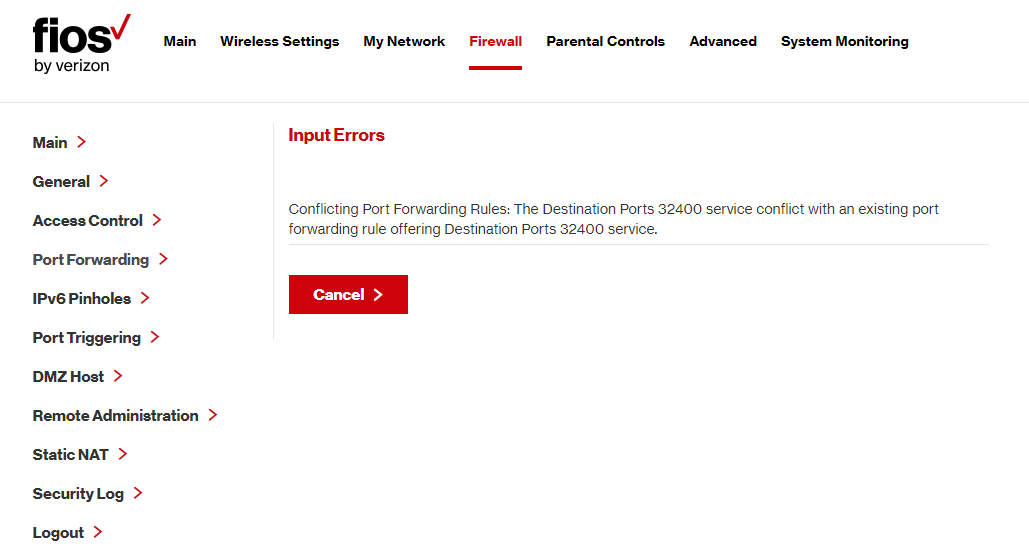
The error from the router when entering the second config is “Conflicting Port Forwarding Rules: The Destination Ports 32400 service conflict with an existing port forwarding rule offering Destination Ports 32400 service.”
I should say that I can stream to my phone but sometimes it doesn’t “take”. I have also noticed that even inside my network, the video server has to use the relay for it to play something back.
The home page and even the start up screen is slow to display (spinning while of Plex death) when there is a problem.
And in the Plex settings the outside access checkmark/exclamation-point comes and goes. It usually goes green after testing then goes right back to red a few seconds later.
Nope, “Conflicting Port Forwarding Rules: The Destination Ports 32400 service conflict with an existing port forwarding rule offering Destination Ports 32400 service.”
Because you are dealing with level 1 support, most likely following a script and almost guaranteed not to be familiar with doing port forwarding and the different options available within that settings screen.
That’s why level 2 and above support tend to be so much better, because they generally have the knowledge to be able to more easily guide you. However, as you’ve mentioned that was not really an option for you in this case.
in the future if they lock it down further, ( last time i had thier Fios was when it began rolling out in Richmond VA in '08 and was dead new for the time.) can thier current Gateway be put into a state where its just only a bridge? as at that point, your just locking it down to just being a Modem and would leave it to a Router of your own to handle the rest.
I currently use a pfSense firewall I built using a Protectli system and put that where the FIOS router was. Since we have TV and Phone still I am using the FIOS router on a secondary network to handle the video guide and caller ID on TV portion. That said, had we not needed that, it would just be the FIOS router being removed completely and then using pfSense (or whichever other router you want that can handle the job). I do this at our shore house and my brother is also setup like this.
So, you don’t even need to use a bridge mode, just replace it entirely.