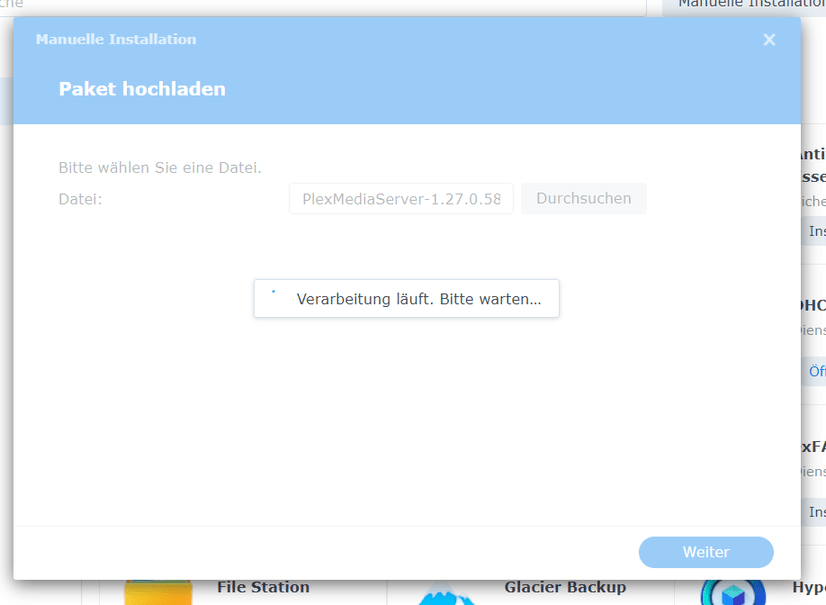
Hallo,
ich versuche gerade, das aktuelle Paket (Stand 10.06.2022) für meine Synology zu installieren, aber nachdem ich auf hochladen geklickt habe, steht dann nur noch “Verarbeitung läuft. Bitte warten…” und es tut sich rein gar nichts.
Hallo,
ich versuche gerade, das aktuelle Paket (Stand 10.06.2022) für meine Synology zu installieren, aber nachdem ich auf hochladen geklickt habe, steht dann nur noch “Verarbeitung läuft. Bitte warten…” und es tut sich rein gar nichts.
Try using a different browser to Manual Install.
Danke
Habe es mit dem Edge Microsoft Browser versucht, aber damit komme ich leider auch nicht weiter.
Which version of PMS are you upgrading from ?
I ask this because if PMS 1.21.0.3744 or any DSM 6 version, there will be time for DSM to “upgrade” the package. It will show “Processing” and not give any output.
Is this what you are seeing.
=====
Von welcher Version von PMS aktualisierst du?
Ich frage dies, weil DSM bei PMS 1.21.0.3744 oder einer beliebigen DSM 6-Version Zeit hat, das Paket zu “aktualisieren”. Es wird “Processing” angezeigt und keine Ausgabe ausgegeben.
Ist es das, was Sie sehen?
Plex Media Server for Synology (DSM 7)
1.27.0.5889-6a2ff9c39
June 9, 2022
I am using Synology DS218play DSM 7.
I even uninstalled the PMS completely from the NAS and tried reinstalling it, but to no avail.
I also have a WD MyCloud Single Bay OS5 and it runs Plex.
Would much rather use my Synology than PMS though.
I only see it on my Synology: Processing is in progress. Please wait…
Which version of PMS did you uninstall ? ( Important to know )
Damn! I can not remember…
I haven’t updated or used Plex in several months. I can’t remember, sorry… But it’s been months without updating Plex…
Here are the key points.
BETA / DSM 7 launch package (1.21.0.3744) - Metadata stored in DSM private area
– Took much time to process (install)
PMS 1.24.2.4973 - Private data moved during update/upgrade from either -
– Plex share (normal migration) → PlexMediaServer
– DSM private storage → PlexMediaServer (UPGRADE took much time – no prompts)
All versions after 1.24.2.4973 use the new PlexMediaServer storage.
There should be no delays during upgrade installation
In DSM 7, we no longer use Plex . That was wise to remove.
Do you have a ‘Plex’ shared folder ?
If you do, and there is data you wish to keep,
Task Scheduler
root
cat /var/log/synopkg.log
When the email arrives, Please place the log file into a file
and attach here (Synopkg.log)
I don´t have a shared folder.
How can I easily install Plex on my Synology? I don’t know about programming.
Installing PMS on Synology is as easy as
Could you please tell me which PMS package I need for my Synology DS 218play?
Per this guide: (Synology)
Your NAS has a RealTek CPU. This is listed on our Downloads page as ARMv8
Be careful not to download ARMv7 packages.
After installation, This is a How-To I have written to help understand how PMS works on Synology and offers suggestions about structuring your media but mostly how to have Plex access your media.
Are you using DSM 6 or DSM 7 ?
This looks like your browser cannot upload to DSM.
Do you have another browser you can use?
I am using DSM 7.
The Edge browser and Chrome browser have the same result. For some reason I can’t upload the package.
Try FireFox
Turn off antivirus for the moment while you upload
Since you have DSM 7. You want the “DSM7” package
Same result with Firefox. No way…
Do I need to enable or disable any setting in Synology?
There are no settings when you install from a computer.
I looked into your history and see you had PMS 1.25.6 installed.
Have you restarted the Synology?
Are the HDDs full?
There is something wrong with the NAS. We need to find the problem.