Has anyone confirmed, or does anyone have knowledge on how Plex with Tidal works with Verizon Wireless unlimited data plans? I am on a plan that limits video streaming to 480p, and have noticed that when playing my music while connected to Verizon Wireless, the app only plays Tidal files at 96kbps mp4, and always transcodes my personal music files. When connected to wifi or when I use a VPN connected to the Verizon Wireless, it will play the full Hifi FLAC files and the original quality of my personal music. My settings are always set to play at original/maximum quality for both video and music. Verizon wireless has opened 2 tickets for me, with one resolved as a network issue (even though I was very detailed in my description of the issue being limited to the Plex app), while I am still waiting for a response on the 2nd ticket. I just wanted to see if anyone else has had this issue, and if they were able to get confirmation that Verizon is throttling the app regardless if it is playing videos or music files. Thanks for any help/answers.
I’m on Verizon unlimited and don’t have any limitations. I can stream videos at original quality and play my flac music. If you can recreate and provide the log from the app, I’ll take a look.
Sorry if this is not what you are looking for, as I have never had to download/upload Plex logs. Plex Media Server.log (1.4 MB)
Turn off verbose logging. You only need the debug option.
Are you using Plex Web? I thought you meant connecting to your server from a mobile device on a cellular network. Or do you mean your home network is on a Verizon connection? That’s a different story.
I don’t know how to get the logs from my phone, so I am grabbing them from plex.tv. Sorry if this isn’t correct. I am talking about listening while on the Verizon Wireless network, nowhere near my home or home network. Plex Media Server - new.txt (4.9 MB)
I found out where to get the logs from my phone. Is this the one you needed? com.plexapp.android 2019-08-12 15-22.log (1.2 MB)
Here are my logs from this morning.plex-log-djraysamora.zip (242.0 KB)
I only see 1 request to a flac file through Tidal. It did direct play this file, so i don’t see any throttling.
08-13 07:08:46.077 i: [Treble]: BASS: Stream 420758 is 136 KB/sec (stream reported 136 KB/sec).
08-13 07:08:48.068 i: [Treble]: Cache: Network completed the read (16644 KB/sec), awesome!
Any idea what would be causing this issue then? All the files I played this morning played at 96kbps mp4, yet are all from Tidal.

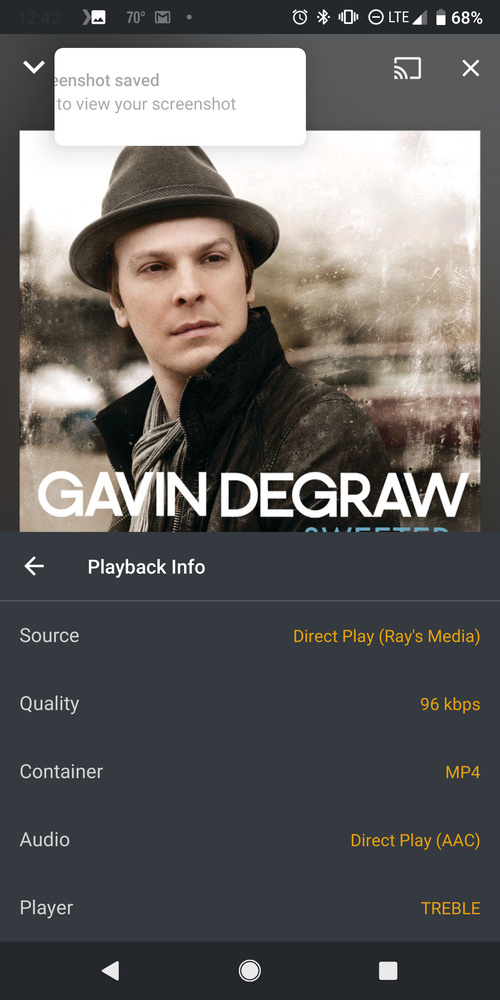


That one request was when I was just leaving home. I was still connected to my home wifi at the time. When on wifi, it plays fine. When connected to mobile (Verizon Wireles) while using a VPN it will work. It’s only when connected directly to Verizon Network that it defaults to lowest quality. It even forces transcode on my files that are on my home computer.


Here are my most recent logsplex-log-djraysamora.zip (247.8 KB)
On your server, go to settings>remote access
And check and make sure your upload speed is set correctly, and that you have “Original” selected from the drop down?
This “shouldn’t” affect music I wouldn’t think, but it could be causing the issue

if your plex connection to your server is ‘secure’ (ie https encrypted) then it should avoid any throttling or conversion by verizon.
unless they are somehow decrypting plex’s stream, converting to lower quality, then re-encrypting, without plex detecting it.
I checked my server settings, and my “Limit remote stream bitrate” is set to Original (No Limit). My upload speed was set a little high, so I have adjusted it to 10 Mbps, but it didn’t change anything on my playback (Tidal tracks are no more than 2Mbps, and play directly from Tidal anyway I think). I am on the plan that limits video to 480p (includes 50gb premium data), but Verizon won’t confirm if they are throttling my Plex connection. I was hoping it might be something in my Plex settings, or that I could get confirmation about what’s going on from Verizon’s end.
When I play music files directly through Tidal, they play in Hifi (FLAC) and Master formats, so it’s not my data speeds. My only thoughts are that it’s either something going on in the Plex app or Plex server, or Verizon is throttling my data when using Plex.
if you’re in the app on your phone, go to settings>quality
Make sure Automatically Adjust quality is off
Make sure limit cellular data is off
remote streaming maximum
home streaming recommended
remote streaming original
and use low quality on cellular is turned off
Most of my settings were already set like that, except for “home streaming recommended” which was set at maximum. Still forcing transcoding for my audio files playing from my server, and still playing Tidal tracks at 96kbps.
